What matters when choosing
Measure the usable desk space first, then decide whether readable page layout, colour review or a simpler laptop connection is the main reason for changing monitors.
| Concern |
What to check |
Who this matters to |
| Layout and copy |
Check native resolution, text size at your viewing distance and how your editing software scales. |
When I’m correcting dense cast lists and page layouts, I need text and page elements to remain comfortable to review. Around 31% of consumers would put layout and copy proofing first. |
| Colour review |
Check the stated colour-space coverage and calibration information against the printer’s required workflow. |
If a cover image or sponsor logo needs approval, I want a controlled on-screen starting point without mistaking it for a print match. For around 31% of consumers, colour confidence is the primary concern. |
| Desk fit |
Measure complete width and depth with the stand; allow for rear cables and check adjustment or VESA-mounting requirements. |
With little space behind the keyboard, I need the stand and cables to fit before screen size becomes useful. Desk fit and viewing position come first for roughly 23% of consumers. |
| Laptop connection |
Confirm USB-C video support on both devices and whether the monitor’s power delivery meets the laptop’s needs. |
When I move a laptop onto a shared desk, I want to connect it without adding avoidable cables. About 15% of consumers would make connection simplicity their main priority. |
Monitor brands and lines to consider
These product lines offer different specifications to compare; the right model still depends on your desk measurements, laptop and print workflow.
BenQ Creative Pro PD
The PD range includes QHD and 4K options aimed at creative work, with stated colour modes and calibration information.
- BenQ UK specifies 100% sRGB and Rec.709 coverage, average Delta E ≤3, 65 W USB-C power delivery and 140 mm height adjustment for the PD2705Q.
- The PD2705Q’s stated 230.7 mm depth with stand needs a desk-fit check. For the 4K PD2705U, consider your preferred text scaling rather than assuming the higher resolution is necessary.
ASUS ProArt
The PA278QGV is a 27-inch QHD option for comparing colour specifications, stand depth and viewing adjustments.
- ASUS United Kingdom specifies 100% sRGB, 95% DCI-P3, Delta E <2 and a 19.04 cm complete depth with stand for the PA278QGV.
- Its listed inputs do not include USB-C video or laptop power delivery. Check whether your laptop has a suitable display output or needs an adapter or dock.
Dell UltraSharp
The line includes flat 27-inch QHD and 4K options with different connectivity and adjustment specifications.
- Dell UK specifies QHD IPS Black technology, a 120 Hz refresh rate, 150 mm height adjustment, tilt, swivel and pivot for the U2724D.
- Check the exact model before planning a one-cable laptop setup: connectivity descriptions for the U2724D conflict, while the U2725QE is a separate 4K Thunderbolt hub model.
Joybuy monitors for programme editing
These 27-inch QHD and 4K monitors offer different starting points for programme layout. Compare the complete desk footprint, your preferred text scaling and the exact laptop connection before choosing one.
 No image available
ASUS ProArt PA278CV QHD IPS monitor
Consider this QHD IPS model if page layout and copy review are your main tasks. Check its complete stand footprint and confirm that its USB-C functions meet your laptop’s needs if you want a simpler connection.
View on Joybuy
 No image available
ASUS ProArt PA278CFRV QHD IPS 100 Hz monitor
Its QHD IPS format is relevant to programme page layout. Before planning the desk or a laptop connection around it, confirm the complete stand dimensions and the ports on the exact unit.
View on Joybuy
 No image available
iiyama ProLite XUB2792UHSU-B6 27-inch 4K UHD monitor
Consider this 4K option if you prefer that resolution for detailed layouts. Check how large text appears at your normal viewing distance, measure the desk space and confirm any USB-C functions your laptop requires.
View on Joybuy
 No image available
BenQ MA270UP Nano Glossy 27-inch 4K USB-C monitor
This Mac-oriented 4K IPS model is worth comparing if your laptop workflow calls for USB-C. Check the exact device compatibility, stand dimensions and whether the Nano Glossy surface suits the lighting at your desk.
View on Joybuy
 No image available
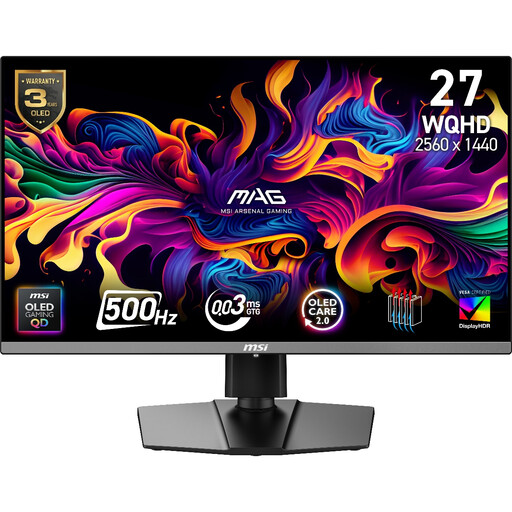
MAG 272QP QD-OLED X50 27-inch QHD 500 Hz monitor
This gaming-oriented QHD model may suit a desk used for both programme editing and other tasks. Confirm its physical dimensions, colour modes and whether its USB-C connection meets your laptop’s charging requirements rather than choosing it for its refresh rate alone.
View on Joybuy
Questions about desk fit and print work
Will a 27-inch monitor fit a small desk?
It can, but the diagonal alone will not tell you. BenQ UK specifies a 614 × 230.7 mm width-by-depth footprint with stand for the PD2705Q, while ASUS United Kingdom specifies a 61.22 × 53.61 × 19.04 cm complete size with stand for the PA278QGV. Check your available space for the stand, rear cables and keyboard before choosing either.
Do I need USB-C to edit a theatre programme from a laptop?
No; USB-C is useful if you want compatible video, peripherals and charging through one connection. BenQ UK specifies DisplayPort Alt Mode and 65 W power delivery for the PD2705Q, whereas the ASUS United Kingdom specification for the PA278QGV does not list USB-C input. Check your laptop’s display output and power requirements against the exact monitor.
Will a colour-focused monitor make the printed programme match the screen?
No. A monitor’s stated gamut and calibration provide information about on-screen work, but the printed result also depends on the file profile, printer, paper and production process. Confirm the printer’s workflow and request a physical proof for colour-critical approval.
Are there workstation requirements for long daily screen use?
For workers who use display screen equipment daily for continuous periods of an hour or more, the UK Health and Safety Executive says the display screen equipment regulations apply. Employers should assess the workstation and manage the relevant risks; the guidance does not require a particular monitor model.


