What should you check before buying?
Choose the panel shape you want, then confirm the PC, connections and physical layout before setting a refresh-rate target.
Matching flat QHD IPS screens
Consider when: You want three flat panels with the same screen geometry. AOC lists the Q27G4X as a 27-inch, 2560 × 1440 Fast IPS model.
Allow for: Three QHD screens still require suitable GPU outputs, cables and enough room to align the panels.
Matching curved QHD VA screens
Consider when: A curved, symmetrical cockpit layout appeals to you. AOC specifies a 1500R curved Fast VA panel for the 27-inch CQ27G4X.
Allow for: Curvature is a shape preference, not proof of better rally performance; check side-screen angles and mounting clearance.
Higher-refresh QHD screens
Consider when: You want to explore modes beyond the cited 180Hz models and your PC can support the intended three-screen arrangement.
Allow for: LG says its 27GS75QN-B needs a DisplayPort 1.4-capable graphics card and cable for its 200Hz overclocked mode. That mode is distinct from its 180Hz native specification.
| Concern | What to check | Who this matters to |
|---|
| Matching screens |
Compare full model numbers, native resolution and panel dimensions across all three units. |
If the rally view crosses panel edges, I want the screens to line up without mismatched image scale. Around 36% of consumers put matching screen geometry first. |
| PC and connections |
Check the exact GPU’s usable outputs, the required cable for each display and the simulator’s multi-screen method. |
Before ordering several panels, I need to know my PC can connect them in the intended arrangement. For around 29% of consumers, compatibility is the primary concern. |
| Refresh and motion |
Distinguish native from overclocked refresh rates and check which input supports the desired mode. |
When practising fast stages, I want to choose a refresh target my PC and connections can use. Motion-related specifications come first for around 21% of consumers. |
| Cockpit fit |
Measure available space and confirm panel dimensions, mounting pattern and arm clearance. |
If the side screens or arms crowd my driving position, the layout will not suit my rig. Roughly 14% of consumers prioritise physical fit. |
Joybuy monitors for this setup
These monitors include QHD IPS and higher-refresh OLED options relevant to planning matching screens for a rally rig. For each model, check the connection mode, panel dimensions and mounting fit before buying multiple units.
 No image available
MSI MAG 274QF 27-inch WQHD 180Hz Rapid IPS monitor
Consider this model when planning three matching WQHD IPS screens. Its product name specifies Adaptive Sync and a 0.5ms response-time figure; confirm the response-time conditions and the refresh mode available through each intended connection.
View on Joybuy
 No image available
MSI MAG 271QP QD-OLED X28 QHD 280Hz monitor
This is a QD-OLED option for consumers considering a higher refresh target across matching screens. The product name gives 280Hz and 0.03ms; check the mode’s connection requirements and the panel’s exact dimensions when planning a three-screen mount.
View on Joybuy
 No image available
Samsung Odyssey G6 S27DG612 27-inch QHD OLED 240Hz monitor
Consider this OLED model if a 240Hz specification is relevant to your three-screen plan. Check which input supports the intended mode and whether the stand or a compatible mount fits your rig.
View on Joybuy
 No image available
HKC G27H2DPro 27-inch QHD Fast IPS 220Hz monitor
This Fast IPS model is relevant if you want matching 2560 × 1440 screens with a stated 220Hz refresh rate. Check the input and cable needed for that mode, as well as the mounting pattern and dimensions of each panel.
View on Joybuy
 No image available
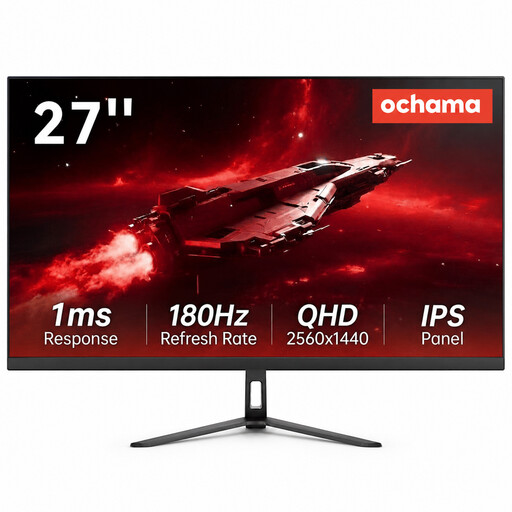
Ochama 27-inch QHD IPS 180Hz monitor, Gift Keyboard variant
The 27-inch IPS screen and stated 180Hz refresh rate make this a model to assess for a matching set. Confirm the exact pixel resolution, mounting dimensions and supported connection mode before ordering three; check what the Gift Keyboard variant includes.
View on Joybuy
Frequently asked questions
Can three monitors act as one wide rally display?
Yes, if the graphics hardware and simulator support the intended arrangement. AMD says Eyefinity can combine two or more displays into one large desktop, while NVIDIA Surround provides controls for topology, resolution and refresh rate. Check your exact GPU and the game’s display options before buying.
Do all three rally monitors have to be identical?
No, but buying the same complete model makes screen dimensions and stated modes easier to match when planning a dedicated rig. If you mix models, check their physical alignment and test the combined resolution and refresh mode rather than assuming that equal headline resolution is enough.
Can I plan around an overclocked refresh rate?
Only after checking its stated requirements for every screen. LG specifies 180Hz natively for the 27GS75QN-B and requires a DisplayPort 1.4-capable graphics card and cable for its 200Hz overclocked mode. Keep the native mode as your planning baseline until the complete connection path is confirmed.
What should I do with monitors I replace?
Use an appropriate electrical-equipment recycling or take-back route rather than treating old monitors as ordinary rubbish. UK guidance covers monitors under the waste electrical and electronic equipment framework; check your local council’s service or an available retailer scheme for the arrangements that apply to you.


