Student with straightforward plots
If your work mainly involves an ordinary tide chart, browser pages and documents, a Full HD external screen may meet your needs without adding features you will not use.


A 27-inch QHD monitor with an adjustable stand is a practical starting point if you plot tide tables beside notes or reference pages. Dell UK and BenQ UK list QHD models at 2560 × 1440, compared with 1920 × 1080 for BenQ UK’s Full HD GW2790. Full HD can suit simpler work; consider 4K for frequent inspection of dense charts if your laptop supports the output and you are comfortable adjusting display scaling. Check desk fit and laptop connections before counting on a one-cable USB-C setup.
If your work mainly involves an ordinary tide chart, browser pages and documents, a Full HD external screen may meet your needs without adding features you will not use.
If you keep a plot, spreadsheet and notes open together, QHD gives you more native desktop resolution than Full HD. A USB-C connection is useful only if your laptop supports the monitor’s video and charging functions.
If you regularly inspect dense labels, maps or images, consider 4K alongside your laptop’s output capability and the text size you prefer after scaling.
Start with the space your plots and study windows need, then check the connection and physical fit; a larger screen alone does not settle those choices.
| Concern | What to check | Who this matters to |
|---|---|---|
| Readable plots and workspace | Compare native resolution with the space your chart, source table and notes need; confirm your laptop supports the intended output. | If I regularly compare a plot with source data, I need labels and adjacent windows to remain readable. Around 31% of consumers would put workspace first. |
| A straightforward setup | Decide whether Full HD meets your work before choosing QHD or 4K features; check which cables and stand adjustments you need. | For basic plotting and documents, I would rather choose a screen that covers those tasks than add features I may not use. Roughly 31% of consumers would make simplicity their primary concern. |
| Laptop connection | Confirm USB-C video support, the laptop’s charging requirement and the required cable; check HDMI or DisplayPort where relevant. | With little room for leads and adapters, I want my laptop connection to work as intended. Around 23% of consumers would prioritise connection simplicity. |
| Screen positioning | Measure desk space and the stand base; check adjustment options and where reflections fall. | At an awkward desk, I need to position the screen without working around glare or a fixed stand. For about 15% of consumers, positioning would come first. |
Display output and charging depend on the laptop, monitor and cable. BenQ UK states 65W power delivery for the GW2790QT, while LG UK states up to 90W for the 27UP850K-W; neither figure establishes compatibility with your laptop.
Check the exact laptop port’s video capability, its charging requirement and the monitor’s supported connection before ordering.
If those connections do not match, you may need a separate charger, adapter, dock or suitable cable.
A 27-inch panel does not tell you how much native desktop space it offers. BenQ UK lists its GW2790 at 1920 × 1080, while Dell UK lists the S2725DC at 2560 × 1440.
If a chart, source table and notes must stay open together, compare resolution and readable window sizes before settling on a screen.
Monitor settings do not replace appropriate screen placement and lighting. The Health and Safety Executive advises adjusting screens and lighting to avoid reflections and glare.
Plan where the screen will sit and take breaks during long display-screen sessions; treat manufacturer-described comfort modes as supplementary settings, not a substitute for the wider setup.
A monitor and its base must share desk space with your laptop, keyboard and study materials. Screen adjustment helps with placement, but it cannot create more desk depth.
Measure the available width and depth, then check the particular monitor’s dimensions with its stand.
A riser, monitor arm or external keyboard may be needed if the planned arrangement leaves too little usable space.
BenQ UK lists both a Full HD route and a QHD USB-C route for a 27-inch desk setup.
Dell UK lists distinct 27-inch QHD USB-C and 4K models.
LG UK lists the 27UP850K-W as a 27-inch 4K USB-C option for detailed screen work.
These QHD and 4K monitors are options for tide-table plotting where screen resolution and desk placement matter. Compare each model’s stated features with your laptop connections and available desk space; the list is not a substitute for checking the exact setup you need.
 No image available
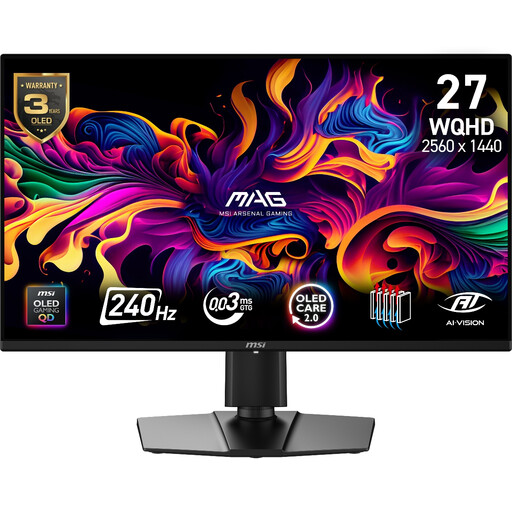
Consider this model if you want QHD space for a plot beside reference windows and need to check how an adjustable screen will fit your desk.
The product name specifies QD-OLED, 2560 × 1440 resolution and a 240Hz refresh rate. Confirm your laptop’s intended display connection and measure the space available for the stand.
 No image available
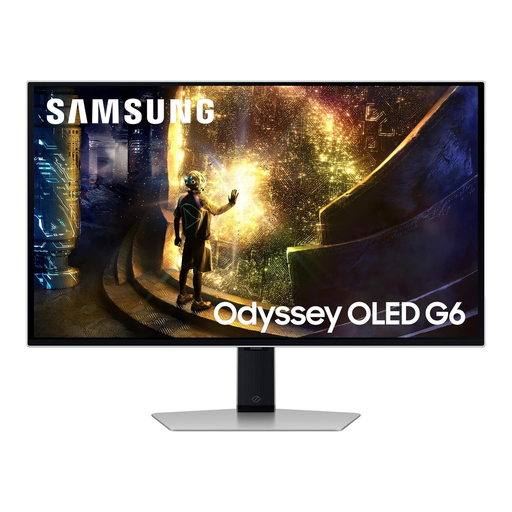
This is another QHD option for keeping tide plots and study material on screen while planning an adjustable desk setup.
The product name specifies a 27-inch QHD OLED screen and 240Hz refresh rate. Check the laptop connection you intend to use and the stand’s fit on your desk.
 No image available
Consider this QHD model if you work with a plot alongside notes and want flexibility in screen position.
The product name specifies an IPS panel and 100Hz refresh rate. Check the exact model’s USB-C functions if they matter to your laptop setup, and measure the desk space required by its stand.
 No image available
Consider this 4K route if you often inspect dense tide-chart labels or maps and can accommodate the screen on your desk.
The product name specifies a 27-inch 4K UHD display. Confirm your laptop’s intended 4K output, your preferred text scaling and the USB-C video or charging functions you need.
 No image available
This 4K option is relevant if detailed plots are a regular part of your work and you can position the screen comfortably.
The product name specifies a 27-inch 4K IPS screen, 60Hz refresh rate, built-in speakers, HDMI and DisplayPort. Check your laptop’s 4K output and the stand’s fit before ordering; do not assume it has the USB-C functions of LG’s different 27UP850K-W model.
Yes, if your work is mainly basic plotting, browser pages and documents. BenQ UK lists its 27-inch GW2790 at 1920 × 1080; if you regularly need a chart beside a source table and notes, compare that workspace with a 2560 × 1440 QHD model before choosing.
No: HDMI or DisplayPort may suit your laptop and monitor. USB-C can simplify the arrangement when the laptop supports video through that port and the monitor and cable meet its charging needs; check all three before relying on one cable.
An adjustable stand helps you position the monitor, but it is only one part of the workstation arrangement. The Health and Safety Executive also advises managing lighting and reflections; consider your desk position and breaks during long screen sessions.
A faulty monitor may fail the Consumer Rights Act 2015 requirement that goods be of satisfactory quality; the appropriate statutory remedy depends on the circumstances. Keep your order record and contact the seller about the fault. A retailer’s change-of-mind policy is separate from remedies for faulty goods.