If you want to play without depending on terminal Wi-Fi, start with a handheld that can run your chosen game on the device: Nintendo Switch Lite suits compact carrying, while Switch – OLED Model offers a larger screen and tabletop stand. Steam Deck OLED is an option if the game you want is compatible with your Steam library and its controls. PlayStation Portal requires an existing PS5 and a dependable connection, so it is a less dependable choice for a wait with uncertain public Wi-Fi.
Who each option suits
Travellers who want offline play
If terminal Wi-Fi is uncertain, choose a game that runs on the handheld itself. Nintendo says Switch Lite supports Switch games playable in handheld mode; check the particular tile-matching title before relying on it for the wait.
Players who value screen and tabletop comfort
If you expect a longer wait or prefer a larger view of the tiles, Nintendo’s Switch – OLED Model has a 7-inch screen and adjustable stand. Valve specifies a 7.4-inch display for Steam Deck OLED, although you should check the game’s controls and compatibility.
Existing PS5 owners considering Remote Play
PlayStation Portal can provide access to games on your PS5 when Remote Play is set up and the connection is dependable. Sony cautions that public Wi-Fi quality may be outside your control, making an offline fallback sensible.
What matters when choosing
For tile-matching during a ferry-terminal wait, establish whether your game must work without live internet access. Then weigh carrying comfort, screen use and battery planning against any game-library or network requirements.
| Concern |
What to check |
Who this matters to |
| Playing without terminal Wi-Fi |
Confirm that the exact game runs on the device, supports its controls and can launch without a live connection. |
If I cannot count on public Wi-Fi, I want my tile-matching game ready to play on the handheld. Around 36% of consumers would put dependable offline access first. |
| Carrying and charge |
Compare model-specific size and manufacturer battery ranges; plan how you would charge during a longer wait. |
A device that fits comfortably in my bag matters as much as having charge left for the journey. For around 29% of consumers, carrying and battery practicality would be the primary concern. |
| Screen and tabletop use |
Look at screen size and whether the device has a stand if you expect to use a stable table. |
When I will be scanning small tiles for a while, I would rather have a larger view or set the device down. Around 21% of consumers would prioritise screen and tabletop comfort. |
| Using a PS5 library |
Check PS5 Remote Play setup and test the connection you plan to use away from home. |
If my games are already on my PS5, accessing them may matter more to me than playing offline. Existing-PS5 access would come first for around 14% of consumers. |
Checks before you travel
-
Assuming every Switch game works on Switch Lite
Nintendo limits Switch Lite compatibility to software playable in handheld mode. Games relying on particular Joy-Con functions may not offer those functions through its integrated controls alone.
Check the exact game’s play modes and controller requirements on its packaging or eShop listing.
Some games may require separately purchased Joy-Con controllers and a way to charge them.
-
Planning the wait around the maximum battery figure
Nintendo gives approximately 3–7 hours for Switch Lite and 4.5–9 hours for Switch – OLED Model; Valve gives a content-dependent 3–12 hours for Steam Deck OLED. Software and use affect those ranges, and battery capacity declines over time.
Plan around the lower end unless you have checked the device with your game and settings. Bring a compatible charging option if the wait could run long.
-
Relying on PlayStation Portal over uncertain public Wi-Fi
Portal streams from a PS5 rather than running the game independently. Sony warns that public Wi-Fi quality may be outside your control.
Set up and test Remote Play using your intended connection before travelling, and keep another activity available if the connection fails.
Mobile Remote Play uses your data allowance and may incur charges if you exceed it.
Brands and product lines to consider
Nintendo
Nintendo’s Switch Lite is a dedicated handheld, while Switch – OLED Model also supports tabletop and TV play.
- Nintendo describes Switch Lite as compact, with integrated controls, for Switch software playable in handheld mode.
- Switch – OLED Model has a 7-inch OLED screen and adjustable stand for use on a suitable surface.
- Switch Lite does not output to a TV, and some Joy-Con-dependent game functions require additional controllers and charging equipment.
Valve
Steam Deck OLED is a portable-PC option to consider when your intended tile-matching game is available in your Steam library.
- Valve specifies a 7.4-inch HDR OLED display and a 50 Wh battery.
- Valve’s stated 3–12 hours of gameplay depends on content; confirm the particular game’s Steam Deck compatibility and controls.
PlayStation
PlayStation Portal is a Remote Play accessory for an existing PS5, not a standalone console.
- Sony specifies an 8-inch 1080p screen for accessing compatible games through a PS5 Remote Play setup.
- A PS5 and broadband connection are required. Sony recommends at least 15 Mbps for a better experience and cautions that public Wi-Fi quality can vary.
Joybuy handheld choices
These handheld consoles are options for playing while you wait. Before choosing one for tile-matching games, confirm that your particular title works on the model and can be played under the connection conditions you expect at the terminal.
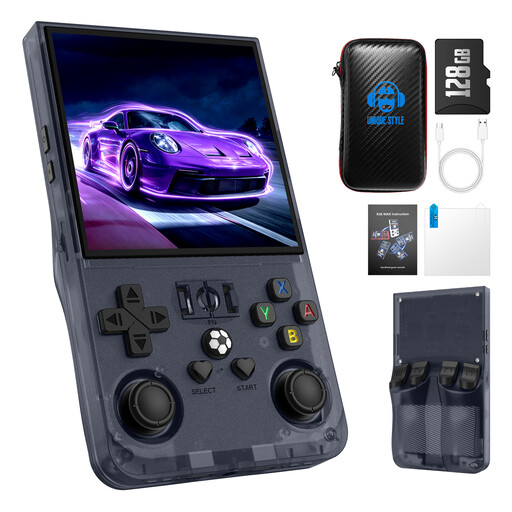 Image unavailable
AISLPC R36MAX handheld console (Grey)
Consider this retro handheld for a wait only after checking that the tile-matching game you want is included and works offline.
The listing names a 4.0-inch, 720 × 720 IPS display, a Linux system and a 4,000 mAh battery. Confirm the storage and included games for the Grey variant before choosing it.
View on Joybuy
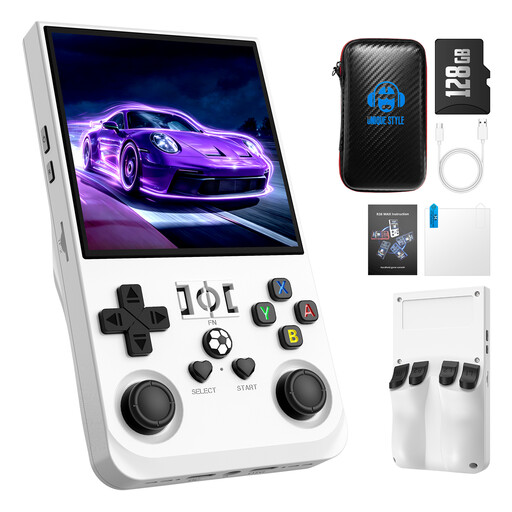 Image unavailable
AISLPC R36MAX handheld console (White)
This retro handheld is another portable option if your intended tile-matching game is included and playable offline.
The listing names a 4.0-inch, 720 × 720 IPS display, a Linux system and a 4,000 mAh battery. Check the storage and game collection for the White variant before buying.
View on Joybuy
 Image unavailable
Nintendo Switch 2 Console (UK Version)
Consider this console if you want handheld play with the option to set it down during a wait.
Check that your chosen tile-matching game is available for Nintendo Switch 2, works offline as you intend to play it and suits the time you expect to spend away from a charger.
View on Joybuy
Frequently asked questions
Will Nintendo Switch Lite run every Switch game?
No. Nintendo says Switch Lite supports Switch software playable in handheld mode. Check your chosen game’s play modes and any Joy-Con requirements; certain functions may need separately purchased controllers.
How much battery time should I allow for at a ferry terminal?
Allow for less than the top of a manufacturer’s stated range. Nintendo lists approximately 3–7 hours for Switch Lite and 4.5–9 hours for Switch – OLED Model, depending on software and use; battery capacity also gradually declines over time.
Can PlayStation Portal play games without a PS5 or internet connection?
No. Sony says PlayStation Portal requires a PS5 and broadband internet for Remote Play. It recommends at least 15 Mbps for a better experience and warns that public Wi-Fi quality may be outside your control.
What should I set up before taking PlayStation Portal away from home?
Configure Remote Play on your PS5, pair Portal and check that it connects while you are near the console. Sony advises doing this before trying to connect remotely; also test the connection you expect to use during travel.


