If separate physical screens are not essential, consider one ultrawide monitor to reduce the number of display units, or a USB-C monitor that can power your laptop to free its charger’s socket. If you need separate screens, DisplayPort or Thunderbolt daisy-chaining can simplify video connections, but it does not establish that the monitors share mains power. Check laptop charging requirements, display-chain compatibility and the supplied power hardware before choosing.
Who needs which setup?
Laptop users short of sockets
If your laptop charger occupies an outlet you need elsewhere, look for a monitor with USB-C power delivery that meets your laptop’s charging requirements. Dell UK and Philips UK list model-specific power-delivery ratings; the presence of USB-C alone is not enough to settle the choice.
People building a physical screen tile
If each window needs its own display, keep the separate panels and check the computer’s output support alongside the monitors’ input and output ports. BenQ UK and Lenovo UK describe DisplayPort or Thunderbolt chaining for compatible multi-screen arrangements.
People who can use one continuous screen
If a broad, uninterrupted desktop works for your tile layout, an ultrawide can replace several display units. Check its dimensions against your desk and remember that one panel cannot be positioned as independent screens can. Dell UK’s U3824DW is an example of this single-panel route.
What matters when choosing?
Decide whether the layout needs separate panels before comparing connections. A display chain addresses video cabling; reducing pressure on sockets calls for a closer look at display-unit count, laptop charging and the power hardware supplied.
| Concern |
What to check |
Who this matters to |
| Free a wall socket |
Check whether one screen can replace several, or whether the monitor’s USB-C power-delivery rating meets your laptop’s charging requirements. Confirm the supplied mains hardware. |
If outlets are scarce, I would prioritise removing a display unit or a separate laptop charger without losing the workspace I need. Around 46% of consumers put socket reduction first. |
| Keep separate screens |
Confirm the computer’s DisplayPort or Thunderbolt support, the required monitor input and output ports, and supported display resolution and refresh rate. |
When my work needs windows on distinct panels, simpler cabling matters, but I cannot trade away the physical tile layout. For around 36% of consumers, retaining separate screens is the primary need. |
| Make the layout usable |
Compare native resolution, panel dimensions and positioning options with the intended windows and available desk space. |
A single wide canvas is less useful to me if the layout or screen position does not fit how I work. Layout quality and positioning come first for around 18% of consumers. |
Common buying mistakes
-
Expecting a display chain to share mains power
BenQ UK describes daisy-chaining as a DisplayPort or Thunderbolt display connection. Connecting the video signal from one monitor to the next does not, by itself, resolve how each display is powered.
Count the mains-powered items in the planned setup. If sockets are the main constraint, compare a single-screen layout and compatible USB-C laptop charging before choosing multiple monitors.
-
Assuming any USB-C monitor can replace a laptop charger
Power delivery varies by model: Dell UK specifies up to 100W for the P2726HE and 90W for the U3824DW. Neither figure establishes that a particular laptop will charge adequately.
Check that your laptop accepts USB-C charging and compare its manufacturer-stated requirements with the exact monitor’s power-delivery rating.
-
Buying an input-only monitor for a display chain
A chain needs a supported path onward to the next display. Lenovo UK lists DisplayPort output for the ThinkVision T27h-30, but the computer and the rest of the display arrangement must also support the intended connection.
Confirm the relevant input and output ports, then check your computer’s supported external-display count, resolution and refresh rate.
-
Planning around a discontinued dual-screen model
LG UK marks the 27QP88D-BS as discontinued. Its two-panel arrangement may help define the layout you want, but availability and the supplied power hardware need checking for any particular offer.
Before committing to that model, confirm the retailer’s current listing, warranty information and included power components.
Relevant monitor brands
Dell
Dell UK lists USB-C hub, Thunderbolt hub and ultrawide monitors relevant to different socket-constrained layouts.
- The P2726HE is specified for up to 100W USB-C power delivery; the U3824DW offers a single 3840 × 1600 ultrawide panel with 90W power delivery.
- Choose by exact model: charging capability and whether a single panel suits your work cannot be inferred from the Dell name.
Lenovo ThinkVision
The ThinkVision T27h-30 is relevant when separate QHD displays and a DisplayPort chain are part of the plan.
- Lenovo UK lists USB-C docking and DisplayPort output for this model.
- Check host and downstream-display compatibility; a DisplayPort chain is not a shared-power arrangement.
LG
LG’s 27QP88D-BS illustrates an integrated layout with two separate 27-inch QHD panels.
- LG UK lists 65W USB-C power delivery and QHD/60Hz daisy-chain support for the model.
- LG UK marks it as discontinued. Check any current offer and its supplied power hardware rather than assuming the integrated stand needs only one socket.
Philips
The Philips 326P1H/00 is a docking-oriented QHD monitor to consider when laptop charging matters.
- Philips UK states that the model can display QHD while supplying up to 90W laptop charging over USB-C, and lists daisy-chaining as a feature.
- Confirm the laptop’s charging needs and the exact display-chain arrangement before relying on either feature.
Joybuy monitors for this workspace
These monitors offer single-screen approaches to a tiled workspace: three are ultrawide displays, while the Dahua model offers a 4K screen with a stated USB-C power rating. Decide whether one panel can replace your separate tiles, and check laptop charging and mains connections for the exact setup.
 No image available
Acer X Predator X49X 49-inch curved QD-OLED monitor
Consider this 32:9 ultrawide if one continuous screen can serve your tile layout in place of separate panels.
The product name specifies a 49-inch panel, a 1800R curve and a 240Hz refresh rate. Check desk space, support and the supplied power arrangement; confirm laptop-charging compatibility before planning to free its charger’s socket.
View on Joybuy
 No image available
Dahua 32-inch 4K 165Hz curved OLED monitor
This single-screen option suits a layout that does not require separate physical panels, with a possible laptop-charging route if the computer is compatible.
The product name specifies 3840 × 2160 resolution, 165Hz and Type-C 65W. Check whether 65W meets your laptop’s charging requirements, and confirm the supplied mains hardware.
View on Joybuy
 No image available
CRUA 49-inch curved ultrawide monitor, black
Choose this route only if a wide, single-panel layout can take the place of your physical display tiles.
The product name specifies 5120 × 1440 resolution, 165Hz, HDMI 2.1 and DisplayPort 1.4 inputs, and VESA 75 × 75 mounting. Check desk or mount support and the supplied power arrangement; verify USB-C laptop charging separately if you need it.
View on Joybuy
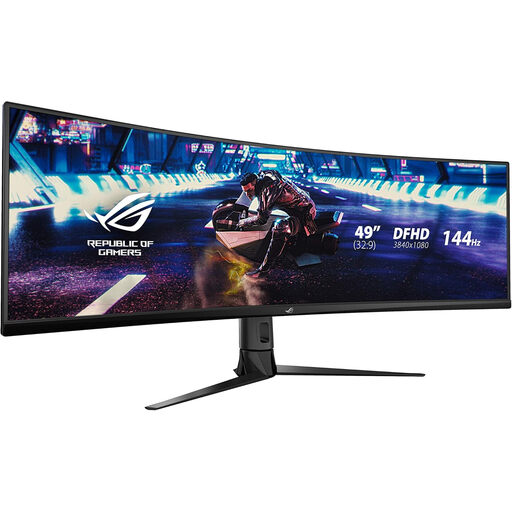 No image available
ASUS ROG STRIX XG49VQ curved DFHD 144Hz monitor
This is another single-panel route for a layout that does not depend on independently positioned screens.
The product name identifies the XG49VQ variant and a 144Hz refresh rate. Check that its native resolution and physical dimensions suit your tile layout, and confirm the mains arrangement and any laptop-charging feature you require.
View on Joybuy
Frequently asked questions
Will daisy-chaining monitors free a wall socket?
Not simply by connecting the displays in a chain. BenQ UK describes DisplayPort and Thunderbolt daisy-chaining as ways to pass display signals between compatible devices; check the mains lead or adapter required for each monitor separately.
Can I use HDMI for a DisplayPort monitor chain?
HDMI is not a substitute for the DisplayPort or Thunderbolt daisy-chain method described by BenQ UK. Check that the computer and monitors support the same intended chain connection, including the necessary output on the monitor that connects onward.
Will a MacBook work with a DisplayPort MST chain?
Do not plan a MacBook setup around DisplayPort Multi-Stream Transport (MST) without checking the exact Mac model. BenQ UK’s support guidance says MacBook does not support MST and instead describes a Thunderbolt 3 or 4 chain; external-display limits can also depend on the Mac model.
What should I check before using an extension lead?
Check that the extension lead and every connected item are suitable for the intended electrical supply and use. The Health and Safety Executive advises using suitable electrical equipment; check the lead’s rating, the connected equipment’s requirements and the condition of plugs and cables rather than judging capacity by socket count.
What electrical-equipment information matters when buying in Great Britain?
Check the applicable conformity and safety information for equipment supplied to the Great Britain market. GOV.UK’s guidance on the Electrical Equipment (Safety) Regulations 2016 describes requirements for placing electrical equipment on that market; Northern Ireland has separate arrangements, so check the rules applicable there if that is where the monitor will be supplied.


