Overhead tutorial beginners
If you want to set up, film the paper and put the equipment away between study sessions, a compact camera may appeal. You will still need a stable support that reaches over the writing area.


For a small, repeatable overhead setup, consider a compact fixed-lens camera if storage and quick setup matter most; choose an interchangeable-lens camera if you expect to change the framing or develop a more involved editing workflow. Neither choice replaces a stable overhead support. Check the view of the paper at your available mounting height, the support’s rated payload and the items included with the exact camera variant.
If you want to set up, film the paper and put the equipment away between study sessions, a compact camera may appeal. You will still need a stable support that reaches over the writing area.
If you expect to change the field of view as your tutorials develop, an interchangeable-lens system gives you lens choices. Decide whether its recording options match the editing work you actually plan to do.
Compare the equipment needed to start filming, not just the camera body. A lens, suitable charging equipment, storage and an overhead mount may need separate attention, depending on the variant.
Work out where the camera can sit above your desk and whether the paper fits in view before deciding which recording features or kit contents are worth paying attention to.
| Concern | What to check | Who this matters to |
|---|---|---|
| Overhead framing | Measure the paper area and available camera height. Check the support’s reach, mounting fit and rated payload for the complete setup. | If my desk is small, I need the whole writing area in view without a mount obstructing my hands. Around 42% of consumers put a practical, repeatable overhead setup first. |
| Detail and editing control | Check the view and focus at your writing distance. Consider lens choice and recording formats only in relation to your editing plans. | As my tutorials develop, I may want to alter the paper framing and spend more time editing the footage; around 33% of consumers make that control their primary concern. |
| Complete starting setup | Check the exact variant’s box contents for a lens, charging equipment and storage, then account for the overhead support. | I need to know which essential items I must obtain before I can record a lesson. For around 25% of consumers, completing a usable setup is the main priority. |
A flip screen helps you inspect a composition, but it does not hold the camera safely above the writing surface.
Measure the reach and hand clearance you need, then choose a support with a stated payload suitable for the camera, lens and mounting hardware together.
You may need a separate overhead arm, tripod, clamp, plate or adapter.
Canon’s UK EOS R50 V body listing identifies body-only contents and says a USB-C charger is not included.
For that variant, check the compatible lens and charging equipment alongside storage and the overhead mount before comparing complete setups.
DJI states that the Osmo Pocket 3 has no built-in storage.
Choose a compatible microSD card for the recording mode you intend to use, and check whether your selected bundle includes one.
DJI lists a fixed 20 mm-equivalent lens for the Osmo Pocket 3. If the paper looks too small or does not fit at the available mounting height, you cannot change the view by fitting another lens.
Check the intended paper area and mounting position before choosing a fixed-lens camera; consider an interchangeable-lens route if your framing needs are likely to change.
The ZV-E10 II and its 16–50 mm K kit represent an APS-C interchangeable-lens route for calligraphy filming.
The EOS R50 V body represents an APS-C interchangeable-lens, video-focused starting point.
The Osmo Pocket 3 represents a compact, fixed-lens camera route.
The LUMIX G100D with 12–32 mm lens represents a Micro Four Thirds interchangeable-lens kit route.
These choices cover interchangeable-lens kits, a pocket-gimbal bundle and an action-camera bundle. For any of them, check paper coverage and focus at your planned mounting height, as well as the fit and payload of a separate overhead support.
 No image available
Consider this kit if you want to adjust framing with its supplied zoom lens and may later use other E-mount lenses.
The listed lens is 16–50 mm f/3.5–5.6. Sony lists 4K 60p and 10-bit 4:2:2 recording for the ZV-E10 II.
Check focus at your writing distance, memory-card requirements and the support’s rated payload for the mounted kit.
 No image available
Consider this compact bundle if you need a camera that is easy to put away between filming sessions and its fixed view fits your paper.
DJI lists a 179 g body, a fixed 20 mm-equivalent lens and normal 4K recording up to 60 fps for the Osmo Pocket 3.
It has no built-in storage. Check microSD card compatibility and bundle contents, and do not treat a mini tripod as a substitute for a rated overhead support.
 No image available
This interchangeable-lens kit is an option if you want to adjust the paper framing with a supplied zoom rather than rely on a fixed view.
The product is identified with a 16–50 mm power-zoom lens. Check focus at your intended mounting distance, card requirements and the support’s fit and payload.
 No image available
The supplied zoom gives you a way to adjust framing for different paper sizes or desk layouts.
This variant is identified with a 16–50 mm power-zoom lens. Check the writing detail at your intended distance, memory-card needs and the mounted setup’s support requirements.
 No image available
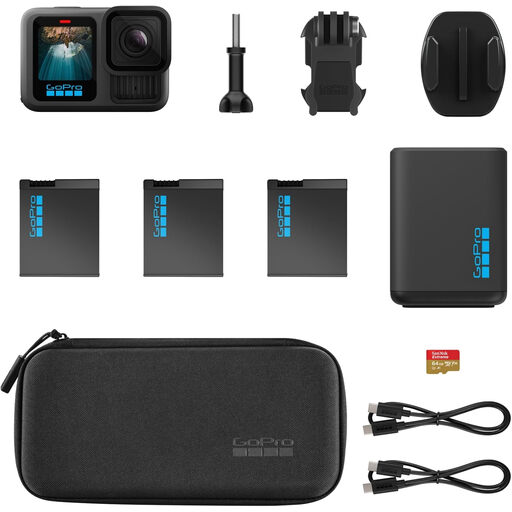
Consider this bundle only after checking whether its view and close focus show the writing clearly from your available mounting position.
The Extended Power Bundle is an action-camera option, not an overhead mount. Check the exact bundle contents, memory-card requirements and support compatibility before choosing it for desk filming.
Yes, a camera alone will not hold a top-down view above the paper. Choose a support whose stated payload accommodates the complete mounted setup, and check that its reach leaves room for your hands.
No: Canon’s UK EOS R50 V body listing does not include a lens or USB-C charger. Check compatible lens and charging options, storage and an overhead support when planning the setup.
Yes. DJI states that the Osmo Pocket 3 has no built-in storage and uses a microSD card. Check its card recommendations for your recording mode and whether your chosen bundle includes a card.
Not necessarily for a fixed, normally paced top-down lesson. Check framing, focus and your editing and storage workflow first; 60p is worth considering when you have a particular motion or editing use for it. Sony and Canon list 4K 60p for the ZV-E10 II and EOS R50 V, while Panasonic lists 4K/30p for the G100D kit.
Keep the frame on your own writing area and check your accommodation rules if a housemate or communal space could be recorded. The Information Commissioner’s Office says its cited surveillance guidance does not cover purely personal or household activity within private-property boundaries; that limited point does not settle shared-room arrangements, accommodation terms or filming for other purposes.