
24/7 Customer Support

Free returns

Same-day & Next-day Delivery

Quality Guaranteed

Unlock Your Welcome Offers: FREE Delivery | Up to 80% OFF | Free 30-day JoyPlus trial
Download the APP
Touchscreen laptops and stylus pens can make editing, note-taking and digital drawing feel more direct. However, a premium-looking display or “AI” label does not automatically mean a device suits your workflow. The right choice depends on compatibility, performance, portability and how you intend to use the screen.
As the Joybuy Product Recommendation Officer, I focus on practical specifications rather than promotional wording. These are the main buying traps to avoid before choosing a laptop, portable display or pen.
A capacitive stylus may operate basic taps and navigation, but it may not offer pressure sensitivity, palm rejection or tilt recognition. Conversely, an active pen may require a particular protocol, operating system or compatible screen digitiser.
Check whether the product supports:
For example, Apple Pencil USB-C and Apple Pencil Pro are designed for compatible iPad models rather than Windows touchscreen laptops. A universal active stylus may work across capacitive screens, but its advanced features can vary by device.
A 4K OLED touchscreen laptop can display highly detailed images, but resolution is only one part of screen quality. Look at the panel type, colour coverage, brightness, refresh rate and finish.
OLED screens can provide strong contrast and deep blacks, while IPS panels may be a practical choice for a portable touchscreen monitor. A 120Hz refresh rate can make scrolling and pen movement appear smoother than 60Hz, but it may also affect battery consumption.
A powerful laptop may be less convenient if it is heavy, has limited connectivity or needs a large charger. Creative users should check for USB4 or Thunderbolt, HDMI, DisplayPort support, SD card access and sufficient storage.
Portable monitors also need careful checking. Some support a single USB-C cable for both video and power, while others require a separate power supply. Confirm that your laptop, phone or tablet supports video output before ordering.
For photo editing, illustration and video work, consider a panel with a wide colour gamut such as 100% DCI-P3 or 100% sRGB, depending on your workflow. Colour specifications should be treated as stated product features, not a guarantee that every application or setting will display identical results.
A 16-inch 3840 × 2400 OLED screen, such as the one on the ASUS ProArt P16 laptop, provides more workspace and detail than a standard Full HD panel. By comparison, the UPERFECT portable touchscreen monitor uses a 14-inch Full HD IPS display with 100% sRGB coverage and a 60Hz refresh rate.
For office work and study, 16GB RAM and a modern processor are generally a sensible starting point. Video editors, 3D users and designers working with large files may benefit from 32GB or more, alongside dedicated graphics.
The ASUS ProArt P16 combines an AMD Ryzen AI 9 HX 370 processor with 64GB LPDDR5X RAM, a 2TB SSD and an NVIDIA GeForce RTX 5080 Laptop GPU with 16GB GDDR7 graphics memory. These specifications are suited to demanding compatible applications, though the resulting hardware can be more than a note-taker needs.
An AI laptop for creatives should also be assessed by its NPU, software compatibility and graphics performance rather than by the AI label alone. Check which applications can use local AI acceleration.
Before purchasing, match the pen to the screen. The ASUS Zenbook Duo dual-screen laptop includes an ASUS Pen and supports touch and stylus input. The HP OmniBook X Flip has a 360-degree hinge and touchscreen, but you should verify whether a pen is included with the exact retailer configuration.
For Apple devices, compare the supported iPad list carefully. Apple Pencil Pro includes features such as squeeze gestures, barrel roll, haptic feedback and hover on compatible models. Apple Pencil (USB-C) supports USB-C pairing and charging, tilt sensitivity and magnetic attachment, but it is not a universal tablet pen for iPad and Android.

Why This Fits Their Persona: A strong match for UK-based photographers, designers and video editors who need a high-resolution screen and substantial internal hardware rather than an ultra-light travel machine.
Its specification lists the OLED resolution, 120Hz refresh rate, dedicated graphics and SD card reader, making the core creative hardware easier to assess.
16GB RTX 5080 graphics memory, 64GB RAM, 2TB SSD and Wi-Fi 7 provide substantial capacity for compatible demanding workloads.
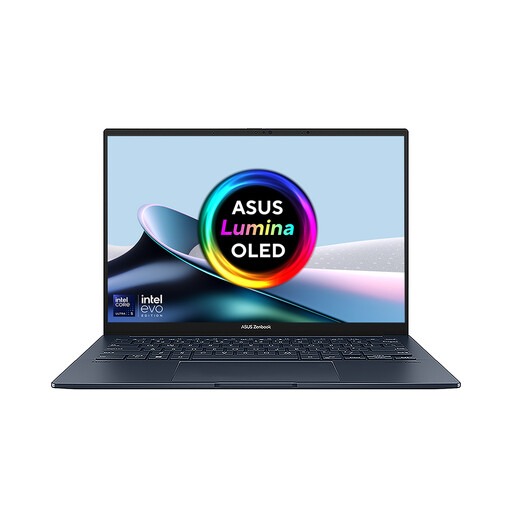
Why This Fits Their Persona: Suitable for multitaskers who regularly work with reference material, timelines, documents or creative tools and want a flexible workstation for home, university or travel.
The dual-screen format supplies extra workspace without relying on an external portable monitor, while the detachable keyboard and kickstand support different layouts.
Two touch OLED panels, 1TB SSD, Wi-Fi 7 and an included ASUS Pen support flexible multitasking and handwriting workflows.
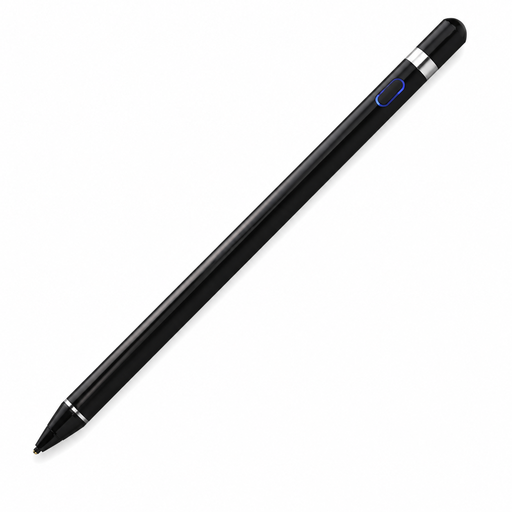
Why This Fits Their Persona: A practical starting point for users who need a rechargeable pen for navigation, handwriting or casual drawing across compatible capacitive iOS, iPad and Android devices.
The listing identifies capacitive-screen requirements and supported systems, so buyers can check compatibility before relying on advanced pen functions.
140mAh built-in battery, 59.4g weight and support for writing, drawing and precise navigation.
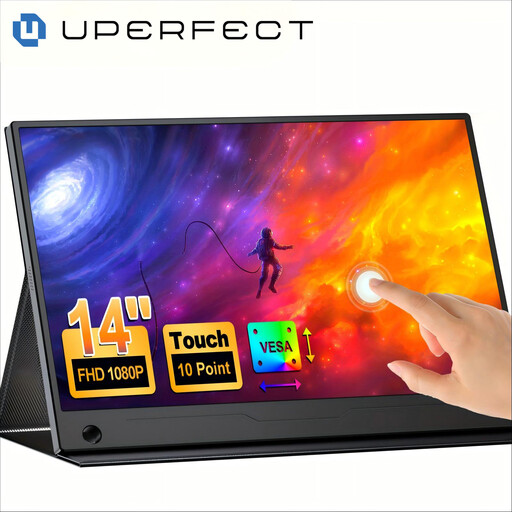
Why This Fits Their Persona: Useful for remote workers, students and travellers who want a second screen without replacing their current laptop.
The specifications state the Full HD resolution, 10-point touch, USB-C one-cable support, adjustable stand and VESA compatibility.
Slim 14-inch design, 100% sRGB coverage, 180-degree stand and touch support for compatible Windows, macOS, Android and some iOS devices.
We have compiled a complete, real-time list of products that fully satisfy these strict selection criteria and UK safety regulations.
They can be, provided the screen supports the required active-pen protocol and the pen offers features you need, such as pressure sensitivity or tilt recognition. For occasional annotations, a capacitive stylus may be sufficient. Digital artists should check compatibility with their preferred drawing software and confirm whether palm rejection is supported.
Touch input and a brighter display can contribute to higher power consumption, although actual battery life depends on screen technology, brightness, processor load, graphics use and battery capacity. OLED panels, dedicated GPUs and high refresh rates may use more power during demanding creative work. Use a balanced power mode and reduce brightness when practical.
Lifespan varies according to battery condition, charging habits, tip wear and physical handling. Rechargeable active pens may eventually require replacement, while passive capacitive styluses have no internal battery but can experience tip wear. Store the pen securely, avoid moisture and replace damaged tips rather than pressing harder on the screen.