What should you check before buying?
Decide which interruption would matter most on your journey, then check device compatibility and how much you can comfortably carry.
| Priority | What to check | Your needs |
|---|
| Power |
Match the laptop’s charging requirement to the charger or power bank’s applicable USB-C PD output and the cable’s capability. Check single-port output, not just a multi-port total; a mains charger also needs a working socket. |
I cannot afford to lose laptop power midway through a task. A compatible power bank lets me plan without relying entirely on an onboard socket; National Rail says socket availability varies by train company. |
| Connectivity |
Check whether your plan permits tethering and consider the route and tasks involved. Download files that can be used offline before boarding; do not assume a hotspot will sustain a call. |
Cloud files or messages may be useful, but I need an offline option for work that cannot wait. Ofcom’s February–March 2026 measurements covered 50 journeys on 24 rail lines and do not guarantee service on my particular train. |
| Carrying |
Compare the laptop’s width, depth and thickness, including any fitted case, with the bag or sleeve’s internal dimensions. Keep hard accessories organised and the full bag manageable. |
My laptop travels alongside chargers and cables, so I want it to fit without an overfilled bag. National Rail says luggage must be securely packed and easy to carry. |
| Calls and audio |
Check the exact headset’s microphone, device-switching features, comfort and stated battery runtime. Noise cancellation does not establish call quality or connectivity on a train. |
Carriage noise can make listening difficult, but I still need to notice announcements and cannot treat headphones as a fix for a weak signal. |
| Charging safety |
Inspect the pack, charger and cable for damage; follow the maker’s instructions and keep battery equipment away from heat, liquids and loose conductive items. Check your train operator’s current policy before carrying a power bank. |
I want charging equipment I can use and carry responsibly without assuming every operator has the same luggage rules. |
Joybuy options for a train-work setup
These options cover charging from a socket, carrying independent battery power, listening equipment and a laptop slipcase. Choose by the interruption or carrying need that matters on your journey, then check compatibility and the relevant train operator’s policy.
 No image available
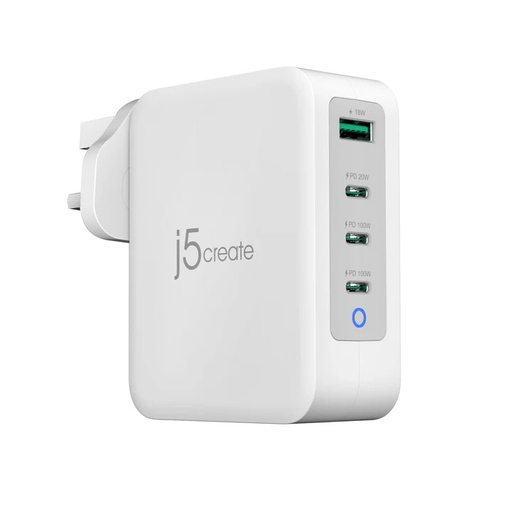
j5create JUP43130F 130W GaN USB-C 4-Port Charger, UK plug
For charging compatible devices when a working socket is available. Check its applicable USB-C output and a suitable cable against your laptop’s documented requirement; National Rail says onboard socket availability varies by train company.
Joybuy
 No image available
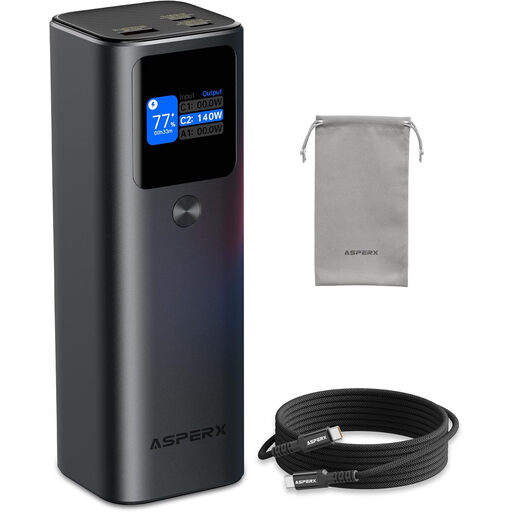
AsperX 27,600mAh 99.36Wh PD3.1 Laptop Power Bank
A battery-power option for journeys where a socket may not be available. Its name states 27,600mAh, 99.36Wh and 162.5W; check the output applicable to your laptop, cable compatibility, carrying weight and your train operator’s current policy. Flight-related wording in the product name does not establish permission on a train.
Joybuy
 No image available
JBL Tune 780NC Wireless Noise-Cancelling Headphones, Black
For travellers considering over-ear listening equipment in a noisy carriage. Check microphone needs and comfort for your journey; noise cancellation cannot ensure a quiet call or a reliable connection, and you should remain aware of announcements.
Joybuy
 No image available
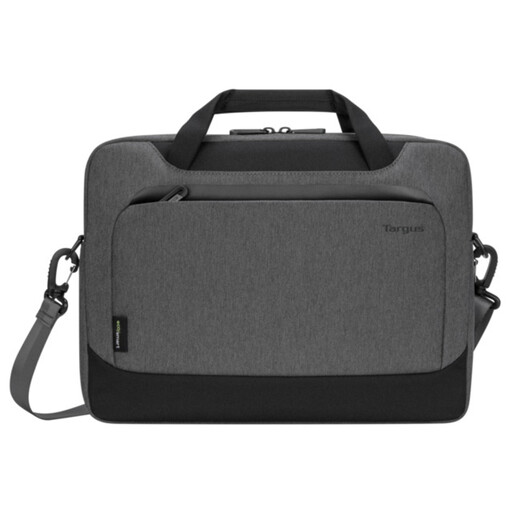
Targus EcoSmart Cypress 14-inch Slipcase, Grey
For carrying a laptop and small work accessories between stations and workplaces. The 14-inch label is not an internal fit measurement: compare the slipcase’s internal dimensions with your laptop, including any fitted case, and consider the full bag’s carrying weight.
Joybuy
Common questions
Can I rely on a socket and Wi-Fi on a Great Britain train?
No. National Rail says many train companies offer both, but availability and Wi-Fi charges vary. Check your train company, carry enough power for essential work and download important files before travelling.
Will tethering guarantee a video call on the train?
No. Ofcom measured mobile and Wi-Fi performance across 50 journeys on 24 rail lines in February and March 2026, and mobile performance varied. Check your plan’s tethering terms and prepare an offline option for time-critical work.
What should I check before taking a power bank on a train?
Check the current luggage and prohibited-items policy of the operator running your service. National Rail says train-company luggage policies can differ; do not assume that a product’s flight-related description answers the question for rail travel.
How should I pack a laptop and its charging accessories?
Use a sleeve or compartment that fits the laptop, keep hard accessories organised separately and make sure the bag remains easy to carry. National Rail says luggage must be securely packed and light enough to carry with ease.
What safety checks matter for portable charging equipment?
Inspect the charger, cable and power bank before travel, and stop using damaged equipment. Electrical Safety First advises following the maker’s instructions and keeping power banks away from heat, liquids and loose conductive items.


