Who needs an offline setup?
The right device depends on what you need to do when a connection drops, not simply on how much screen time you expect.
Mixed-media travellers
If you want films, podcasts, ebooks and light tasks on one device, consider a tablet and check the download rules for the services you use. Ofcom’s 2026 measurements across rail lines in England, Scotland and Wales found poor mobile performance in many tests, so prepare content before boarding.
Regular long-form readers
If books and text documents are the main activity, an e-reader may suit you better than a multipurpose screen. Check that it works with your ebook store, library and file formats.
Passengers doing desktop work
If you need a keyboard, particular software or substantial documents, consider a laptop. Save files locally and check whether the software still works without its cloud connection.
Which brands illustrate the options?
These examples show features to compare within each device type; a brand name alone does not establish offline compatibility.
Amazon Kindle
A text-first e-reader option for travellers who do not need video or desktop applications.
- An Amazon UK listing describes a 16GB Kindle Paperwhite with a glare-free display and weeks of claimed battery life.
- Check the ebook ecosystem, file formats and exact configuration against your reading library.
Apple
The iPad range offers general-purpose tablets for reading, downloaded entertainment and supported light work.
- Apple’s UK model comparison lists different storage capacities, displays, ports and accessories across iPads.
- A larger capacity does not establish that your streaming or work app permits offline use.
Samsung
An Android tablet reference for travellers considering media, notes and light tasks together.
- Samsung describes the Galaxy Tab S10 Lite with a 10.9-inch display, 8,000mAh battery and included S Pen.
- Those features belong to that model; battery capacity does not establish playback time for your journey.
Microsoft Surface
A laptop reference for locally saved files, a physical keyboard and compatible desktop work.
- Microsoft’s UK Surface Laptop information distinguishes models by screen size, ports and manufacturer-tested battery estimates.
- Check the exact model and workload: Microsoft says actual battery life can vary significantly.
Sony
A headphone reference for private audio alongside a device holding offline content.
- Sony specifies up to 30 hours of continuous music playback with noise cancelling on for the WH-1000XM6.
- That manufacturer figure does not establish the fit, noise reduction or runtime of other Sony models.
Joybuy options for the journey
These options span a Chromebook for prepared work, an e-reader, a tablet, headphones and a power bank. Choose the device for the activity first; audio and charging accessories support it rather than providing offline content themselves.
 No image available
Acer Chromebook Plus 514 CB514-5H, 14-inch, 8GB RAM, 256GB SSD
Consider this Chromebook for prepared, locally saved work if your required apps run on ChromeOS and work offline. Its listed configuration includes a 14-inch WUXGA (1920 × 1200) display and Intel Core i3-1315U; check software compatibility before relying on it for the journey.
View on Joybuy
 No image available
Bigme B6 6-inch E-Ink e-reader, 4GB + 64GB, white
This is a text-first option with a listed 36-level front light and Android 14. Confirm that your ebook store, library and file formats work on the device; check the exact SKU’s storage-expansion capability before relying on additional storage.
View on Joybuy
 No image available
Xiaomi Pad 8 Wi-Fi tablet, 8GB RAM, 128GB, grey
A tablet is worth considering if you want reading, downloaded media and supported light tasks on one device. Check that your intended apps allow offline use on this model and leave room in its 128GB storage for the content you plan to save.
View on Joybuy
 No image available
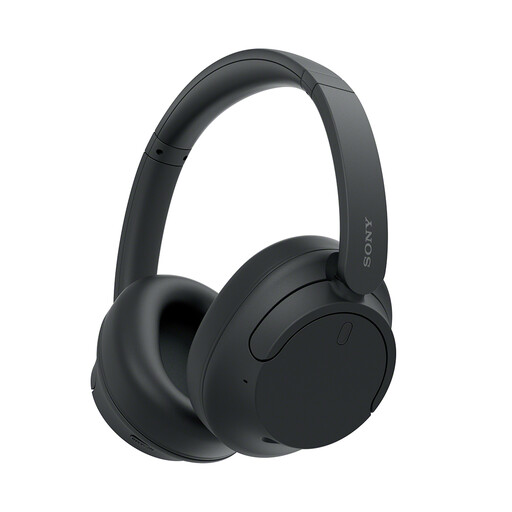
Sony WH-CH720N noise-cancelling over-ear headphones, black
These headphones provide a private-listening option alongside a device holding your offline content. Check fit for the length of your journey and confirm how you will connect them to your playback device.
View on Joybuy
 No image available
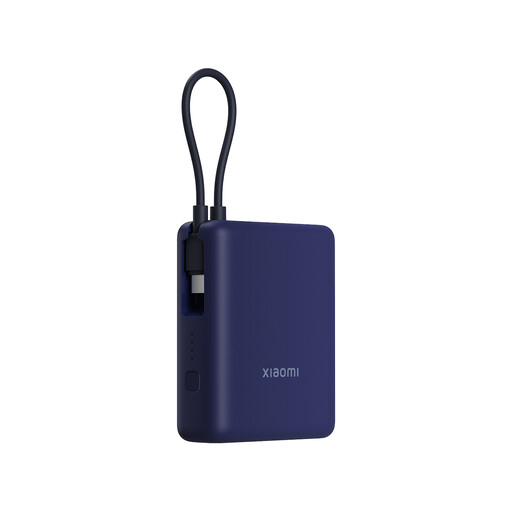
Xiaomi 33W 10000mAh power bank with integrated cable, ice blue
A power bank can support a device that may need charging during the travel day; it does not make content available offline. Confirm that its 33W output and integrated cable meet the charging requirements of the device you will carry.
View on Joybuy
Questions about offline travel
Why prepare downloads for a UK train journey?
A connection cannot be assumed throughout the trip. Ofcom’s study measured 50 journeys across 24 rail lines in England, Scotland and Wales in February and March 2026 and found poor mobile performance in many tests; save the entertainment and work files you need before boarding.
Will a Netflix download always play when I need it?
No. Netflix says download availability depends on the title, device and plan, and downloads can expire. Its help information sets different active-download limits for ad-free and ad-supported plans, so check your chosen title and its availability on the device before departure.
How long can YouTube Premium videos stay available offline?
YouTube says downloaded videos can play offline for up to 29 days before reconnection is needed. Higher-quality downloads also take up more device storage, so check your saved videos and free space ahead of the journey.
Should I bring headphones for offline entertainment?
Bring them if you intend to listen to audio or watch video in a shared carriage. Transport for London encourages headphone use on public transport; check their charge and fit, and confirm that any wired connection works with your device.
What should I check before travelling with a power bank?
Confirm its output and cable are compatible with the device you intend to charge. Follow London Fire Brigade’s battery-safety advice: use genuine or trusted charging equipment, protect batteries from damage and heat, and stop charging a swollen battery.


