What to prioritise
Set up offline work first, plan how to keep your device powered, then decide whether occasional live connectivity is worth adding. Ofcom’s February–March 2026 measurements across 50 journeys on 24 rail lines in England, Scotland and Wales found poor mobile performance in 58% to 83% of tests, depending on network, and good onboard Wi-Fi performance in 1% of tests; those results do not predict service on an individual train or route.
| Concern |
What to check when buying |
Who this matters to |
| Offline files |
Check usable storage, application compatibility and the offline settings for your document service. Download and open your actual files without a connection before travelling. |
If I need to work through coverage gaps, I want the files and apps I rely on available locally; around 36% of consumers put offline documents first. |
| Journey-long power |
Compare the device’s charging requirements with the power bank’s output per port and the cable. Check socket availability for your specific service, train and seat. |
When my device needs to last through the journey and onward work, I want a compatible backup rather than relying on a seat socket; around 29% of consumers prioritise power for the journey. |
| Mobile connectivity |
Check the network for your route, SIM and device compatibility, data allowance and any ongoing plan commitment. Keep an offline option for areas without service. |
If I only need to message or synchronise work during connected stretches, I want a connection that suits my route without depending on uninterrupted coverage; around 21% of consumers prioritise intermittent online access. |
| Calls and screen privacy |
Check the operator’s call guidance and your workplace’s information-handling rules. Consider whether to use a headset, protect the screen or defer sensitive work. |
When I need to communicate or view work in a shared carriage, I want to avoid disturbing others or exposing information; around 14% of consumers put considerate and confidential communication first. |
Joybuy product options
These Joybuy options cover laptop and tablet devices, backup charging and mobile hotspot connectivity for train work. A hotspot can share a connection only where its underlying mobile network has service.
 No image available
Lenovo IdeaPad 1, 15-inch, Ryzen 3 7320U
A laptop option for work that needs local files; check that your applications support your intended offline tasks.
15-inch Full HD display; AMD Ryzen 3 7320U; 8GB RAM; 128GB SSD; Windows 11 Home in S Mode.
The product description states a weight of 1.58kg and up to 10 hours of battery life; actual working time depends on use.
Joybuy
 No image available
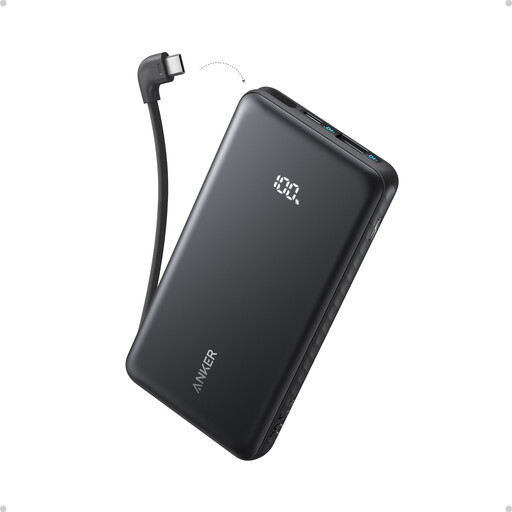
Anker Zolo Power Bank, 10,000mAh, 22.5W
A portable charging option when you cannot rely on a socket; check that its output suits the device you plan to charge.
10,000mAh capacity; 22.5W output; built-in USB-C cable.
Joybuy
 No image available
ASUS ROG Zephyrus G14 GA403WR-QS088W
A laptop option if your work benefits from locally stored files; confirm application compatibility and the device’s charging requirements before travel.
14-inch WQXGA+ display; AMD Ryzen AI 9 HX 370; 32GB LPDDR5x memory; 2TB SSD; Windows 11 Home.
Joybuy
 No image available
D-Link DWR-932W 4G LTE AX300 Wi-Fi 6 Mobile Hotspot
A hotspot option for sharing mobile data when the underlying network has coverage; check the SIM and network requirements for your journeys.
The product description specifies a Nano SIM, support for up to 32 connections and up to 16 hours of operation.
Joybuy
 No image available
Xiaomi Pad 8, 8GB RAM, 128GB, Wi-Fi, Grey
A tablet option for document and note tasks that suit your apps; check offline compatibility and whether you need a separate keyboard.
128GB storage; Wi-Fi; 9,200mAh battery; 485g, as stated in the product description.
Joybuy
Train work kit FAQs
Does onboard Wi-Fi mean I can skip downloading files?
No; prepare important files for offline use before you travel. In its February–March 2026 measured journeys, Ofcom reported good onboard Wi-Fi performance in 1% of tests, while National Rail notes that facilities vary between train companies. The measurements do not predict every future train.
Will a separate hotspot fix poor reception on my route?
No, not where the hotspot’s underlying mobile network has inadequate service. Check the relevant network for your journeys and treat Ofcom coverage information as guidance rather than a carriage-level guarantee.
How should I prepare cloud documents before boarding?
Make the specific files available offline and confirm that they open without a connection. Microsoft’s OneDrive instructions distinguish downloaded files from online-only files; Google Drive’s offline steps vary by document service and file type.
Can I count on a seat socket or make calls in a quieter coach?
Check the operator, train and seat rather than assuming a socket will be available; National Rail says onboard facilities vary. LNER asks passengers who need to take or make a call in its quieter coach to move through the doors at the end of the coach. Check other operators’ guidance separately.
What should I check before using a power bank?
Match the bank’s output and cable to your exact device, inspect the bank for damage and check its model against relevant safety notices. The Office for Product Safety and Standards says users should stop using the specified recalled Anker models A1681, A1689 and A1647; that notice does not apply to every Anker power bank.


