What matters when choosing?
Choose the input method for your main task first. Then decide whether your files must be available online during the journey and whether your notes begin as handwriting or other captured observations.
iPad Air 11-inch
Consider it when: You want a compact iPad for typed document work with a compatible Magic Keyboard.
Allow for: The keyboard is a separate purchase, and a Wi-Fi configuration is not the same as Wi-Fi + Cellular.
Galaxy Tab S10 FE
Consider it when: Handwritten capture is important before you turn observations into typed text; Samsung lists an S Pen in the box.
Allow for: The Book Cover Keyboard is an accessory, and Samsung says a travel adaptor is not included.
Surface Pro
Consider it when: Your work calls for a Windows 2-in-1 and the particular desktop applications you use run on the configuration you choose.
Allow for: Microsoft sells the keyboard and Slim Pen separately; check the assembled setup for train-seat use.
| Concern |
What to check |
Who this matters to |
| Sustained typing and editing |
Check keyboard compatibility with the exact tablet size and generation, whether it is included, and how the setup rests in your usual seat. |
If I spend most of the journey turning notes into edited prose, I need physical keys that work in the space available. Around 42% of consumers put sustained typing first. |
| Connectivity during the journey |
Check whether your app and files work offline; if they do not, compare the exact cellular configuration and its data-plan requirements. National Rail advises checking facilities with the train company. |
When I need cloud material before I get off the train, waiting to sync later may interrupt my work. Connectivity is the primary concern for around 33% of consumers. |
| Capturing observations |
Check pen inclusion and compatibility with your chosen apps, plus the local storage needed for notes and images. |
If my observations start as annotations or sketches, I want to keep them organised before I transcribe them. Around 25% of consumers prioritise this capture step. |
Joybuy tablets for train transcription
These tablets offer compact screens and different approaches to typing: two TABWEE listings describe keyboard bundles, while the two Apple models call for a compatible keyboard to be chosen separately. Check each complete setup against the space and connectivity your journeys require.
 No image available
TABWEE T20 10.1-inch tablet with keyboard, mouse and stylus
Consider this bundle if you want physical keys for transcription and a stylus for capturing observations.
- The title lists 256 GB storage and a 5000 mAh battery capacity; capacity does not establish runtime for your workload.
- Check the keyboard layout and how the assembled setup fits your train seat.
- If you need mobile data, confirm the exact connectivity variant: Wi-Fi terminology alone does not establish cellular access.
View on Joybuy
 No image available
TABWEE T80 10-inch Android 16 tablet with keyboard
This is a compact keyboard-bundle option to consider if typing is your main way of entering field notes.
- The title lists 128 GB storage; check whether its screen layout suits the documents you transcribe.
- Confirm the keyboard layout, bundle contents and fit in your usual train seating.
- Check battery runtime for your workload and confirm cellular capability separately if you need it; the title's 5G Wi-Fi wording is not a mobile-data specification.
View on Joybuy
 No image available
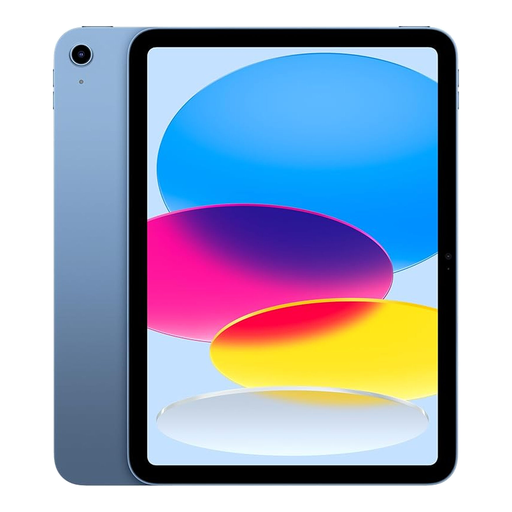
Apple iPad 11-inch, 128GB, Blue
Consider this iPad if you prefer to choose a keyboard separately for your transcription setup.
- Confirm keyboard compatibility with this exact iPad model and check the dimensions with it attached.
- Choose an offline workflow or confirm the connectivity configuration if you need access to cloud files during a journey.
View on Joybuy
 No image available
Apple iPad Air 11-inch (2026, M4), Wi-Fi, 128GB, Space Grey
This Wi-Fi iPad Air suits an Apple-based transcription setup when you are prepared to choose a compatible physical keyboard separately.
- Apple offers a Magic Keyboard option for iPad Air; confirm compatibility with this exact 11-inch model before choosing one.
- Check the keyboard-attached fit for your train seat and plan to work offline if you cannot rely on onboard Wi-Fi.
- This is the Wi-Fi variant; choose a different configuration if built-in mobile-data access is required.
View on Joybuy
Questions about train transcription
Do I need cellular connectivity for transcribing on a train?
Choose Wi-Fi-only if your transcription app and files can work offline and you can sync later; consider cellular when live cloud access is necessary. National Rail says onboard Wi-Fi availability varies by train company, while a cellular tablet also needs a suitable mobile-data plan.
Is a keyboard necessary for field-note transcription?
For occasional corrections, touch input may suffice; for sustained typing, check a physical keyboard with the exact tablet you intend to buy. Apple, Samsung and Microsoft describe keyboard options for the tablet routes discussed here, but the accessory arrangement differs by model.
What belongs in a complete transcription setup?
Start with the exact tablet and a compatible keyboard, then add only the pen, charger, connectivity plan and protection your work requires. Check what comes in the particular box: Samsung lists an S Pen for the Galaxy Tab S10 FE but says its travel adaptor is not included.
Can I use any transcription app for observations containing personal data?
If you handle identifiable observations for an organisation, use its approved apps and storage procedures rather than assuming any cloud tool is suitable. The UK Information Commissioner's Office identifies principles including security, storage limitation and accountability under the UK GDPR; follow your organisation's requirements for access, retention and sharing.


