Choose your charging setup around your destinations, device input ratings and the number of devices you need to charge. A destination-specific adapter can cover repeat trips to one socket region, while a universal adapter offers more plug options; laptop charging may call for a separate USB-C Power Delivery (PD) charger, and a power bank can provide backup away from sockets. As Electrical Safety First explains, a plug adapter changes neither voltage nor frequency, so a fitting plug alone does not establish that a device is suitable for the destination supply.
Who is each setup for?
Travellers returning to one destination
If you mainly charge a phone or tablet in the same socket region, a destination-specific plug adapter may be enough once you have checked the charger input label against the local supply. Electrical Safety First notes that an adapter does not convert voltage or frequency.
Travellers carrying several devices
For trips across different socket regions, check a universal adapter against every destination. If you also want to charge a phone, tablet or other small devices together, check the port types and combined USB output rather than counting ports alone.
Travellers who rely on a laptop
Start with the laptop maker’s charging instructions, required wattage and connector. For a Mac that charges through USB-C, Apple Support says a USB-C PD adapter can be used; the available power still needs to suit the particular model, especially when other ports are occupied.
What should you check before buying?
Check the destination socket and electrical supply first, then the power your devices need and whether you will charge them simultaneously. Treat charging away from a socket as a separate decision.
| Concern |
Buying checks |
Who this matters to |
| Plug fit and electrical compatibility |
Match the destination socket; compare its supply with the device or charger input label. Check the adapter’s load rating and earth suitability where relevant. |
If a plug fits but my device cannot use the local supply, I still cannot charge safely. Around 31% of consumers put plug fit and electrical compatibility first. |
| Laptop charging |
Confirm the laptop’s charging method and documented wattage, then check the cable and the charger’s output with other ports occupied. |
When I depend on my laptop during a trip, I need it to receive enough power even while my phone is plugged in; roughly 25% of consumers make laptop charging their primary concern. |
| Several devices, limited sockets |
Count the devices you will charge together; compare USB port types and the stated combined output. |
If several small devices need charging from one wall socket, I want a workable port arrangement without carrying separate chargers. About 25% of consumers prioritise that need. |
| Power away from sockets |
Check the power bank’s watt-hour rating and your airline’s carriage rules; keep it out of checked baggage. |
During transfers or long days in transit, I want backup for portable devices when no socket is available; around 19% of consumers put that need first. |
Travel charging mistakes to avoid
-
Assuming an adapter converts voltage
A plug that fits does not establish electrical compatibility. Electrical Safety First states that travel adapters do not change voltage or frequency.
Compare the device or charger input label with the destination supply before use. Consider a voltage converter only if the device requires one and falls within that converter’s stated uses and limits.
-
Overlooking the adapter rating or earth connection
Electrical Safety First advises checking that the connected load does not exceed the adapter’s rating; an adapter may also be unsuitable for equipment that requires an earth connection.
Check the amps or watts marked on the adapter and confirm earth suitability for any device that needs it. An AC socket on a universal adapter is not, by itself, proof that every device can be used with it.
-
Choosing a multi-port charger by its headline wattage
That figure alone does not tell you what a laptop receives when other ports are in use. Anker’s UK guidance recommends checking combined USB output; the laptop’s own charging requirements also matter.
Confirm the laptop’s charging method and required wattage, then check the charger’s output for your intended port combination and use a cable rated for the required power.
If the chosen combination cannot supply the laptop adequately, you may still need to carry its usual charger.
-
Putting a power bank in checked baggage
The UK Civil Aviation Authority says power banks must be kept in the cabin, not in checked luggage.
Check the power bank’s watt-hour label and your airline’s current rules before departure, and pack it in your cabin baggage.
Relevant brands to consider
SKROSS
SKROSS offers country-specific and multi-country travel adapters, including models with USB charging ports.
- SKROSS lists a 100–250 V AC input range, a 16 A maximum and USB-C and USB-A ports for its World to UK USB AC20PD model.
- That model is not a voltage transformer. Check the direction of plug adaptation, socket coverage and earth suitability of the exact model you are considering.
Targus
Targus lists travel adapters, laptop chargers and laptop power accessories on its UK site.
- Its range is relevant if a laptop charging arrangement is the starting point for your packing list.
- Check the exact laptop connector, charging protocol, wattage and destination plug arrangement for the particular accessory.
Anker
Anker offers travel-adapter and separate charger options for portable devices.
- Anker’s UK guidance distinguishes compact adapter USB charging from a dedicated charger for laptop use and advises checking combined USB output.
- A travel adapter’s USB ports should not be assumed to meet a particular laptop’s power requirement; check the exact product and laptop specifications.
Joybuy charging products
These EU-plug USB-C chargers are options for trips where their plugs fit the destination socket. Compare each charger’s stated power with your devices’ requirements; for other socket types, check what additional plug adaptation you need.
 No image available
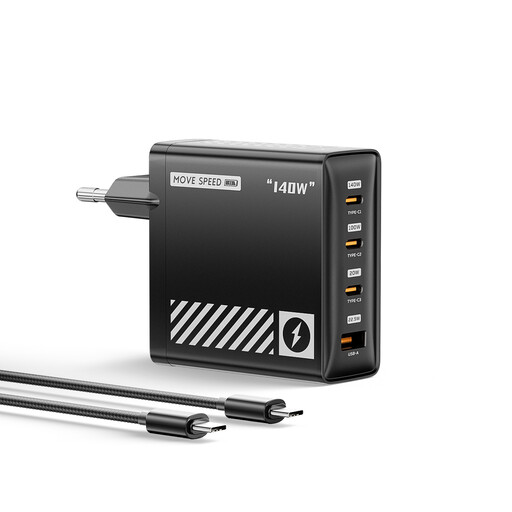
MOVESPEED HC-TR271A-EU 140W USB-C EU Charger, Black
Consider this four-port charger if you want to connect several devices on a trip where its EU plug fits.
The product name lists a 140 W rating, USB-C PD 3.1 and GaN technology. Check the power available to your laptop with your intended ports occupied; the headline rating does not establish its per-port output.
Joybuy
 No image available
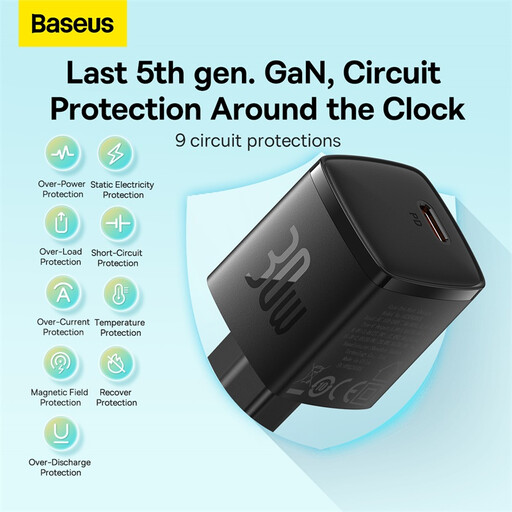
Baseus GaN5 30W USB-C PD EU Charger, Black
Consider this charger for a USB-C device on a trip where its EU-standard plug fits.
The product name lists USB-C PD and a 30 W rating. Check your device’s power requirement before relying on it, particularly for a laptop.
Joybuy
Travel charging questions
Does a travel adapter make a UK device safe to use abroad?
No: a travel adapter changes the physical plug connection, not voltage or frequency, according to Electrical Safety First. Compare the device or charger input rating with the destination supply before connecting it; if they are incompatible, an adapter alone is not enough.
What should I check on a travel adapter?
Check that its plug arrangement fits the destination and that its stated amps or watts cover the connected load. Electrical Safety First also advises checking whether an adapter is suitable for equipment requiring an earth connection; a fitting socket does not settle that question.
Can one USB-C charger power my laptop and phone?
It can if the laptop accepts the charger’s USB-C PD output and still receives sufficient power when the phone is connected. Check the laptop maker’s documented wattage, the cable rating and the charger’s output for that port combination; Apple Support’s USB-C PD advice applies to Macs that charge through USB-C, not automatically to other laptops.
Can I put a power bank in checked luggage?
No. The UK Civil Aviation Authority says to keep power banks with you in the cabin rather than in checked baggage. Check the battery’s watt-hour rating and your airline’s current carriage rules before flying.


