What matters when choosing
Decide whether you will usually record from one position, move while speaking or keep the microphone on the camera. Then check the connection and recording safeguards needed for that setup.
| Concern | What to check | Who this matters to |
|---|
| Voice clarity in a fixed position |
Whether you can place a close-miked directional microphone near your mouth and monitor the result. |
If I narrate at the same desk while household sounds continue, I want my speech to remain clear without relying entirely on processing. Around 36% of consumers would put fixed-position voice clarity first. |
| Hands-free movement |
The clip attachment, the exact phone or camera connection, and the charging arrangement. |
When I walk or change framing mid-entry, I need a microphone that moves with me. Around 29% of consumers would make hands-free mobility their primary concern. |
| Camera-led recording |
The microphone's stated directional pattern, high-pass filters and compatibility with your recording input. |
If I film from a camera rig, I want to aim the microphone towards my voice and manage low-frequency rumble, while accepting that it stays at camera distance. Around 21% of consumers would prioritise that camera-led setup. |
| Protecting difficult takes |
Available monitoring, on-board recording or safety tracks, and support for the number of speakers. |
For a two-person entry or a take I cannot easily repeat, I want a way to catch level problems or retain a backup. Around 14% of consumers would put recording resilience first. |
Joybuy microphones for desk and mobile recording
These choices cover fixed-position USB/XLR microphones and clip-on wireless kits for mobile diary entries. Choose the recording position first, then check the connections and package contents of the particular model.
 No image available
FIFINE K688CT USB/XLR dynamic microphone kit with boom arm
Consider this kit for narration from a fixed desk where you can position a microphone close to your mouth. It has USB/XLR connections and a boom arm; check that its clamp fits your desk. An XLR cable is not included, and the microphone controls are inactive in XLR mode.
View on Joybuy
 No image available
FIFINE AM8 USB/XLR dynamic microphone with desktop stand
This is a fixed-position option if the supplied desktop stand lets you place the microphone close enough for diary narration. It has USB/XLR connections and a headphone jack. A boom arm and XLR cable are not included, and the microphone controls are unavailable in XLR mode.
View on Joybuy
 No image available
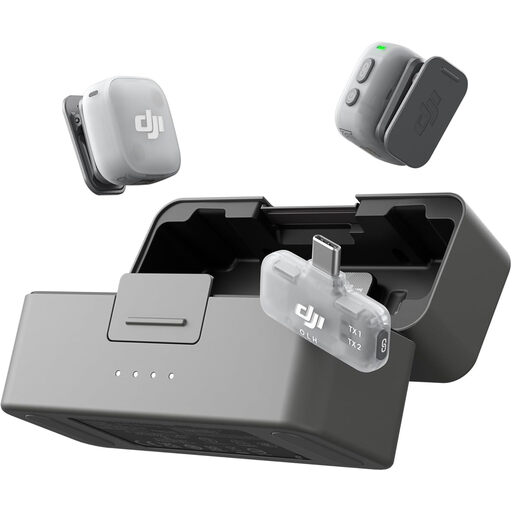
DJI Mic Mini 2 (2 TX + 1 Mobile RX + Charging Case)
The two-transmitter kit is worth considering for hands-free phone diary entries or two speakers. Its package specifies a mobile receiver and charging case. Confirm that the receiver works with your phone and recording app, and check the UK-supplied wireless configuration.
View on Joybuy
 No image available
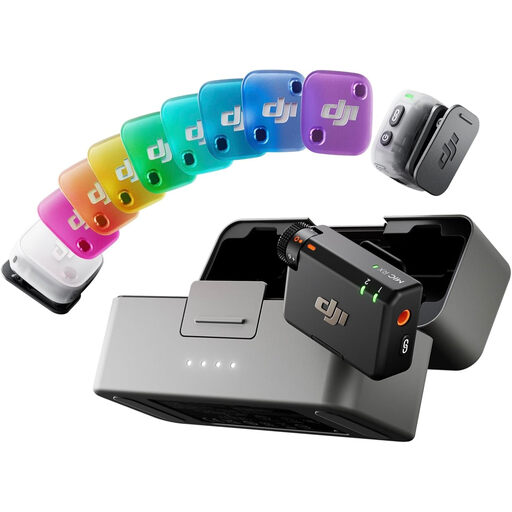
DJI Mic Mini 2 (2 TX + 1 RX + Charging Case)
This two-transmitter wireless kit suits diary entries recorded while moving or with a second speaker. The package specifies one receiver and a charging case; check how this receiver connects to your recording device and app, and confirm the UK-supplied wireless configuration.
View on Joybuy
 No image available
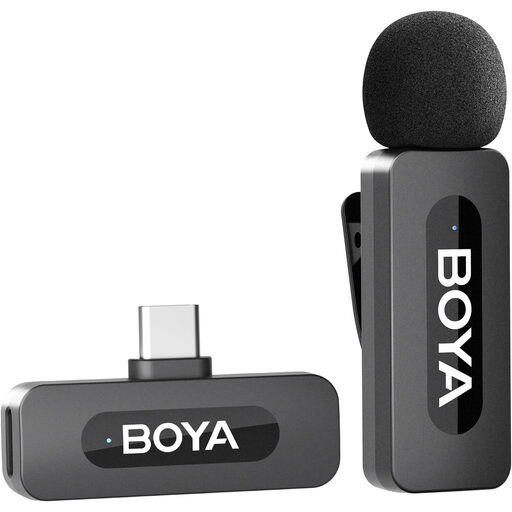
BOYA BY-V10 V2.0 USB-C wireless microphone (1 TX + 1 RX)
Consider this single-transmitter kit for mobile diary recording with a compatible USB-C phone. The listing states 9 hours of battery life and describes one-click noise cancellation, but that wording does not establish how much room noise your recording will retain. Check your phone connection and the UK-supplied wireless configuration.
View on Joybuy
Frequently asked questions
What microphone should I consider for desk narration in a noisy flat?
Start with a directional dynamic microphone you can keep close to your mouth. Shure describes the MV7+ as intended for close-miked speech, but its noise-isolation claims do not mean that neighbours, appliances or traffic will disappear; monitor a recording in your usual position.
Can an on-camera microphone help with traffic or air-conditioning rumble?
The RØDE VideoMic NTG has 75 Hz and 150 Hz high-pass filters that RØDE describes as useful for low-frequency rumble. Those settings do not address every type of room noise, and the microphone still needs to be aimed appropriately from the camera position.
Will the VideoMic NTG safety channel work with my phone?
Not through a smartphone TRRS input: RØDE says that connection supports only one audio channel, so the VideoMic NTG safety channel will not work there. Check your phone's actual input and adapter path before relying on the feature.
Can I assume a 2.4 GHz wireless kit is licence-exempt in the UK?
Do not assume that the frequency alone settles the question for your particular kit. Check the UK-supplied configuration against Ofcom's applicable radio conditions; shared-spectrum operation also does not guarantee freedom from interference.
What accessories and connections should I check for phone and camera diaries?
Check the complete connection from microphone to recording device and what the exact package includes. A desk setup may need a suitable stand or boom, while a wireless kit needs the right receiver or adapter; also check how you will monitor sound before recording an important entry.


