Space-limited travel-journal editors
If your laptop shares a shallow desk with notes, maps or photo-editing materials, you need to check the clear space available for the mouse, not just whether it fits in your bag.


Choose a mouse that fits both the space beside your laptop and your hand. A slim model suits packing and shorter editing sessions, while a controllable scroll wheel or configurable buttons may matter more if you regularly work through long entries and photo layouts. Check the connection options for every device you use, and leave enough room to position the mouse comfortably during longer sessions.
If your laptop shares a shallow desk with notes, maps or photo-editing materials, you need to check the clear space available for the mouse, not just whether it fits in your bag.
If you move between a laptop, tablet or second computer, check how the mouse connects to each one and whether switching devices is supported. A receiver option is useful only when you have a suitable port.
Hand fit and mouse placement become more important when writing and photo selection take longer. The Health and Safety Executive advises placing a mouse in line with the elbow; Posturite also emphasises matching the mouse to the person and task.
For travel-journal editing on a small desk, establish the usable mouse space and connection method first. Then decide whether your sessions call for more scrolling control or a shape you find comfortable to hold.
| Concern | What to check | Who this matters to |
|---|---|---|
| Desk space and packing | Measure the clear area beside the laptop; compare the mouse’s published width and depth and the space it takes in your bag. | If my mouse has to share a shallow desk with my laptop and travel notes, I want it to be easy to place and carry. Around 33% of consumers put space and packing first. |
| Editing control | Check for adjustable pointer sensitivity and a scroll wheel or configurable buttons that suit your editing tasks. | When I move through long entries and select details in photos or layouts, I want controls I can adjust rather than relying on a headline DPI figure. For around 27% of consumers, editing control is the primary concern. |
| Quiet use and connections | Check click-noise claims, Bluetooth compatibility, receiver type and whether the mouse can switch between your devices. | If I edit near other people or move between devices, I want quiet clicks and a connection that works with what I carry. Quiet use and connectivity come first for around 20% of consumers. |
| Comfort over longer sessions | Assess hand fit where possible and make room to place the mouse in line with your elbow. | For a long editing session, I need a grip and desk position I can use comfortably, even if that means choosing a less slim mouse. Around 20% of consumers prioritise sustained comfort. |
A small mouse may free desk space yet feel awkward in your hand during a longer session. Posturite’s mouse guidance relates fit to both the user and the task.
Try the grip where possible, and check whether the desk lets you keep the mouse beside the keyboard and in line with your elbow, as the Health and Safety Executive advises.
Bluetooth, USB-A receivers and USB-C receivers make different demands on your devices. Multi-device switching also varies by model.
Check each device’s Bluetooth capability and available ports, then confirm the receiver arrangement before ordering. Logitech says the MX Anywhere 3S works with a Logi Bolt receiver, but that receiver is not included.
A large DPI figure alone does not tell you how easily you can set a comfortable pointer speed or navigate a long journal entry.
Look at the available sensitivity adjustments, scroll behaviour and button controls that you would actually use in your editing workflow.
Manufacturer battery-life figures describe stated maximums, not how long every traveller will go between battery changes or charges.
Check whether the model uses replaceable batteries or charging, and choose the arrangement you can manage while travelling.
The MX Anywhere 3S and Pebble Mouse 2 M350s address different compact-mouse priorities: editing controls and easy portability respectively.
Dell’s MS355 is a compact, quiet mouse for desks where a choice between Bluetooth and a receiver matters.
The HP 430 is relevant when device switching and configurable controls matter more than choosing the smallest possible mouse.
The Lenovo 540 USB-C Wireless Compact Mouse is an option to examine if you specifically want a USB-C receiver.
These Joybuy mice offer different wireless connection and control options for travel-journal editing. Their shapes and desk-space requirements vary, so compare each one with your laptop, available surface and typical session length.
 No image available
Consider this model if quiet clicks and a choice of wireless connection matter at your editing desk.
The product name specifies 2.4G and Bluetooth connections, adjustable sensitivity levels and 1 × AA battery. Check its fit in your hand before relying on it for longer sessions.
 No image available
Consider this model if carrying weight and a choice of connection methods take priority over a particularly small desk footprint.
The product name specifies wired, 2.4G and Bluetooth modes and a stated weight of 49 g. Check that its shape fits your available mousing area and that its click sound suits any shared workspace.
 No image available
Consider this model if you want Bluetooth and 2.4G connection choices while editing across different setups.
The product name specifies five adjustable DPI levels and an 800 mAh battery. Check its physical dimensions against your desk, and confirm its click sound if you work near other people.
 No image available
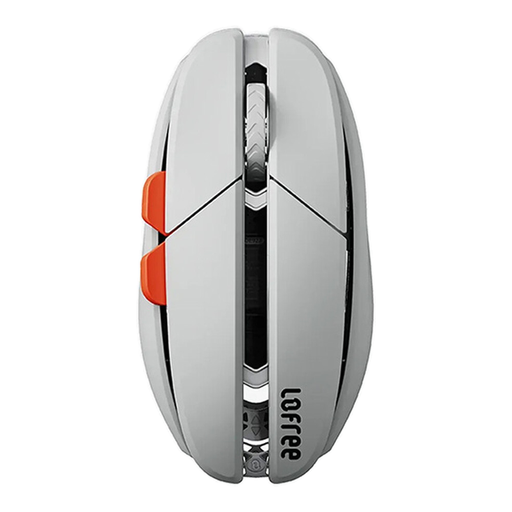
Consider this model if connection flexibility matters and you can assess its desk fit separately.
The product name specifies Bluetooth, 2.4G and wired modes, with a magnesium-alloy frame and PC shell. If you need to switch between paired devices, confirm how that works rather than assuming tri-mode connection provides it.
 No image available
Consider this model if you want several connection routes and have room for its charging dock, rather than needing the smallest travel setup.
The product name specifies Bluetooth, 2.4G and USB-C modes. Check the space required for both mouse and dock, assess the grip for your hand and confirm click noise if you edit in shared spaces.
No: choose a pointer speed you can control comfortably rather than selecting a mouse by its maximum DPI alone. For text, photos and page layouts, check the available sensitivity settings and scroll controls; HP, for example, specifies adjustable wheel speed and programmable buttons on its 430 mouse.
A smaller mouse alone is not a remedy for discomfort. Check how the shape fits your hand and whether your desk lets you place the mouse in line with your elbow, as the Health and Safety Executive advises. If discomfort persists, reassess your setup and seek appropriate professional advice.
Choose the connection your actual devices and available ports can accommodate. Dell specifies Bluetooth or an RF receiver for the MS355, HP specifies Bluetooth or a USB-A nano dongle for the 430, and Lenovo specifies a USB-C receiver for its 540 compact mouse. Check receiver inclusion and device compatibility for the particular model before ordering.