Choose a compact mouse with quiet clicks if shared-room noise, limited desk space and carrying it with your laptop matter most. If you regularly sort photos or navigate long drafts, give more attention to the wheel and configurable controls; for extended sessions at one desk, consider a fuller grip, provided it fits your hand and available space. Check connection requirements and operating-system support for the exact model before buying.
Who is this for?
Quiet shared-room editors
If you write captions or browse beside other people, click noise and the space a mouse takes beside your laptop may matter more to you than extra controls. Logitech and HP list quiet-click options among the relevant compact and wireless models.
Photo-heavy travel-journal editors
If you repeatedly sort images and move through long drafts, look closely at scrolling and controls you can configure for your applications. Logitech and HP describe these features on specific productivity mice; check the exact model rather than assuming every mouse has them.
Long-session desk editors
If most editing happens at one desk, hand fit may take priority over a very slim shape. HP describes a contoured body and thumb rest on its 480 Comfort Bluetooth Mouse, though those features cannot establish whether it will fit your grip.
What matters when choosing?
For a student-room setup, settle the question of space, noise and hand fit before deciding whether specialised scrolling or extra buttons would help with your editing routine.
| Concern |
What to check |
Who this matters to |
| Quiet clicks and desk space |
Check quiet-click claims for the exact model, then compare its dimensions and grip shape with the space beside your laptop. |
When I edit near a roommate, I want clicks that cause less disturbance without crowding my desk. Around 42% of consumers put a quiet, compact setup first. |
| Photo and document navigation |
Check wheel behaviour and whether any horizontal scrolling or programmable buttons work with your editing software. |
If I spend much of a session sorting photos and moving through a long draft, I want navigation that suits those repeated tasks. Around 33% of consumers prioritise editing controls. |
| Hand fit and laptop connection |
Compare the shape with your grip and session length; confirm the exact model's operating-system and Bluetooth or receiver requirements. |
For sustained editing at one desk, I need a mouse I can hold comfortably and connect to my laptop. Around 25% of consumers put long-session fit and connection first. |
What should you avoid?
-
Choosing by DPI alone
DPI describes sensor sensitivity, not whether a mouse fits your hand, clicks quietly or has a wheel you like using through a long draft.
Check shape, connection, wheel behaviour and click noise before treating the manufacturer's DPI figure as a deciding specification.
-
Assuming wireless means everything is in the box
A Bluetooth connection and a receiver connection have different laptop requirements. Logitech says its MX Anywhere 3S works with a Logi Bolt receiver, but that receiver is not included.
Check your laptop's Bluetooth capability and ports, the mouse's connection options and the contents of the exact package.
A receiver-based setup may also require a separate receiver or a suitable USB adapter.
-
Choosing the smallest shape without checking your grip
A slim mouse is easier to place on a narrow desk or carry with a laptop, while a contoured design may provide a different grip for stationary editing. Neither shape fits everyone.
Compare dimensions and, where possible, try the shape for the length of session you expect.
-
Overlooking batteries and end-of-life disposal
Power arrangements differ: Razer specifies AA or AAA battery configurations for its Orochi V2, while named rechargeable models use other arrangements. GOV.UK advises keeping used batteries and electrical products out of household rubbish.
Check the exact model's battery or charging method, and use an appropriate battery or electrical collection route when it reaches end of life.
A replaceable-battery mouse requires access to suitable spare cells during use.
Relevant brands to consider
Logitech
Its named models span slim portable use and compact mice with additional editing controls.
- Logitech describes the Pebble Mouse 2 M350s as compact, with Silent Touch and three-device switching; the MX Anywhere 3S has quiet clicks and a two-mode MagSpeed wheel.
- For the MX Anywhere 3S, Logitech says a compatible Logi Bolt receiver is not included. Check connection and box contents for the particular model.
HP
The named HP models are relevant if you want quiet clicks alongside controls or a fuller desk-oriented shape.
- HP lists quiet clicks and configurable controls for its 480 Comfort Bluetooth Mouse and 690 Rechargeable Wireless Mouse; the 480 has a contoured shape and thumb rest.
- Check the dimensions, grip and software support of the model you choose rather than applying those features to every HP mouse.
Microsoft
The Surface Arc Mouse is a slim Bluetooth option for someone who puts carrying space first.
- Microsoft describes a mouse that snaps flat for travel and supports vertical and horizontal scrolling.
- Its folding shape is a different proposition from a conventional contoured grip; check hand fit and the requirements of the exact model.
Razer
The Orochi V2 is relevant if the same portable mouse would also be used for gaming.
- Razer lists Bluetooth and 2.4 GHz wireless modes for the Orochi V2, with an AA or AAA battery configuration.
- Check click noise, hand fit and battery preferences for shared-room writing rather than assuming a gaming-oriented model meets those needs.
Joybuy product choices
These mice offer different starting points for a student-room journal setup, from quiet-click and receiver-connected options to gesture controls and fuller desk-oriented designs. Compare each listing with your laptop, grip and editing habits.
 No image available
Logitech MX Master 3S Ergonomic Black
Consider this ergonomic model for editing at a fixed desk if its shape suits your grip. Check its dimensions, connection options, wheel behaviour and operating-system support against your setup before choosing it for long sessions or travel.
View on Joybuy
 No image available
HOFOTEK M311 2.4G+BT Silent Mouse, White-Grey (1xAA)
Its silent-click description makes this a model to consider for a shared room. The White-Grey 2.4G+BT variant lists adjustable DPI and a 1xAA battery; check which connection suits your laptop, as well as wheel behaviour and hand fit.
View on Joybuy
 No image available
Apple Magic Mouse White Multi-Touch Surface
Consider the Multi-Touch surface if gesture navigation suits the way you edit on a compatible Apple device. Check support for your particular laptop and confirm click noise before choosing it for shared-room use.
View on Joybuy
 No image available
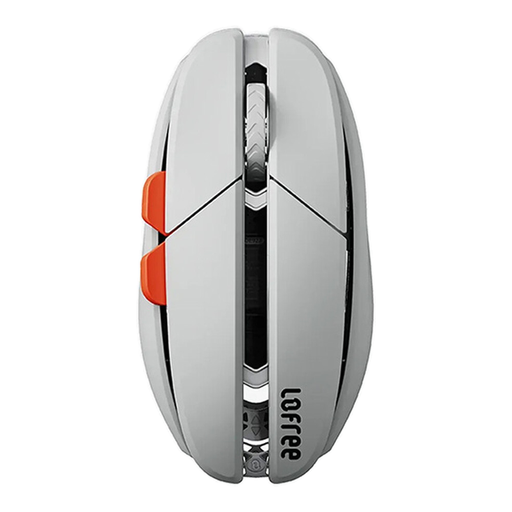
lofree Hypace OE923 Light Gray Tri-Mode Mouse
Consider this model if you need a choice of connection methods between study spaces. Its named configuration has a magnesium-alloy frame, PC shell, PAW3950 sensor and Bluetooth, 2.4G and wired modes; check dimensions, wheel behaviour and click noise for your desk and shared room.
View on Joybuy
 No image available
Philips 3000 Series SPK7378B/00 2.4GHz Mouse, Black, EU Version
Its silent-click description is relevant to quiet study if a receiver connection works with your laptop. This EU Version is listed with a USB receiver and 1600 DPI optical sensor; check the port you need, the mouse's dimensions and its wheel behaviour for long drafts.
View on Joybuy
Common questions
Will a Bluetooth mouse work with my laptop?
It will work only if your laptop and operating system meet that mouse's requirements. For example, Microsoft specifies Windows 10 or 11 and Bluetooth 4.0 or later for its Microsoft Bluetooth Mouse; check the requirements for the exact model you plan to buy.
Do I need a USB receiver for a wireless mouse?
Not if the mouse can connect directly through Bluetooth and your laptop supports it. Receiver options and box contents vary: Logitech says its MX Anywhere 3S is compatible with a Logi Bolt receiver, but that receiver is not included.
How should I dispose of an old mouse or its batteries in the UK?
Use an appropriate electrical recycling route for the mouse and a suitable battery collection point for removable batteries. GOV.UK advises against putting unwanted electrical products and batteries in household rubbish.
Are returns and warranties the same at every shop?
No. A retailer's change-of-mind returns policy applies to purchases covered by that retailer's terms, so check it on the product page before ordering. Keep that policy distinct from remedies for faulty, damaged or misdescribed goods.


