Choose for the tabletop as well as the journey: if you regularly edit directly on glass, a compact mouse with a model-specific glass-tracking claim is a more grounded choice than assuming any travel mouse will work there. If you use a mouse mat or an ordinary desk, quiet clicks and packability may matter more; for longer sessions at a settled workstation, consider hand fit and scrolling controls. Rearrange the screen and lighting to address window glare rather than treating it as a mouse-sensor problem.
Who is this for?
Journal editors using varied tables
If you move between desks and sometimes work directly on a glass tabletop, check the exact mouse’s tracking claim before prioritising a compact shape. Logitech’s glass claims for the MX Anywhere 3S and MX Master 3S carry a minimum glass-thickness condition.
Quiet, multi-device travel writers
If you alternate between compatible devices or edit in shared spaces, a portable Bluetooth model with documented quiet clicks may suit your routine. Check device compatibility separately from click noise and carrying size.
Long-session desk editors
If you spend longer periods refining entries, captions and layouts at one workstation, consider hand fit, scrolling and where the mouse sits on the desk. The UK Health and Safety Executive also advises arranging screens and lighting to avoid reflections and glare.
What matters when choosing?
Start with the surface you will actually use, then decide whether carrying size, editing controls or longer-session fit will most affect your choice. The percentages below refer to consumers who would put each concern first when choosing a mouse for this travel-journal setting.
| Concern | What to check | Who this matters to |
|---|
| Tracking on the tabletop |
Check the exact model’s glass claim and its conditions, or plan to use a mouse mat. Logitech specifies glass at least 4 mm thick for its MX Anywhere 3S and MX Master 3S claims. |
If I edit directly on a glass table, I want a tracking claim that applies to that surface rather than relying on the mouse’s DPI figure. Roughly 31% of consumers would put surface reliability first. |
| Packability and quiet clicks |
Check the shape you will carry, the intended device’s Bluetooth compatibility and whether quiet clicks are specified for that model. |
When I pack my laptop for shared spaces, I want a mouse I will bring along without disturbing people nearby. For roughly 25% of consumers, portability and quiet use would be the main priority. |
| Editing controls and switching |
Decide whether you will use scrolling controls or shortcuts, and confirm pairing and software compatibility for your devices. |
If I move between long entries and reference material, I want controls that suit that workflow and devices I can switch between. About 25% of consumers would prioritise editing controls and device switching. |
| Fit for longer sessions |
Check hand-size guidance and handedness, and leave room to position the mouse comfortably. Address screen glare separately. |
When an editing session stretches out at a desk, I care more about how the mouse fits and where I can place it than its packed size. Longer-session comfort would come first for roughly 19% of consumers. |
Buying pitfalls
-
Choosing a sensor because the window is bright
Window light can create screen reflections, while the surface under the mouse is the relevant question for tracking. The Health and Safety Executive recommends arranging screens and lighting to avoid glare.
Identify the tabletop first. Reposition the screen or lighting for glare, and look for a model-specific glass claim if the mouse will run directly on glass.
If you choose a mouse without a suitable tracking claim for a glass table, carrying a mouse mat adds an item to your travel setup.
-
Assuming every portable mouse tracks on glass
Logitech describes the Pebble Mouse 2 M350s as portable, but its glass-tracking claims for the MX Anywhere 3S and MX Master 3S are model-specific and subject to a minimum 4 mm glass thickness.
Choose using the claim for the exact model and surface, or use a mouse mat. Bluetooth connectivity and a DPI number do not establish glass suitability.
-
Choosing a vertical shape without checking fit
Logitech positions Lift for small to medium hands. The Health and Safety Executive’s workstation guidance also makes clear that mouse position, screen arrangement and patterns of use matter alongside equipment choice.
Check the grip and handedness that suit you, particularly if the mouse will be carried often, and arrange the workstation so the mouse stays within comfortable reach.
-
Treating similarly named variants as identical
A model-family name can cover different variants: the Joybuy listing described in the product research is an MX Master 3S for Business, rather than an established exact match for the consumer MX Master 3S discussed here.
Check the complete variant name, included accessories, compatibility and warranty terms on the product-detail page before ordering.
Relevant brands to consider
Logitech
Its mouse range includes distinct approaches to this task, from compact travel use to longer sessions at a desk.
- Logitech claims glass tracking for the MX Anywhere 3S and MX Master 3S, subject to a minimum 4 mm glass thickness; the Pebble Mouse 2 M350s instead emphasises portability and quiet clicks.
- Those features are model-specific. Lift’s 57° vertical shape is positioned for small to medium hands, not as a substitute for checking your own fit.
Apple
Magic Mouse is relevant if your journal-editing setup uses a compatible Mac or iPad and you prefer gesture-based navigation.
- Apple describes a Multi-Touch surface for actions including document scrolling.
- Apple specifies macOS 15.1 or later for Mac and iPadOS 18.1 or later for iPad for the USB-C Magic Mouse; check those requirements before choosing it for travel.
Microsoft
The Surface Arc Mouse is a flat-folding option to consider for a compatible Windows travel setup.
- Microsoft describes the mouse as snapping flat for carrying.
- Confirm current availability and the exact device requirements before making it part of your travel kit.
Razer
Orochi V2 is a compact wireless alternative if Bluetooth and 2.4 GHz connection options matter to you.
- Razer specifies both Bluetooth and 2.4 GHz wireless modes for Orochi V2.
- It uses an AA or AAA battery rather than internal USB-C charging; decide whether its gaming-oriented controls are useful for journal editing.
Joybuy product choices for travel-journal editing
These mice offer different combinations of portable connectivity and editing controls. If you plan to work directly on glass, check how the exact model performs on your tabletop or use a mouse mat; do not infer glass tracking from its wireless mode or sensor name.
 No image available
HOFOTEK M311 2.4G and BT Mouse, White-Grey
Consider this model if quiet clicks and a mouse you can carry between editing locations are priorities.
Its product name specifies 2.4G and BT connectivity, adjustable DPI and one AA battery. Check compatibility with your device and tracking on your tabletop.
View on Joybuy
 No image available
HP 700 Rechargeable Wireless Mouse
Consider this rechargeable model if you edit at a workstation as well as while travelling.
Before choosing it for a glass table or a tightly packed kit, check tabletop tracking and whether its size suits what you carry.
View on Joybuy
 No image available
lofree Wavy Chips EP115 Mouse, Milk Tea
Consider this model if switching between Bluetooth and 2.4G suits your editing setup.
Its product name specifies five DPI levels and an 800 mAh battery. Check its carrying dimensions, click noise and tracking on your intended tabletop.
View on Joybuy
 No image available
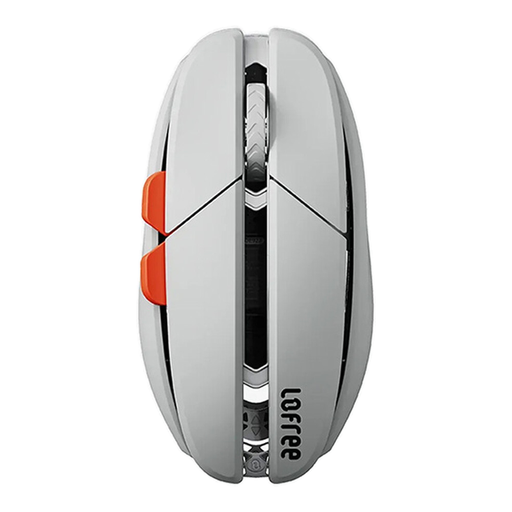
lofree Hypace OE923 Mouse, Light Gray
Consider this model if carrying weight and a choice of connection modes matter more than dedicated document controls.
Its product name specifies Bluetooth, 2.4G and wired modes, a magnesium-alloy frame and a PC shell. Check glass tracking and click noise for your work setting; the listed limitation excludes Boot Camp dual-system mode on Mac.
View on Joybuy
 No image available
MACHENIKE L9X1 49 g Wireless Mouse
Consider this model if a stated low weight appeals for a travelling laptop setup.
Its product name specifies wired, 2.4G and Bluetooth modes and a 49 g weight. Check compatibility with your operating system and tracking on the surface you will use; its gaming specifications alone do not establish glass suitability.
View on Joybuy
Common questions
Does a bright window mean I need a special mouse sensor?
No: window brightness is not itself a reason to choose a particular mouse sensor. The Health and Safety Executive advises arranging screens and lighting to avoid reflections and glare; if the mouse will run directly on glass, check a model-specific tracking claim instead. Logitech’s claims for the MX Anywhere 3S and MX Master 3S specify glass at least 4 mm thick.
Can I use a Bluetooth travel mouse without a USB-A port?
Yes, if both your device and the exact mouse support a compatible Bluetooth connection. Logitech states that the MX Anywhere 3S can connect to up to three devices by Bluetooth; check your device’s operating system and the model’s connection requirements before buying.
Will the USB-C Magic Mouse work with any laptop or tablet?
No. Apple specifies a Mac running macOS 15.1 or later or an iPad running iPadOS 18.1 or later for the USB-C Magic Mouse, so confirm the device you will take travelling before choosing it for gesture-based editing.
Should I choose a vertical mouse for long editing sessions?
Choose a vertical mouse only if its shape fits your hand and carrying needs; an ergonomic label alone cannot settle the choice. Logitech positions Lift for small to medium hands, while the Health and Safety Executive advises considering mouse position, posture and screen glare as part of the wider workstation arrangement.


