What should you check before buying?
Start with the camera card and the mobile device you already carry, then choose a reader and destination drive that you can test as one transfer chain.
| Priority | What to check | Your needs |
|---|
| Card and host compatibility |
Identify the camera’s card format and a reader that accepts it. Confirm that your phone or tablet recognises the reader and attached storage; matching USB-C plugs alone do not establish a working transfer. |
I want to move files from my actual camera card without bringing a laptop. A full copy-and-open test with my own devices matters more than a connector match. |
| Drive format and power |
For Apple external storage, Apple Support specifies one data partition and a supported format. Check whether the mobile device can power the connection throughout a long copy or needs a suitable powered hub. |
If I am transferring a day’s photos on the move, I need the drive to stay connected until the copy finishes. |
| Capacity and interface |
Allow for the files you expect to keep between independent backups. Check the host port, cable and drive standard together before relying on a stated maximum transfer speed. |
I need room for my trip’s photos and video, but a larger or faster-labelled SSD will not solve an incompatible mobile workflow. |
| Independent copies |
Open a sample of copied files and reconnect the drive to check the destination folder. Keep the original card until the copy is checked, and arrange another independent copy for irreplaceable images. |
I do not want one lost drive, interrupted transfer or accidental deletion to leave me without my photos. |
Joybuy options for the transfer and storage steps
These options include portable SSDs for the destination copy and an SD reader for a compatible camera-card import. Choose the pieces that fit your card and mobile device, then test the complete workflow before travelling.
 No image available
Samsung MU-PE1T0S 1TB USB-C portable SSD, black
A 1TB destination drive for a travel copy once your mobile transfer route has been tested. The product name specifies USB 3.2 Gen 2; confirm that your phone or tablet mounts the drive in the workflow you intend to use, and retain the source card until the files are checked.
View on Joybuy
 No image available
Lexar ES5 1TB portable SSD, USB 3.2 Gen 2x2
A 1TB USB-C storage option for a tested mobile transfer setup. The product name lists speeds up to 2000MB/s for reading and writing and specifies MagSafe-related use with iPhone 15/16 Pro models; check the conditions for those functions rather than assuming they apply to another phone or to card-to-SSD copying.
View on Joybuy
 No image available
Samsung MU-PG4T0B 4TB USB-C portable SSD, black
The stated 4TB capacity may suit a longer stretch between independent backups. Its product name specifies USB 3.2 Gen 2x2; check that your mobile host, reader arrangement and power supply complete a file transfer before relying on it during travel.
View on Joybuy
 No image available
Samsung Portable SSD T7 4TB USB-C, grey
Another stated 4TB destination for photos and video, with USB 3.2 Gen 2 in the product name. This T7 listing says the drive is not IP-rated for water resistance; protect it from moisture and test the complete mobile transfer before your trip.
View on Joybuy
 No image available
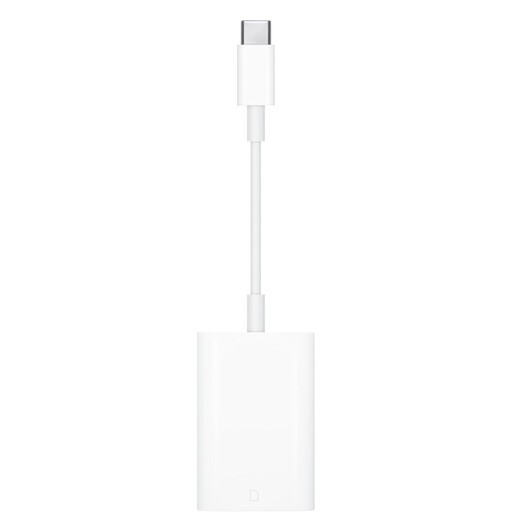
Apple USB-C to SD Card Reader Adapter
A reader for the card-import step when your camera uses a compatible SD card and your mobile device supports the connection. The listing states UHS-II SD support; this accessory does not store a backup by itself, so check the destination-drive step as well.
View on Joybuy
Travel photo backup questions
Can an iPad copy camera photos to an external SSD without a laptop?
Yes, with a compatible iPad, camera or SD-card connection and external drive. Apple Support documents importing photos and videos to iPad and exporting unmodified versions to connected storage; import first, then check the exported files before removing or formatting the card.
Which SSD format works with iPad or iPhone?
Apple Support says connected storage must have one data partition and use a supported format, including APFS, encrypted APFS, Mac OS Extended (HFS+), exFAT, FAT32 or FAT. Choose a format your intended devices can use and prepare the drive before the trip; formatting a drive erases its existing contents.
Can an Android phone copy camera files to a USB SSD?
It can be part of that workflow if the phone supports the necessary USB connection and recognises your storage. Files by Google documents copying files on a connected USB device with Android 7.0 or later, but you still need to test your own card reader, drive and power arrangement together.
Do I need a powered hub for a travel photo backup?
You may need one if your tested setup cannot keep the attached storage connected throughout a transfer. Apple Support notes that external hard drives often require external power with iPhone or iPad; check the requirements of your particular mobile device, hub and drive rather than assuming every USB-C setup needs the same arrangement.


