
24/7 Customer Support

Free returns

Same-day & Next-day Delivery

Quality Guaranteed

Unlock Your Welcome Offers: FREE Delivery | Up to 80% OFF | Free 30-day JoyPlus trial
Download the APP
A modern gaming setup is rarely just one device. You might have a main gaming PC, a laptop for work or travel and perhaps a tablet for casual use. The dream is a single mouse that can seamlessly switch between them all. This is the promise of the tri-mode gaming mouse, but navigating the market can be tricky. Many products are laden with marketing hype that can lead to a disappointing purchase.
As a Joybuy Product Recommendation Officer, my role is to help you see past the clutter. Before you spend your money, let's look at three common pitfalls that UK buyers encounter and how you can sidestep them to find a mouse that truly fits your needs.
The main appeal of a tri-mode mouse is its versatility. However, many models fail at the most crucial function: switching between 2.4G, Bluetooth and wired modes. You might find yourself constantly re-pairing your bluetooth gaming mouse connection, or experiencing significant lag when you switch back to the low-latency 2.4G dongle for a gaming session. This defeats the entire purpose, turning a feature meant for convenience into a source of constant frustration.
Many brands advertise impressive battery longevity for their wireless gaming mouse models. What they often omit is that these figures are typically achieved under ideal and often unrealistic, conditions—with the RGB gaming mouse lighting turned off, the polling rate set to low and minimal usage. A rechargeable gaming mouse that dies mid-game or needs constant charging is no better than a wired one. The key is to look for a mouse with a reasonable battery capacity and, crucially, a modern and convenient charging method like USB Type-C.
Dots Per Inch (DPI) has become a numbers game in mouse marketing, with some models boasting levels of 20,000 or more. While it sounds impressive, the reality is that very few gamers or professionals use a sensitivity setting above 4,000 DPI. Paying a premium for an ultra-high DPI you will never use is a waste. A far more practical feature is a mouse with a sensible and easily adjustable DPI range, allowing you to switch between fast movements for gaming and precise control for desktop tasks.
To ensure you get a mouse that performs as advertised, focus on these core specifications.
Connectivity Options: A true tri-mode mouse should offer three distinct and reliable connection types.
Adjustable DPI Range: Instead of chasing the highest number, look for a mouse that allows you to switch between several practical DPI levels on the fly. A range like 800 / 1200 / 2400 / 3600 DPI is highly versatile, covering everything from pixel-perfect photo editing to fast-paced first-person shooters.
Charging and Battery: A built-in lithium battery is standard, but the charging implementation is what matters. A Type-C charging port is a modern standard that offers faster charging and a reversible connector, meaning you won't be fumbling to plug it in.
We have analysed the market for options that deliver on their promises without the inflated hype. Here are our recommendations based on different user needs.
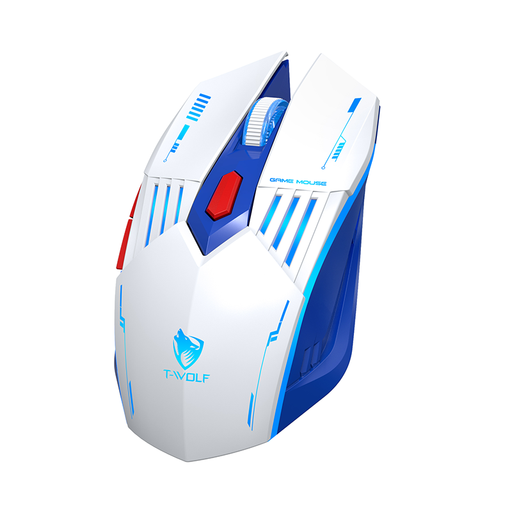
Why This Fits Their Persona: A student needs to switch between a gaming PC in their dorm, a laptop for lectures and maybe a tablet. This mouse's three distinct connection modes allow it to be the single peripheral for every device, saving space and money.
It directly counters the "clunky switching" pitfall by providing reliable, separate modes for 2.4G and Bluetooth, ensuring a stable connection whether gaming or studying.
Offers true device-hopping flexibility. The practical 800-3600 adjustable DPI is perfect for both fast-paced gaming and precise document work.
Why This Fits Their Persona: This user wants a clean, wire-free desk for their 9-to-5 job but needs lag-free performance for gaming after hours. The ergonomic shape ensures comfort during long workdays, and the wireless options keep the setup tidy.
It solves the "battery life myth" by being a rechargeable gaming mouse with a Type-C port. Even if the battery runs low, a quick charge or using it in wired mode means no downtime.
Seamlessly transitions between work and play. The subtle RGB lighting adds personality for gaming but isn't distracting in a professional context.
Why This Fits Their Persona: This gamer wants core performance features—low latency and adjustable sensitivity—without paying for top-tier brand names. This mouse delivers the essentials for competitive play at an accessible price.
It avoids the "overpaying for DPI" trap by focusing on a practical, effective 800-3600 DPI range that is genuinely useful for the most popular gaming genres in the UK.
Provides essential gaming performance via its 2.4G and wired modes. The inclusion of Bluetooth adds significant extra value for everyday tasks.
We have compiled a complete, real-time list of products that fully satisfy these strict selection criteria and UK safety regulations.
Yes, but it is crucial to use the correct mode. For competitive, fast-paced games like first-person shooters (FPS), you should always use either the 2.4G wireless connection or the wired connection. These modes are designed to provide the lowest possible latency, ensuring your movements are registered instantly. The Bluetooth mode, while convenient, generally has higher latency and is better suited for strategy games, productivity or general web browsing.
Battery life varies significantly between models and depends heavily on usage. Enabling the RGB lighting will noticeably reduce the time between charges compared to having it off. A mouse with a 300mAh battery, for example, might offer several days of moderate use. The most important feature is convenient charging. A mouse with a Type-C port can be topped up quickly or used in wired mode while it charges, so you are never left without a functioning mouse.
Most modern tri-mode mice are designed to be plug-and-play, meaning they will work straight out of the box without any special software. You can connect via the USB cable, plug in the 2.4G dongle, or pair through Bluetooth, and the mouse will be ready to use. Some high-end models may offer optional software that allows for advanced customisation of button mapping, DPI stages or complex RGB lighting effects, but it is rarely a requirement for core functionality.