
24/7 Customer Support

Free returns

Same-day & Next-day Delivery

Quality Guaranteed

Unlock Your Welcome Offers: FREE Delivery | Up to 80% OFF | Free 30-day JoyPlus trial
Download the APP
A tri-mode wireless mechanical gaming keyboard can simplify a desk shared between a gaming PC, MacBook, tablet and work laptop. It offers wired USB-C, Bluetooth and 2.4GHz wireless connections, but specifications can be presented in ways that make comparison difficult.
Before buying, UK shoppers should look beyond RGB effects and phrases such as “gaming-grade”. The practical questions are whether the layout suits your work, whether the wireless mode matches your device and whether the keyboard can be maintained or customised later.
Bluetooth is convenient for laptops, tablets and phones, but it may not provide the same connection behaviour as a dedicated 2.4GHz wireless keyboard. The latter normally uses a USB receiver and is often preferred for desktop gaming. Wired USB-C remains useful for charging, firmware access or situations where a stable connection matters.
Check that the receiver is included and that your PC has a suitable USB port. Also confirm whether the keyboard supports the operating systems you use. Some products list Windows and Mac compatibility but may not offer identical shortcut functions on both platforms.
A 75% mechanical keyboard usually retains the function row, arrow keys and navigation keys while reducing the width of a full-size board. A 60% model saves more space but removes the dedicated function row and navigation cluster, requiring function-layer shortcuts.
For gaming, this can leave more room for mouse movement. For spreadsheets, coding or frequent document editing, the absence of dedicated keys may slow down everyday work. A 65% layout is another compromise, generally retaining arrow keys while remaining compact.
An RGB backlit keyboard can improve visibility and personalise a setup, but lighting does not tell you whether the switches are replaceable, the stabilisers are consistent or the wireless battery is suitable for your routine.
Look for practical construction details such as hot-swappable sockets, a rechargeable battery capacity, keycap material and the type of internal dampening. RGB also affects battery use, so advertised operating figures should be read alongside the lighting conditions used to achieve them.
A QWERTY US layout keyboard has a different Enter, Shift and punctuation arrangement from a UK ISO keyboard. If you normally type on a UK layout, check the printed legends and key arrangement before ordering. Windows and Mac shortcuts may also require remapping.
PBT keycaps generally have a textured feel and are commonly selected for resistance to the polished appearance that can develop on frequently used key surfaces. Transparent PC keycaps, as found on some style-led models, create a different visual effect but may feel and wear differently.
A gasket-mounted keyboard uses cushioning material around parts of the plate or internal assembly. This can provide a softer typing feel, although the actual result depends on the plate, foam layers, switches and case design.
A hot-swappable mechanical keyboard allows compatible switches to be changed without soldering. Confirm whether the sockets accept 3-pin, 5-pin or both types. Switches should be inserted straight and gently, as bent pins can damage the socket. Linear switches are often chosen for smooth key travel, while clicky switches create more audible feedback and may be less suitable for shared offices.
Battery capacity is given in mAh, but real use depends on RGB brightness, connection mode and sleep settings. A larger battery can reduce charging frequency, but it may add weight.
Use the supplied or an appropriate USB-C mechanical keyboard cable and a standard compatible charger. Do not puncture, dismantle or expose the built-in lithium battery to heat. Keep receivers, switches and keycap pullers away from children, and stop using the keyboard if it becomes unusually hot, swells or emits smoke or an unusual smell.
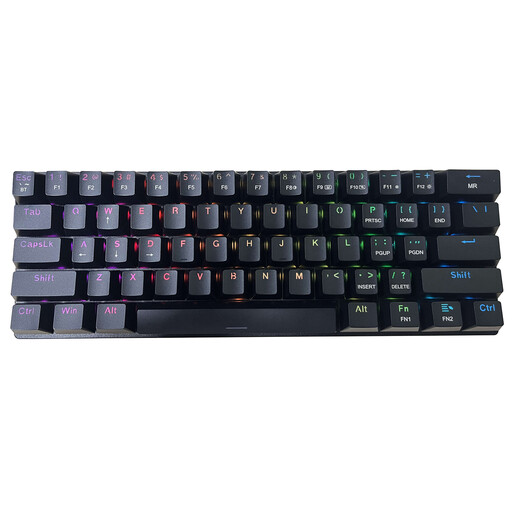
Why This Fits Their Persona: Its 60% footprint suits smaller UK desks, student rooms and portable setups, while Bluetooth, 2.4GHz and wired USB connections cover PCs, tablets and laptops.
The connection modes are clearly specified, and the rechargeable 1600mAh battery can be used while connected by cable. Buyers should note that the 61-key layout omits dedicated navigation and function rows.
Compact 60% format; 16 RGB modes; blue clicky switches; Bluetooth and 2.4GHz support.

Why This Fits Their Persona: This 75% board balances desk space with arrow and function keys, making it suitable for gaming, programming and regular office work.
The listing identifies gasket construction, five-layer internal padding, full-key hot-swap functionality and a 4000mAh battery rather than relying only on lighting claims.
Tri-mode connectivity; PBT keycaps; RGB lighting; multimedia knob; hot-swappable switches.
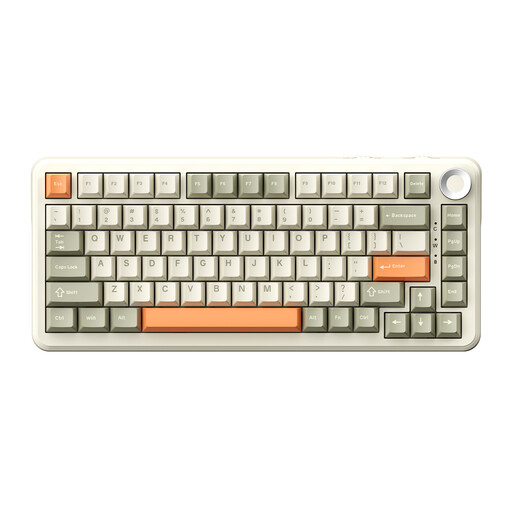
Why This Fits Their Persona: The 82-key layout retains the function row and arrow keys, while the large battery and rotary knob suit long gaming, editing and work sessions.
The stated 8000mAh capacity, hot-swap support and three connection modes address charging, customisation and connectivity concerns. Actual runtime varies with RGB use.
75% layout; aluminium knob; pre-lubricated linear switches; 2.4GHz, Bluetooth and USB-C modes.
The GravaStar Mercury K1 Lite offers a 75% format, gasket construction, five-layer dampening, 4000mAh battery and QWERTY US layout in a transparent PC design. Its included spare switches may appeal to users who want to compare key feel.
For a larger layout, the AULA F108 Pro combines a gasket-mounted tri-mode design with a smart LCD screen, knob and full-size key arrangement. It may suit users who rely on a number pad for office work, finance or content production.
Those who prefer a transparent 65% keyboard can consider the Lofree OE907. It uses Bluetooth 5.1 and USB-C rather than tri-mode connectivity, so it is more appropriate for users who do not require a 2.4GHz receiver.
We have compiled a complete, real-time list of products that fully satisfy these strict selection criteria and UK safety regulations.
Usually, yes, when the product specification lists Windows and macOS support. Wired USB-C and Bluetooth are commonly practical for Mac laptops, while 2.4GHz is convenient for a Windows gaming PC with an available USB port. Check the layout and shortcut compatibility before purchase.
Gasket mounting primarily affects typing feel and internal dampening rather than guaranteeing a longer lifespan. Durability also depends on the case, PCB, switches, sockets, battery and how the keyboard is maintained. Avoid liquids, excessive force and unauthorised disassembly.
A keyboard’s RGB lighting adds a small amount of power consumption compared with the keys and wireless electronics themselves, but it can reduce battery runtime. Lower brightness, fewer effects or switching the lighting off can extend time between charges.