Triple-screen sim-rig builders
You want a driving view across three physical monitors and need to plan matching resolution, graphics-card connections and the space the screens will occupy.


For a three-screen driving rig, start with monitors at the same resolution and check that your graphics card can connect all three in the modes you intend to use. Matching flat 27-inch QHD screens offer a straightforward layout; choose curved screens if you are planning the rig around their shape, but neither curvature nor a higher refresh rate replaces careful measurements and connection checks.
You want a driving view across three physical monitors and need to plan matching resolution, graphics-card connections and the space the screens will occupy.
You are planning angled side screens or a curved layout and want to measure the screen positions and bezels before entering the geometry in your simulator.
You want QHD screens with a higher refresh rate or variable refresh rate, while checking that your PC and all three connections can use the intended display mode.
Choose the physical layout and confirm three workable connections before letting motion features decide between otherwise suitable monitors. iRacing Support strongly recommends the same resolution across three screens when using NVIDIA Surround and advises measuring the actual screen positions for its driving view.
Choose when: You want a repeatable three-screen layout and can angle the side monitors to suit your driving position.
Plan for: The screens still need room on the rig and accurate angle and bezel measurements.
Choose when: You are designing a wraparound layout around the monitors’ curve.
Plan for: Curvature does not set the correct simulator geometry for you; measure the installed screens.
| Concern | What to check | Who this matters to |
|---|---|---|
| Connections and matching | Count the graphics-card outputs and match them to three monitor inputs. Check the resolution and refresh rate available through each intended connection. | If I cannot connect all three screens at the settings I want, other features will not settle the purchase. Around 42% of consumers put connection and resolution matching first. |
| Screen geometry | Check rig width and mounting options; measure screen width, bezels, viewing distance and side-screen angles for the simulator. | I want the side screens to follow my driving position without making the view look distorted. For around 33% of consumers, getting the physical layout right is the primary concern. |
| Motion features | Compare stated refresh rates and adaptive-sync support in the connection mode you will use on all three screens. | Once the layout and connections work, I care most about how motion is displayed while driving. That is the leading need for around 25% of consumers. |
Available graphics-card outputs and monitor inputs determine whether all three can use the intended connection. Dell UK lists different QHD refresh limits for the Alienware AW2725DM: 180Hz through DisplayPort 1.4 and 144Hz through HDMI.
List each output, input and cable you intend to use, then check the supported mode for every screen before ordering.
iRacing Support strongly recommends equal resolution for NVIDIA Surround and recommends matching monitor models and sizes. Different physical dimensions can also make screen joins harder to position.
Choose identical models where practical. If you will mix screens, check their native resolutions and dimensions, then assess the simulator’s windowed multi-monitor option.
Even with curved screens, the view depends on the real distance, screen widths, bezels and side-screen angles entered in the simulator.
Plan the rig, position the monitors, then measure the installed layout rather than relying on a curvature figure alone.
When comparing three monitors, energy information and arrangements for screens you replace may affect the practical choice.
Compare the shortlisted displays’ energy information and ask the seller how its electrical-equipment take-back service works.
Its Q27G4X and Q27G4XF flat lines and CQ27G4X curved line give buyers models to compare when planning matching 27-inch QHD screens.
The VG27AQ3A and VG27AQL3A are relevant to buyers comparing 27-inch QHD, high-refresh screens for a matching set.
The AW2725DM is a useful connection-mode reference for a 27-inch QHD monitor in a three-screen plan.
These QHD monitors offer 27-inch options for a matching three-screen set and a 32-inch curved option for a rig planned around larger screens. Before choosing three of any model, check connections, physical fit and the display mode you intend to use.
 No image available
Consider this 27-inch QHD model if higher refresh rate is a priority after planning the three-screen layout.
Its title specifies OLED and 240Hz. Check the refresh mode available through each intended input, along with bezel and mounting dimensions, before choosing three.
 No image available
This is a 27-inch WQHD option for buyers planning three matching high-refresh screens.
The listing specifies Adaptive Sync. It states QHD 180Hz over DisplayPort but QHD 144Hz over HDMI, so check whether your graphics card can provide the desired mode to all three monitors; measure the bezels for screen-join planning.
 No image available
Consider this 27-inch QHD model if a higher stated refresh rate matters to your matching-screen plan.
The title specifies 2560 × 1440, Fast IPS and 220Hz. Confirm the refresh rate through your intended inputs and check the bezel and mounting dimensions before planning the rig.
 No image available
This curved option calls for a rig planned around three 32-inch screens rather than the 27-inch layout discussed above.
The listing specifies 2560 × 1440 resolution and 100 × 100mm VESA mounting. It states that DisplayPort is needed for the maximum 165Hz at QHD; check the available ports and measure the installed screens before setting the simulator geometry.
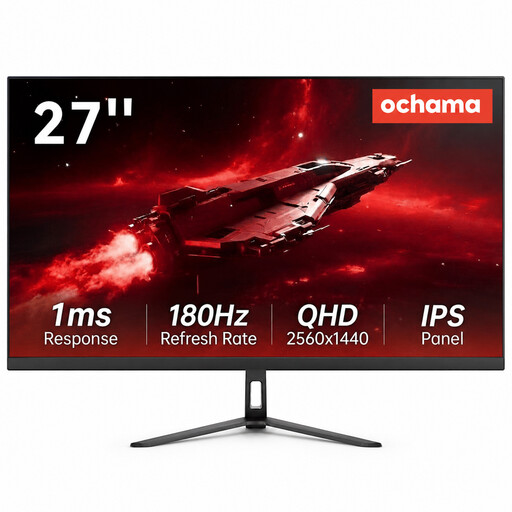 No image available
The listed 27-inch size and narrow-bezel design make this a model to assess for a matching three-screen layout.
Before choosing three, confirm the exact resolution, input ports and refresh mode, plus bezel measurements and mounting fit. Check the listing to see what the Gift Keyboard offer includes.
No, but iRacing Support strongly recommends the same resolution for NVIDIA Surround and recommends matching models and sizes. If you mix models, compare their physical dimensions, inputs and native resolutions before committing to the layout.
Yes, in iRacing: its support guidance describes a windowed mode spanning three monitors as an alternative to a full-screen combined-display mode. Check your chosen driving game’s own multi-monitor settings before assuming it works the same way.
For iRacing, measure the distance from your eyes to the centre screen, monitor width with and without bezels, and the side-screen angles. Enter the measurements from the installed rig; iRacing Support gives additional angle guidance for curved triples.
No additional Surround-menu correction is needed for iRacing’s own bezel correction, according to iRacing Support; using both can make its view look incorrect. This guidance is specific to iRacing, so check the settings of other driving games separately.
Ask the seller about its take-back process before ordering. GOV.UK guidance says distributors supplying new electrical equipment must offer to take back waste equipment of the same type; confirm how the retailer arranges collection or drop-off for your screens.