Desk-based PC truck-sim drivers
If you drive at a desk rather than in a cockpit, a compact wheel-and-pedal bundle is one route to consider. Check the mount against your desk and confirm support for your PC and truck simulator.


For seated virtual trucking, start with a wheel that matches your platform and game, then check whether its mount and pedals fit your driving position. A wheel-and-pedal bundle keeps the setup simpler; a truck-format rim offers a different steering layout and more on-wheel controls, but requires compatible components and more careful mounting.
If you drive at a desk rather than in a cockpit, a compact wheel-and-pedal bundle is one route to consider. Check the mount against your desk and confirm support for your PC and truck simulator.
A bundled wheel and pedals may appeal if you use both Xbox and PC. Choose the exact platform version: compatibility stated for one console edition does not establish compatibility with another.
If trucking is your main use, a larger truck-format rim and accessible on-wheel controls may matter more than a conventional racing layout. Plan the compatible base, pedals and seated mount as part of the same setup.
Choose it when: You want a wheel and pedals together, especially for a stated Xbox-and-PC setup such as the Thrustmaster T-248X.
Trade-off: Its conventional racing-wheel format does not give you a dedicated truck rim or truck-specific controls.
Choose it when: You play on PC and want a bundled direct-drive route without starting with a dedicated truck rim; MOZA Racing describes its R3 PC bundle as intended for desks and entry-level cockpits.
Trade-off: Its supplied wheel has a general racing format, so truck-oriented controls would be a separate decision.
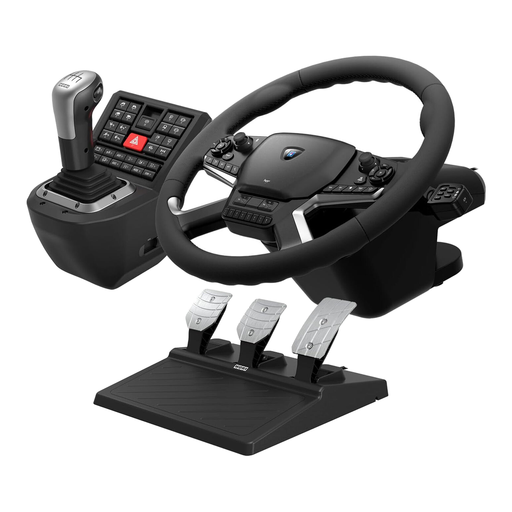
Choose it when: A truck-format steering position and on-wheel controls are central to how you drive; MOZA Racing lists a 400 mm TSW truck rim.
Trade-off: The rim alone is not a powered wheel-and-pedal setup. Base, pedals, mounting and any adapter must work together.
| Concern | What to check when buying | Who this matters to |
|---|---|---|
| Platform and game | Match the exact wheel version to your PC or console; check recognition and control mapping for your truck simulator. | If I switch between Xbox and PC, I need the version that names both rather than relying on a shared model-family name. Around 31% of consumers would put platform and game compatibility first. |
| Seated mounting | Measure the desk edge and clamp space, then check wheel position and room for the pedals from your seat. | A shifting wheel or pedals that sit too far away would make my desk setup awkward to use. For around 25% of consumers, mounting and seated position are the primary concern. |
| Truck-style controls | Compare the rim format and available controls; for a modular rim, check the base and any required adapter. | When most of my driving is in trucks, I may want a larger rim and controls within reach from the seat. Truck-format steering is the main priority for around 25% of consumers. |
| Feedback and pedals | Check the stated drive system, included pedals and whether a desired shifter or clutch needs a separate component. | If I also play other driving sims, I may care more about steering and pedal configuration than a truck-shaped rim. Around 19% of consumers would make feedback and expansion their first consideration. |
Console variants can differ. The Joybuy listing identifies the Thrustmaster T-248X specifically for Xbox Series X|S, Xbox One and PC; that does not establish PlayStation compatibility.
Check the exact model in your basket against your hardware, then confirm support and mapping for the game you intend to play.
MOZA Racing describes the TSW as a rim for compatible bases, with a separate adapter route for third-party bases. A rim by itself does not replace a base and pedals.
Check the rim, base, pedals, adapter where needed, and mounting hardware as one compatible system.
Those additional components also need space around your seat and desk or rig.
A mount that cannot grip your desk, or pedals that cannot sit within comfortable reach, can undermine an otherwise suitable seated setup. Clamp requirements are specific to the mount you choose.
Measure the desk edge, wheel-to-monitor clearance and seat-to-pedal position before selecting the mounting method.
Drive type and manufacturer settings describe different hardware, but they do not establish how every wheel will feel in your game and mounting arrangement.
Use the stated drive system and pedal features to narrow your choice, then check game support and the adjustments available on the exact model.
A modular route spanning PC wheel bundles and truck-oriented rims.
A conventional bundled-wheel route with platform-specific editions.
A conventional wheel-and-accessory route for drivers considering a separate manual shifter.
These choices cover seated wheel-and-pedal setups: a truck-oriented PC system and two Xbox-and-PC racing-wheel systems. Check your exact truck game and mounting space before choosing among them.
 No image available
Consider this truck-oriented system for a seated Windows PC setup. Confirm recognition and control mapping for your game, and check that its mounting arrangement fits your desk and pedal position.
 No image available
This bundled racing-wheel route suits consumers seeking one wheel-and-pedal purchase for a stated Xbox-and-PC setup. The Joybuy listing names Xbox Series X|S, Xbox One and PC; check your truck game and desk fit separately. It is not a dedicated truck-format rim.
 No image available
Consider this wheel-and-pedal system if you use Xbox or a Windows 10/11 PC and want a conventional racing-wheel layout. Check recognition and mapping for your truck simulator, along with the space needed to mount the wheel and position the pedals.
Yes, provided the particular wheel works with your PC and game configuration and can be mounted at your desk. SCS Software has described controller-configuration support for its truck simulators, but you should still check recognition and control mapping for your chosen wheel and game version.
Choose the edition that explicitly names your console and, if needed, PC. The Joybuy Thrustmaster T-248X listing names Xbox Series X|S, Xbox One and PC; do not treat that listing as confirmation that this edition works with PlayStation.
The rim diameter alone cannot tell you whether the setup will fit. For MOZA Racing's 400 mm TSW rim, check the compatible base and selected mount, then measure desk-edge clearance, steering position and pedal space from your seat.
Check that the product information and supplier are appropriate for where it will be supplied and used. The UK Office for Product Safety and Standards sets out electrical-equipment safety requirements for Great Britain; do not assume the same marking arrangements apply identically in Northern Ireland.
Use an appropriate electrical-recycling route rather than treating electrical components as ordinary rubbish. UK government guidance on waste electrical and electronic equipment addresses recovery and recycling; ask your local authority or retailer which collection options are available to you.