Players sharing a small desk
If your monitor and keyboard stay on the desk, you need a wheel that can be clamped securely and put away after driving. Measure the desk edge as well as the space the wheel will occupy.


Choose a compact, removable wheel if the desk also serves other purposes. A flatter truck-style mount makes sense if steering position matters more and its clamp fits your desk; consider a larger direct-drive truck bundle only if you have room for its wheel, mount and controls. Check the exact platform version, game compatibility, desk dimensions and bundle contents before buying.
If your monitor and keyboard stay on the desk, you need a wheel that can be clamped securely and put away after driving. Measure the desk edge as well as the space the wheel will occupy.
A flatter wheel angle, spinner knob or truck-size rim may matter more to you than the smallest setup. Allow for the mount and the space needed to turn the wheel.
Choose the version made for your primary platform, then check your truck simulator and any shifter or other controls you intend to use.
Choose it when: You need to remove the wheel between sessions and a conventional racing-wheel position is acceptable.
Trade-off: Its steering position is not the flatter arrangement offered by a compatible truck-style mount.
Choose it when: A flatter heavy-vehicle steering position matters enough to accommodate the extra mounting hardware.
Trade-off: The mount must fit both your desk and a specified compatible wheel.
Choose it when: Truck simulation is your main use and you have space for a truck-size wheel and its mount.
Trade-off: A larger wheel leaves less usable desk-front space between sessions.
Before choosing a steering style, establish where the clamp can grip and how much space remains around the monitor, keyboard and chair. Then match the wheel to your platform and game.
| Concern | What to check | Who this matters to |
|---|---|---|
| Desk fit and storage | Measure desk thickness and clearance beneath the edge; compare both with the exact clamp and wheel. | If I use the desk for work as well as driving, I need a secure wheel that I can put away. Around 33% of consumers put desk fit and storage first. |
| Truck-style steering | Check the wheel angle, rim size and compatibility of any flat mount or spinner knob. | I want the steering position and controls to feel suited to a virtual truck, even if the setup occupies more room. For around 27% of consumers, that is the primary concern. |
| Platform and game fit | Match the exact PC or console variant, then check support for your truck simulator and intended controls. | If the wheel cannot work with my platform and game, its physical fit will not help. Compatibility comes first for around 27% of consumers. |
| Feedback and expansion | Compare the stated feedback system and the compatibility of pedals, shifters and other controls. | I may add controls later, so I want to understand the wheel ecosystem before committing desk space to it. Around 13% of consumers prioritise feedback and expansion. |
Thrustmaster identifies its T128 PlayStation/PC version for PC, PS4 and PS5, while its cited T128 SimTask Pack is a PC/Xbox version. The shared T128 name does not make those console versions interchangeable.
Start with your primary platform and check the full variant name before choosing a bundle.
Thrustmaster specifies a 15 mm–50 mm desk-thickness range for the SimTask Steering Kit. MOZA specifies up to 50 mm for its Table Clamp; its R5 Trucking Bundle uses a different dedicated mount.
Measure thickness, the desk lip and space beneath the edge, then use the mounting limits for the exact item you choose.
If the supplied mounting arrangement cannot grip your desk, you may need a different compatible mount or a separate wheel stand.
MOZA lists a 400 mm wheel for its R5 Trucking Bundle. That size needs room around the monitor, keyboard and chair, particularly when you turn the wheel.
Check the available space with the wheel in its driving position before choosing a large rim over a compact wheel or flat-mount arrangement.
Logitech G presents its Driving Force Shifter as a compatible add-on, not as proof that every wheel package includes an H-pattern shifter.
Decide whether you need a clutch, shifter or other truck controls, and check the exact bundle contents and accessory compatibility.
Additional controls also need mounting space and somewhere to be stored.
These product lines illustrate different approaches to desk-mounted truck simulation; the brand names alone do not establish fit for your desk, platform or game.
The T128 offers a conventional removable-wheel route, while the SimTask Steering Kit provides a flatter position for specified compatible wheels.
MOZA offers compact direct-drive R3 and R5 routes alongside a larger truck-oriented R5 bundle.
The G29 and G920 are conventional wheel-and-pedal routes with platform-specific versions and a compatible H-pattern shifter option.
These choices span a flat-mount T128 pack, a truck control system and conventional wheels. For any of them, confirm the space around your desk and the compatibility of the exact version with your game before ordering.
 No image available
Consider this pack if you want a flatter truck-style wheel position at a desk rather than a conventional racing-wheel angle.
Thrustmaster specifies a 15 mm–50 mm desk-thickness range for the SimTask Steering Kit. Check clearance around the mounted wheel, compatibility with your truck simulator and the contents of this exact pack if a spinner knob matters to you.
 No image available
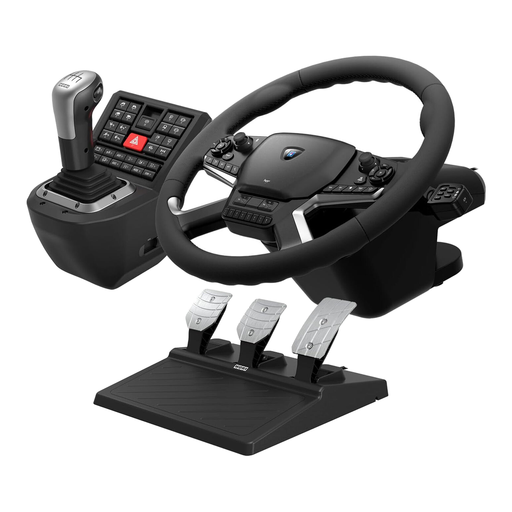
This truck-oriented PC option is worth examining if you want more dedicated controls than a conventional wheel provides.
Check the complete control layout, supported games, clamp dimensions and the space the assembled system needs on your desk.
 No image available
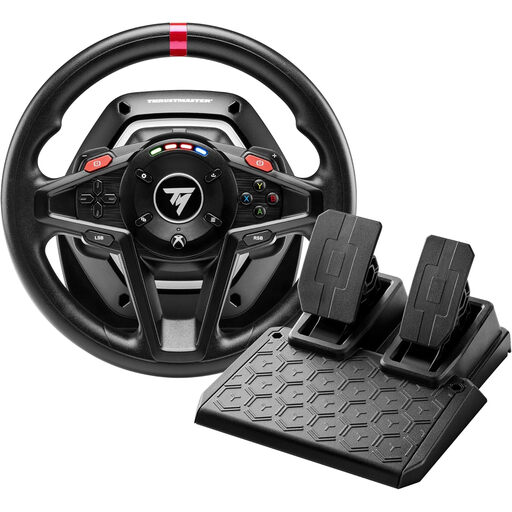
Consider this conventional desk-mounted wheel if you need to clear the desk after a session and do not require a flat truck-style mount.
Thrustmaster specifies a tool-free desk attachment and 270°–900° rotation for this T128 version. Check clamp fit and support for your truck simulator before buying.
 No image available
This is a conventional wheel option if you use Xbox or PC and can accommodate its desk-mounted arrangement.
Check the clamp’s fit, available wheel clearance and support for your chosen truck simulator; a conventional wheel does not provide a flat truck-style position on its own.
Measure the desk thickness, lip and clearance beneath the edge, then check the clamp for the exact wheel or mount. Thrustmaster specifies 15 mm–50 mm for the SimTask Steering Kit, while MOZA specifies desktops up to 50 mm for its separate Table Clamp; those limits should not be applied to other mounts. Leave room to turn the wheel without hitting your monitor or keyboard.
Choose the variant that explicitly names your primary platform. Thrustmaster identifies the cited standard T128 as a PC, PS4 and PS5 version and the cited T128 SimTask Pack as a PC/Xbox version. Check your chosen truck game as a separate compatibility step.
A truck-style mount is worth considering if a flatter heavy-vehicle steering position matters more to you than the quickest, smallest setup. Thrustmaster’s SimTask kit provides that position for specified compatible wheels; if the desk must be cleared frequently, a compact conventional wheel may be easier to live with.
You can add one when a shifter is compatible with your exact wheel, platform and connection arrangement. Logitech G identifies its Driving Force Shifter as an accessory for compatible G-series wheels and specifies table and rig clamps, so check both compatibility and mounting space before choosing it.