For simulated lorry driving in a compact cockpit, choose a desk-clamped racing wheel if a manageable footprint matters more than a full-size truck rim; Logitech G923 and Thrustmaster T248R are documented PC options with clamps and pedals. If you have room for a 40 cm or 400 mm rim and want truck-focused hardware, consider the HORI truck system or MOZA Trucking Bundle instead. Measure the mounting area and check controls in your chosen game before committing, particularly because HORI documents restrictions in Euro Truck Simulator 2.
Who each setup suits
Players with very little cockpit space
A clamped wheel is worth considering if a large lorry-style rim would crowd your seat or display. Logitech Support specifies a clamp extending to 50 mm for the G923; Thrustmaster specifies T248R desk and table clamping up to 45 mm thick. Check your own mounting surface as well as the space around the wheel.
Players prioritising truck-style controls
If you mainly drive in Euro Truck Simulator 2 or American Truck Simulator, a larger rim and dedicated controls may matter more than a small footprint. HORI Europe specifies a 40 cm wheel and 1,800-degree rotation for its PC truck system, while MOZA Racing UK lists a 400 mm truck wheel in its Trucking Bundle. Both require a careful clearance check.
Players switching between driving games
A general-purpose wheel-and-pedals package may suit you if truck simulation shares your setup with racing or other driving games. Logitech documents G923 PC support and pedals; Thrustmaster documents PC support, configurable force feedback and a three-pedal set for the T248R. Check wheel support and control mapping in each game you intend to play.
What matters when choosing
Clamped racing wheel
Choose it when: the wheel must share a small desk or rig and you want a wheel-and-pedals package.
Trade-off: Logitech G923 and Thrustmaster T248R are general driving wheels, not full-size truck rims with dedicated truck-control layouts.
Dedicated truck system
Choose it when: a large rim and truck-oriented controls take priority over conserving steering space.
Trade-off: HORI Europe documents restrictions on simultaneous steering-unit and shifter use in Euro Truck Simulator 2.
Direct-drive truck bundle
Choose it when: your cockpit has room for a 400 mm rim and a dedicated truck mount.
Trade-off: MOZA Racing UK lists a multi-part bundle, so the rim, mount and pedals all need space in your layout.
| Concern |
What to check |
Who this matters to |
| Cockpit fit and mounting |
Measure mounting-surface thickness and clearance around the rim, seat and pedals. Logitech specifies a G923 clamp extending to 50 mm; Thrustmaster specifies T248R clamping up to 45 mm thick. |
If the wheel crowds my seat or display, I cannot use the cockpit comfortably. Around 42% of consumers put physical fit and secure mounting first. |
| Truck-style steering and controls |
Compare rim diameter, rotation and the controls available in your game. HORI Europe documents a 40 cm rim, 1,800-degree rotation and Euro Truck Simulator 2 control restrictions. |
I want steering and controls that suit lorry driving, even if they occupy more space. For around 33% of consumers, truck-specific controls are the primary concern. |
| Feedback and use across games |
Check PC operating-system support, drivers and force-feedback compatibility for the exact wheel and games you use. |
If I switch between truck sims and racing games, I need a wheel I can configure for both. Versatility and feedback come first for around 25% of consumers. |
Mistakes to avoid
-
Assuming every truck control works at once
HORI Europe says that, in Euro Truck Simulator 2, its truck system's steering and shifter units cannot be used simultaneously, and buttons numbered 33 and above do not work. That matters if your intended layout depends on those controls.
Read the compatibility and mapping notes for your exact wheel and game, then decide where essential functions such as indicators, gears and camera controls will go.
-
Choosing a truck rim before measuring the cockpit
HORI Europe specifies a 40 cm wheel, and MOZA Racing UK lists a 400 mm wheel with a dedicated mount in its Trucking Bundle. Either layout needs enough room around the seat and display.
Measure side-to-side and rim-to-seat clearance, including the space needed while turning, before choosing a mounting position.
A larger setup may also call for cockpit adjustments or a different mounting arrangement.
-
Treating PC support as a guarantee for every game function
A compatible PC operating system does not by itself establish how force feedback or every button will behave in a particular game. SCS Software has changed controller configuration in Euro Truck Simulator 2 and American Truck Simulator.
Check the exact wheel variant against current manufacturer drivers, game settings and any game-specific compatibility notes.
Relevant brands to consider
Logitech G
The G923 is a general-purpose PC wheel-and-pedals option for a cockpit where desk clamping and a smaller steering area matter.
- Logitech Support specifies an integrated clamp extending to 50 mm and up to 900 degrees of wheel rotation.
- It is not a 400 mm truck-specific rim or dedicated truck-control system.
Thrustmaster
The T248R combines a general driving wheel with a three-pedal set for PC players considering a clamped setup.
- Thrustmaster specifies configurable hybrid-drive force feedback and clamping for desks or tables up to 45 mm thick.
- Its documented 28 cm rim is not a full-size lorry-style wheel.
HORI
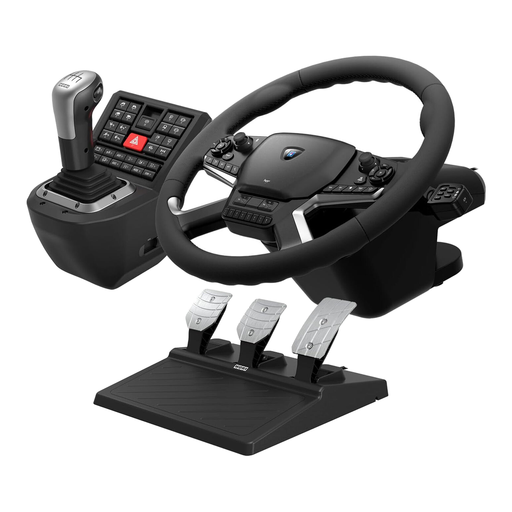
The Force Feedback Truck Control System is a Windows PC option for players placing truck-oriented hardware ahead of a compact wheel area.
- HORI Europe specifies a 40 cm wheel and 1,800-degree rotation.
- HORI Europe lists restrictions on simultaneous steering and shifter use and on buttons numbered 33 and above in Euro Truck Simulator 2.
MOZA Racing
The MOZA Trucking Bundle is a truck-focused PC route for a cockpit with space for a larger rim and dedicated mount.
- MOZA Racing UK lists an R5 direct-drive base, 400 mm TSW truck wheel, SR-P Lite pedals and truck mount in the bundle.
- The rim and separate components need more room than a small clamped wheel setup.
Joybuy truck-control option
This truck-focused option is worth considering if you can accommodate a large wheel in your cockpit and want controls intended for PC lorry simulation. Check your available space and game-specific control requirements before choosing it.
 No image available
HORI Force Feedback Truck Control System (Windows 11/10)
Consider this truck-specific system if your PC cockpit has room for a full-size rim rather than a compact racing wheel.
HORI Europe specifies a 40 cm wheel, 1,800-degree rotation and Windows 11/10 PC support. Measure cockpit clearance before ordering. For Euro Truck Simulator 2, HORI says the steering and shifter units cannot be used simultaneously and buttons numbered 33 and above do not work.
View on Joybuy
Common questions
Is a 900-degree racing wheel enough for truck simulators?
A 900-degree wheel can suit a compact truck-sim cockpit if your game supports the wheel and that steering range meets your preferences. Logitech Support specifies up to 900 degrees for the G923; HORI Europe specifies 1,800 degrees for its larger truck system. Check how your chosen game maps the wheel before relying on either figure.
How can I tell whether a wheel will fit my desk or cockpit?
Measure the mounting edge, space around the rim, knee clearance and pedal area. Logitech specifies a G923 clamp extending to 50 mm, while Thrustmaster specifies T248R desk and table clamping up to 45 mm thick. A 40 cm or 400 mm truck rim also needs clearance around its steering position.
Can I use the HORI truck system with a console?
HORI Europe says its Force Feedback Truck Control System is for PCs running Windows 11 or Windows 10, not consoles. If you need a console wheel, check support for your exact console and game on the alternative model you are considering.
Do the truck games need an update for HORI control mapping?
HORI Europe says Euro Truck Simulator 2 or American Truck Simulator must be at version 1.50 or later for its published truck-system mapping guidance. Check your game version and current HORI setup instructions before configuring the controls.


