What matters when choosing
Check the records first, then the input on the equipment you will listen through. Once those requirements are clear, decide how much manual operation you want and whether wireless listening or recording is useful.
| Concern |
What to check |
Who this matters to |
| Easy playback and record care |
Check whether operation is automatic, which speeds are supported and whether a compatible replacement stylus is available. |
If I am bringing family LPs and singles back into use, I want fewer tonearm movements to manage and a way to replace a worn stylus. Around 36% of consumers put straightforward playback and care first. |
| Connection to existing equipment |
Identify the speaker or amplifier input, then match it to the deck’s phono, line or Bluetooth output as applicable. |
When I already have a listening system, I want the new turntable to work with it rather than discover I need a different connection arrangement. For around 29% of consumers, compatibility is the primary concern. |
| Older formats and digital copies |
Confirm the speeds printed on the records and specified for the deck; if you plan to digitise them, check the USB and computer workflow too. |
If the collection includes 78 RPM discs, I need to account for them; if I want digital copies, I need a workable recording route. Around 21% of consumers prioritise these format or recording needs. |
| Conventional hi-fi setup |
Check the supplied cartridge, operation method and whether the deck’s phono-stage arrangement suits your amplifier or active speakers. |
I may prefer a component turntable while still wanting manageable initial setup. That is the leading need for around 14% of consumers. |
Joybuy turntables for Bluetooth listening
These Sony models are choices to consider if automatic playback and Bluetooth listening suit your inherited-record setup. Check the speeds required by your collection and compatibility with your listening equipment before choosing either one.
 No image available
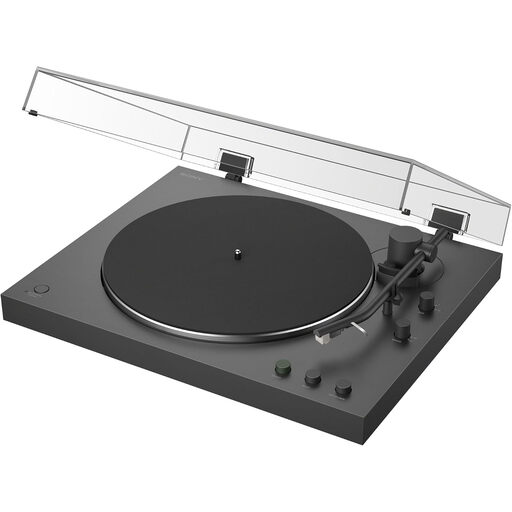
Sony PS-LX3BT Bluetooth Turntable
Consider this model if you want automatic playback and plan to listen through a compatible Bluetooth device. Confirm its stated record speeds against your collection and check the connection options for any wired equipment you intend to use.
View on Joybuy
 No image available
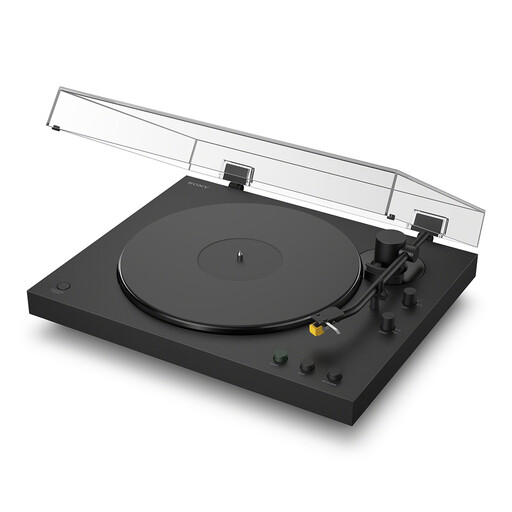
Sony PS-LX5BT Bluetooth Turntable with Cartridge and Stylus
Consider this model if automatic playback and listening through a compatible Bluetooth device match your plans. Its title identifies a cartridge and stylus; check compatible replacement-stylus options, required record speeds and any wired connection you need.
View on Joybuy
Common questions
Do I need a separate phono preamp?
You need an appropriate phono stage if the turntable supplies only a phono-level signal and your speakers or amplifier accept only line-level input. Audio-Technica, Sony, Pro-Ject and Rega each document built-in preamp or phono-stage functionality on the specific models discussed above; check the chosen model and the input you will use.
Will an automatic starter turntable play a 78 RPM record?
Not unless that particular turntable explicitly supports 78 RPM. The cited automatic Audio-Technica and Sony models are specified for 33⅓ and 45 RPM, whereas Audio-Technica specifies 78 RPM for the fully manual AT-LP120XUSB. Also check which stylus is suitable for the 78 RPM records you have.
Can I listen through Bluetooth headphones?
Yes, if the turntable transmits Bluetooth audio and the headphones are compatible. Audio-Technica specifies Bluetooth on the AT-LP60XBT and Sony specifies it on the PS-LX310BT; check the connection features of the exact model you buy rather than relying on the brand name.
How should I care for inherited records and the stylus?
Keep dust off the records and turntable, and replace the stylus when the manufacturer’s guidance calls for it. Which? warns that dust can affect sound and a worn stylus can potentially damage records; follow the cleaning and setup instructions for your particular equipment.
What safety information should I check when buying online?
Check the seller and manufacturer details, instructions, warnings and marking appropriate to the product and delivery market. UK government consumer-safety advice recommends care over the seller and place of purchase. Government guidance for Great Britain recognises CE marking alongside UKCA marking where applicable; check the product’s requirements separately if delivery is to Northern Ireland.


