
24/7 Customer Support

Free returns

Same-day & Next-day Delivery

Quality Guaranteed

Unlock Your Welcome Offers: FREE Delivery | Up to 80% OFF | Free 30-day JoyPlus trial
Download the APP
Choosing Turtle Beach gaming accessories is not simply a matter of picking the most eye-catching design. Headsets, controllers and simulation equipment can differ significantly in compatibility, connection type, comfort and setup requirements. A product that works well with Xbox may not offer the same features on PlayStation or Nintendo Switch.
This guide highlights the main buying traps, explains the specifications worth checking and matches selected products to different gaming needs.
“Multiplatform” can mean different things. A wired headset with a 3.5 mm connection may work with several consoles and PCs, while a wireless headset may require a particular USB transmitter or platform-specific version.
Controllers are more restricted. Xbox-licensed controllers are designed for Xbox and PC, whereas Nintendo-licensed controllers are made for the Switch family. Always check the exact console model, connection method and whether features such as chat audio or motion controls are supported.
Wireless gaming headsets and Turtle Beach wireless controllers offer less cable clutter, but they need charging and may require pairing or a USB receiver. A wired controller or headset is powered through the connection, so there is no battery to maintain.
For competitive multiplayer, a wired connection can also simplify setup. However, cable length matters: a short lead may be inconvenient if your console is positioned several feet from your seating area.
RGB lighting, themed artwork and transparent shells can make an accessory distinctive, but they should not distract from practical features. For controllers, examine trigger adjustment, button mapping, grip texture and audio controls. For headsets, prioritise microphone operation, ear-cup fit, cable or wireless compatibility and volume control.
Simulation equipment has a similar issue. A racing wheel or flight control system needs a secure mounting solution; otherwise, desk movement can affect comfort and control.
Before comparing prices, identify your primary platform:
A wired accessory is generally straightforward to install, but check whether the product uses USB-C, USB-A or a 3.5 mm plug. For wireless products, check transmitter compatibility, Bluetooth support and stated range.
For headsets, over-ear cushions should surround the ears without creating excessive pressure. Synthetic leather cushions can help with isolation and bass response, while lighter frames may be more comfortable during extended sessions. Adjustable headbands and glasses-friendly cushioning are useful considerations for many UK gamers.
For controllers, look for textured or ergonomic grips and an appropriate cable length. A 10 ft USB-C cable, for example, offers more flexibility than a shorter lead when gaming from a sofa.
Useful controller features include:
For wireless gaming headsets, compare stated battery life, charging speed and whether Bluetooth can operate alongside game audio. Simulation users should also check wheel rotation, force feedback, pedal construction and the mounting surface required.
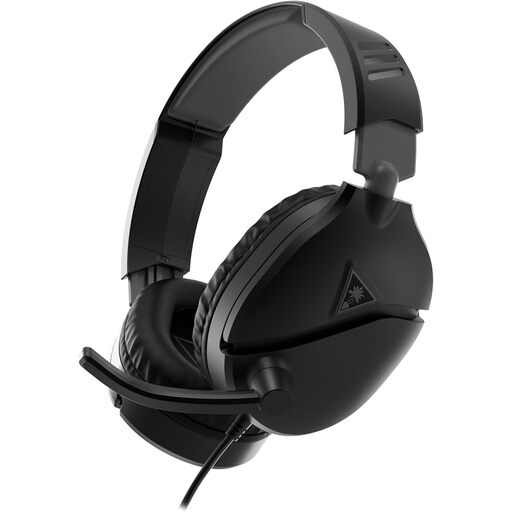
Why This Fits Their Persona: A straightforward wired headset suits players who want plug-and-play audio for PC and console without charging or wireless pairing.
Its 3.5 mm connection avoids battery wear and complicated wireless setup, while the flip-to-mute microphone provides a practical chat control.
40 mm speakers, synthetic leather ear cushions and compatibility with PC, PlayStation, Xbox and Nintendo Switch through supported 3.5 mm connections.
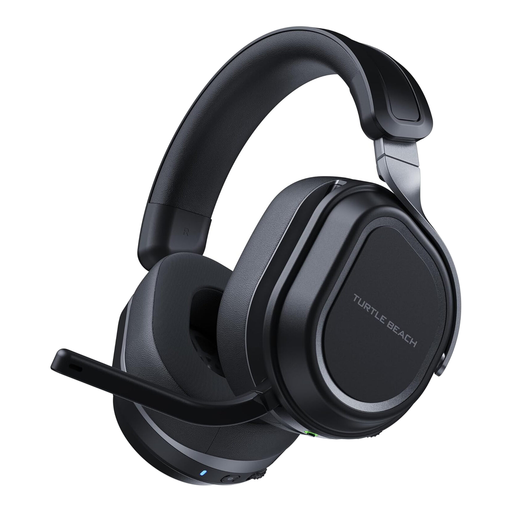
Why This Fits Their Persona: Suitable for players moving between PC and PlayStation who want extended battery life, wireless flexibility and simultaneous mobile connectivity.
Dual USB transmitters and 2.4 GHz wireless plus Bluetooth 5.2 make the connection method clear rather than relying on generic wireless compatibility.
Up to 80 hours of battery life, fast charging, 60 mm drivers and simultaneous wireless and Bluetooth audio.
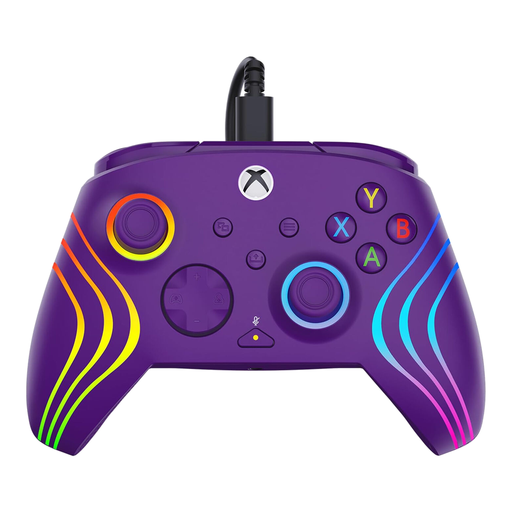
Why This Fits Their Persona: A wired Xbox and PC controller with adjustable triggers and remappable buttons suits players who value direct input and custom control layouts.
The specification clearly states its 10 ft USB-C wired connection, so buyers are not paying for a wireless feature they may not need.
Hall-Effect three-stop adjustable triggers, two mappable quick-action buttons, RGB lighting and dedicated D-pad audio controls.
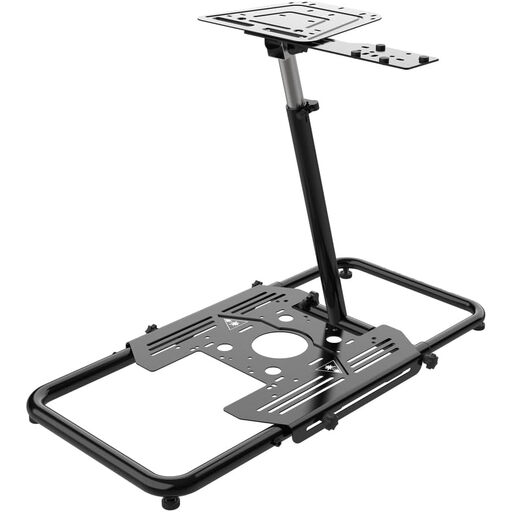
Why This Fits Their Persona: Designed for UK homes where space can be limited, this stand supports flight and racing equipment while folding flat for storage.
Its all-steel construction, adjustable rubber feet and mounting holes address wobble and fit problems often overlooked when buying a gaming simulator stand.
Stepless height, angle and length adjustment, quick-release clamps, universal slotted holes and fold-flat storage.
We have compiled a complete, real-time list of products that fully satisfy these strict selection criteria and UK safety regulations.
Some are. Wired models with a 3.5 mm plug, such as selected Recon headsets, can connect to compatible PlayStation, Xbox, Nintendo Switch, PC and mobile devices. Wireless models are more platform-specific, so check whether the included transmitter supports your console.
Usually, they do not require battery charging or replacement batteries. This can make them convenient for regular use, although the cable must be routed safely and protected from bending or pulling. Wireless headsets offer a cleaner setup but need periodic charging.
Not always. A desk may be suitable if it is stable and has enough space for the clamps. A dedicated stand becomes more useful when you need adjustable positioning, reduced movement or fold-flat storage. Check the mounting holes, equipment weight and available floor space before ordering.