Daytime open-plan viewers
You watch with blinds open or lights on, so window and lamp reflections can interfere with the picture. Screen finish is worth checking on the exact model, not just across a brand's range.


For frequent daylight and window reflections, start by checking the screen finish and viewing angle of an exact Mini LED or LCD model; the panel label alone will not tell you whether glare will be distracting. If you can control reflections, consider OLED for its pixel-level contrast, then check screen size against your seats, narration at normal kitchen noise levels and a position away from heat and moisture.
You watch with blinds open or lights on, so window and lamp reflections can interfere with the picture. Screen finish is worth checking on the exact model, not just across a brand's range.
You watch from dining chairs, a kitchen island or while moving around. The picture needs to work from those positions, and spoken narration needs to remain audible during normal kitchen use.
You want to follow plans, textures, façades and dimly lit interiors rather than use the TV only as background viewing. Contrast, 4K resolution and a screen size suited to the main seat all matter.
Choose the screen around the room's lighting and viewing positions, then assess detail, size and narration. The two panel routes offer different things to examine, but neither removes the need to check the exact model.
Consider it when: Daylight or lamps are a persistent problem and you want to assess a model's bright-room screen treatment. Samsung UK describes its QN90D as having an anti-reflection screen and a wide viewing angle.
Check carefully: A Mini LED or LCD label does not establish the finish, viewing angle or contrast of another model; brightness alone does not remove a sharp window reflection.
Consider it when: You can manage reflections and want to follow shadow detail in interiors. Sony UK explains that OLED pixels can be controlled individually.
Check carefully: Screen finishes differ by model. LG UK's reflection-control claims for its G6 should not be assumed to apply to every OLED TV.
| Concern | What to check | Who this matters to |
|---|---|---|
| Reflections and daylight | Locate window and lamp reflections, then check the exact screen treatment in comparable lighting. Samsung UK distinguishes anti-reflection from anti-glare treatments. | If bright daylight or a reflected pendant lamp obscures plans and close-ups, I want glare control to come before panel type. Around 36% of consumers put reflections and daylight first. |
| Off-centre viewing | Check the picture from the usual dining and kitchen positions, and confirm any wide-viewing-angle claim for the exact model. | When I move between the table and kitchen island, I still want to follow what is on screen. For around 29% of consumers, visibility from multiple positions is the primary need. |
| Image detail and screen size | Measure the main viewing distance and available space. Sony UK gives a minimum 4K distance reference of 1.5 times the screen's vertical height; comfort and layout still guide the choice. | If I watch closely for materials and floor plans, I need a screen that shows detail without dominating the room. Detail and proportionate size come first for around 21% of consumers. |
| Narration clarity | Try speech at a normal cooking-time volume, and check dialogue settings and audio connections on the exact model. | With cooking noise in the background, I want to hear the explanation without repeatedly turning up the volume. Around 14% of consumers make narration clarity their main concern. |
A large screen can feel uncomfortable in a compact diner, while a small one can make plans and material details harder to follow.
Measure the main seat-to-screen distance and the available wall or unit space. Use Sony UK's 4K minimum-distance reference of 1.5 times screen height as a starting check, then judge the layout for comfort.
Brightness and reflection control address different problems: a nearby window or pendant lamp may still appear on the screen.
Map reflections at the times you usually watch. Samsung UK distinguishes treatments that soften visible reflections from those that diffuse incoming light; check which finish the exact model has.
Heat, moisture or an unstable position can create safety risks in a kitchen diner.
Electrical Safety First advises placing TVs on a flat, stable surface away from moisture and heat. Follow the TV's mounting instructions and check plugs and sockets for damage.
The viewing service can affect whether the household needs a TV Licence; buying a television does not settle that question.
For UK viewing, GOV.UK says a TV Licence is needed to watch or record programmes as they are broadcast, or to watch on-demand BBC programmes on iPlayer. Check the household's intended way of watching.
Samsung UK describes its QN90D as combining an anti-reflection screen with a wide viewing angle, both relevant to a bright kitchen diner with several seats.
LG is relevant if you are considering OLED contrast and can manage the room's strongest reflections.
Sony UK offers a way to assess the OLED and LCD routes and a viewing-distance reference to use when planning screen size.
These 4K TVs offer different screen sizes and panel types to assess against your kitchen diner. Measure the viewing distance and available space, then check reflections from the usual seats before choosing an exact model.
 No image available
Consider this OLED model if reflections can be managed and its 55-inch screen suits your main seat.
The product name specifies 4K resolution. Check its screen finish and picture from the room's other seats, and try narration at a normal kitchen-use volume.
 No image available
Its 65-inch screen is worth considering if the measured viewing distance and available space suit that size.
The product name specifies Direct LED, 4K HDR and Google TV. Check the screen finish under kitchen-diner lighting and assess narration and the picture from your usual seats.
 No image available
Consider this larger screen only if a 75-inch TV fits both the principal viewing distance and the available wall or unit space.
The product name specifies 4K Ultra HD. Check the exact screen finish in your lighting and assess the picture from off-centre seats before relying on it for shared viewing.
 No image available
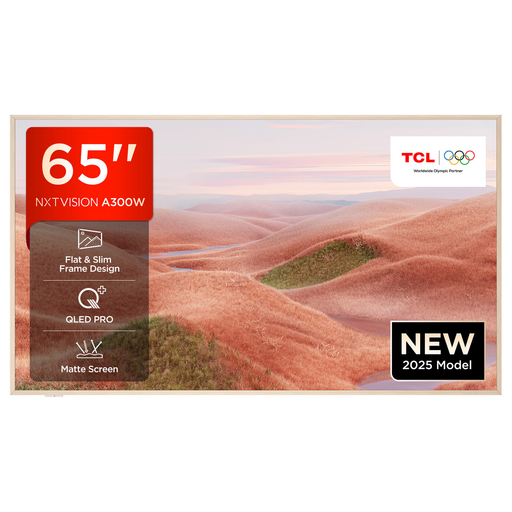
Consider its 65-inch format if you have room for it and want to assess whether this variant suits a bright viewing space.
The product name specifies QLED and 4K HDR. Before choosing it for glare control, confirm whether the supplied 65A300W has the matte anti-glare finish mentioned in its title; also assess off-centre viewing and narration.
 No image available
This is a Mini LED route to assess if a 65-inch screen fits the kitchen diner.
The product name specifies QD-Mini LED and 4K HDR. Check its screen finish in comparable lighting, view it from the usual seats and try spoken narration before deciding.
Start with the distance from the main seat and the space available for the TV, rather than buying by diagonal size alone. Sony UK gives a minimum reference for 4K viewing of 1.5 times the screen's vertical height; use the room layout and your viewing comfort to make the final choice.
Match the treatment to the lighting problem you can see in the room. Samsung UK explains that anti-reflection softens visible window and lamp reflections, while anti-glare diffuses incoming light; check the exact TV's finish rather than relying on a general bright-room description.
Keep it away from heat and moisture, whether it stands on furniture or is mounted. Electrical Safety First advises a flat, stable position and following the manufacturer's instructions; check the TV's mounting requirements if it will go on a wall.
Check the exact TV's energy label and how your household intends to watch. GOV.UK guidance requires energy labels for products within the UK rules, and GOV.UK says a TV Licence is needed to watch or record programmes as they are broadcast or to watch on-demand BBC programmes on iPlayer.