For ballet recordings watched mainly in a dark room, start by comparing 4K OLED TVs: independently controlled pixels can produce deep blacks around a lit stage. Choose a screen size that fits your seating distance, then check your recordings’ formats, motion settings and audio connections on the exact model. If the room is often bright, compare reflection handling on other displays, including Mini-LED TVs, before deciding.
Who is this for?
Dark-room ballet viewers
If you usually watch full performances with the lights down, you may care most about distinguishing dancers and dark costumes from a black stage. RTINGS discusses OLED’s dark-room strengths, while Which? highlights its deep blacks.
Viewers focused on movement and colour
If footwork, group formations and costume colour matter most to you, compare a familiar recording on the exact TV. The source format and motion settings matter alongside the panel’s stated capabilities.
Viewers sharing a multipurpose room
If the same TV will be used with the lights on, from several seats or with separate audio equipment, room fit and connections may shape the choice as much as dark-scene performance.
What matters when choosing?
For a mainly dark-room setup, assess the black stage and spotlit performers first. Then use your own recordings and room measurements to decide which screen size, motion presentation and listening setup work for you.
| Concern |
What to check |
Who this matters to |
| Dark-stage contrast |
Check the exact display type and watch a familiar scene with dark costumes against a black backdrop. OLED’s individually controlled pixels can switch off for black, as Samsung UK explains. |
When the stage goes dark, I want to keep the performers separate from the background. Around 36% of consumers put that contrast first. |
| Natural-looking movement |
Check the model’s supported video signals and compare a familiar sequence with motion processing at its default, reduced and off settings. |
I want to follow quick footwork without a motion setting changing the look of the recording. For around 29% of consumers, that presentation is the primary concern. |
| Screen size and room fit |
Measure from your usual seat to the planned screen position, then check the TV’s width, stand footprint and delivery route. Which? recommends starting with seating distance. |
I want to see group formations clearly, but the set must fit where I actually sit and place it. Room fit comes first for around 21% of consumers. |
| Audio and source connections |
List your playback device and listening equipment; check the exact TV’s ports, eARC and any headphone or Bluetooth options you need. |
If I use a separate audio system or listen privately, I need the TV to connect to it. Around 14% of consumers make that setup their first consideration. |
What should you avoid overlooking?
-
Treating the highest refresh-rate figure as the answer to motion
A panel’s refresh rate or supported input signal does not determine how every filmed performance will look. The recording and the TV’s motion processing also affect what you see.
Confirm the exact model’s panel and input specifications, then compare a familiar dance sequence with motion processing reduced, off and at its default setting.
-
Choosing a diagonal size without measuring the room
A larger screen still needs to fit the viewing position, furniture and route into the room. Which? advises using the distance from your seat to the TV when choosing a size.
Measure that distance and check the chosen model’s actual width, stand footprint and delivery route before ordering.
-
Assuming every HDR-labelled OLED accepts the same formats
HDR support differs by model. RTINGS lists the Samsung S95H without Dolby Vision, while Sony UK lists Dolby Vision for the K-77XR80; neither specification describes every TV from those brands.
Check which HDR formats your recordings or playback device use, then compare them with the specification for the exact TV variant.
-
Assuming every ballet recording needs a TV Licence
How you watch matters. GOV.UK says a TV Licence is not needed to watch on-demand services such as Netflix and Disney+; do not assume the same rule covers every viewing method.
Check the GOV.UK requirements for your particular use, especially if you watch broadcasts or use BBC iPlayer.
Brands to consider
These brands offer models worth comparing for the stated viewing needs; features must be checked on the particular model and screen size.
LG
LG’s UK OLED range offers several series and sizes for comparing screen fit with dark-room viewing priorities.
- LG UK lists a 42-inch C6 alongside larger C6 and G6 OLED models.
- Check the chosen size’s picture features, connections and stand or wall-mount arrangement rather than applying one series description to every variant.
Samsung
Samsung’s UK S-series OLED models give dark-room viewers further sizes and model-specific reflection features to compare.
- Samsung UK describes independently controlled OLED pixels and lists Glare Free for the S95H.
- RTINGS lists the S95H without Dolby Vision. If your recordings use that format, check compatibility before choosing that model.
Sony
A Sony BRAVIA OLED may suit a setup where the recording format and external audio connection are important checks.
- Sony UK lists the K-77XR80 with a 4K OLED display, 120Hz panel, Dolby Vision and eARC.
- Those are specifications for the K-77XR80; confirm them separately for any other BRAVIA model or size.
Panasonic
Panasonic’s UK OLED lines offer model-specific picture and platform features for comparison.
- Panasonic UK describes the 2026 Z86C as a UK OLED line with a 120Hz panel and lists a 144Hz display for the Z95B.
- Platform and feature availability varies by market, series and model, so check the exact UK variant and your recording source.
Joybuy OLED TV choices
These two TV choices are relevant to comparing OLED viewing for ballet recordings in a dark room. Their different screen sizes make seating distance an important check before considering either model.
 No image available
Samsung S85F QE83S85FAE 83-inch 4K Smart TV
Consider this larger screen for ballet recordings only if its dimensions and your usual viewing distance suit the room.
The product name specifies an 83-inch 4K Ultra HD TV with Wi-Fi. Check your recording’s HDR format against the exact model before choosing it.
View on Joybuy
 No image available
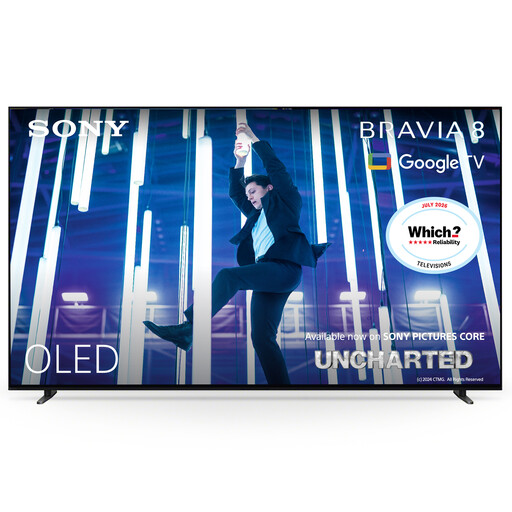
Sony BRAVIA 8 K55XR80BP 55-inch 4K OLED TV
Consider this 55-inch model if it fits your seat and your ballet recordings or player use Dolby Vision.
The product name lists 4K OLED, Google TV and Dolby Vision. Check this exact variant’s motion capabilities and audio connections if either affects your setup.
View on Joybuy
Frequently asked questions
Is OLED a sensible choice for ballet recordings in a dark room?
OLED is a sensible display type to compare first when black stage backgrounds matter: its pixels can be controlled individually, and RTINGS identifies dark-room viewing as an OLED strength. Compare the exact models with your recording source and preferred motion settings rather than assuming they will look alike.
How should I choose a TV size for filmed ballet?
Start with the distance from your usual seat to the planned screen position, then check the TV’s actual width and stand footprint. Which? recommends using seating distance, while Samsung UK gives a broad 4K guideline of roughly 1 to 2.5 times the screen size; your room measurements still determine what fits.
Should I get a soundbar for ballet recordings?
A soundbar is worth considering if the TV’s own sound does not meet your listening needs or you already plan to use external audio. If you intend to connect through eARC, check that both the exact TV and the soundbar support it; check headphone or Bluetooth options separately if you listen privately.
Do I need a TV Licence to watch ballet recordings in the UK?
You do not need a TV Licence merely to watch on-demand services such as Netflix or Disney+, according to GOV.UK. The rule depends on how you watch, so check the GOV.UK requirements if your recordings involve broadcast television or BBC iPlayer.


