What should you check before buying?
Start with the devices you already own, then compare their connections with the exact TV model and any accessories you plan to add.
| Priority | What to check | Your needs |
|---|
| HDMI inputs |
List each device’s output connector; count the HDMI sources you want connected at once; inspect the TV’s exact input layout. |
I want to leave my set-top box, disc player and console plugged in rather than swap cables whenever I change source. |
| Extra HDMI sources |
If sources outnumber free TV inputs, check a switch’s input count and supported resolution and refresh rate. A switch selects one source at a time. |
Several HDMI devices need to share an input, but I am happy to select the one I want to use. |
| Legacy connections |
Identify the old device’s output; check for a compatible TV input or a converter with SCART input, HDMI output and the required power supply. |
My older DVD player or VCR uses SCART, so another HDMI socket alone will not connect it. |
| Streaming |
Check the exact TV’s app platform for the services you use. For a separate player, allow an HDMI input, power and internet access; Roku UK says 4K/HDR also needs a compatible connection chain. |
I want access to my streaming services, whether through the TV’s own interface or a separate player. |
| Gaming ports |
Match any required 4K120, variable refresh rate (VRR) or auto low-latency mode (ALLM) support to the exact TV model, designated port and suitable cable. Samsung UK and Sony UK document differences between models and ports. |
If I use a console or PC that calls for these features, I need to know which TV input can provide them. |
| Soundbar audio |
Find the TV’s eARC or ARC-labelled port and check compatibility with the soundbar and cable before counting inputs left for source devices. HDMI Licensing Administrator does not define eARC as automatically backward-compatible with ARC. |
A soundbar is part of my setup, and I do not want to allocate its planned TV connection to another device. |
Brand information worth checking
These manufacturers publish useful connection information, but features still need checking on the exact TV model rather than assumed across a brand.
Sony
Sony UK provides a guide to TV ports and model-series tables for features including 4K120, eARC, VRR and ALLM.
- The model-series tables help narrow down which features to check on a prospective TV.
- A feature listed for one series does not establish support on every Sony TV or every port.
Samsung
Samsung United Kingdom describes selected gaming TVs with four HDMI 2.1 ports and publishes separate UK guidance on 4K120 Game Mode.
- Its support guidance identifies the need for a selected model, correct HDMI port and suitable cable for 4K120 Game Mode.
- The gaming-range description does not mean every Samsung TV has the same ports or features.
LG
LG UK’s page for the named 2025 G5 TV describes its smart-TV functions and a five-year limited panel warranty for that model.
- The named product page gives a starting point for checking that model’s features and terms.
- Its warranty and feature descriptions do not apply automatically to other LG TVs; inspect the model you are considering.
Replacement TVs on Joybuy
These smart TVs are options for replacing the screen while retaining connected devices. Compare each exact model’s port layout with your equipment before choosing; an HDMI switch or legacy converter addresses a different connection need.
 No image available
Hisense 65U7QTUK Pro 65-inch Mini LED 4K TV
For a household keeping a set-top box and console connected, check this model’s HDMI input count and port assignment against both devices. The title identifies VIDAA OS; confirm that its app selection suits your streaming needs. Its composite input should not be assumed to accept SCART directly.
View on Joybuy
 No image available
Hisense 55U7QTUK Pro 55-inch Mini LED 4K TV
If several existing devices must stay plugged in, check this model’s HDMI layout and reserve the appropriate port if you plan to connect a soundbar. The title identifies VIDAA OS. A listed composite input does not establish a direct connection for a SCART device.
View on Joybuy
 No image available
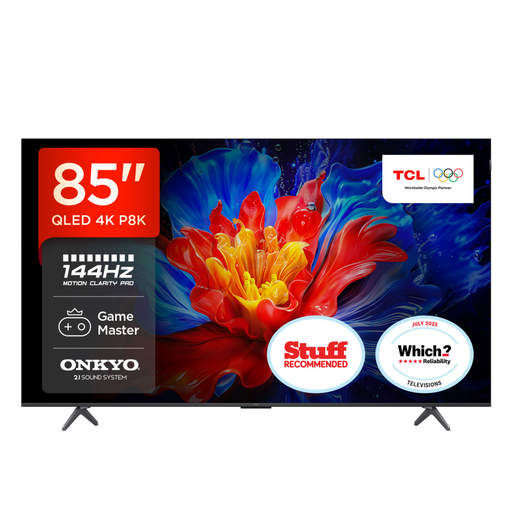
TCL 85P8K-UK 85-inch QLED 4K TV
For a setup involving both streaming and external boxes, compare the TV’s app options and exact HDMI layout with what you will use. Its title states a 144Hz native refresh rate; check the intended gaming input and connected device requirements separately.
View on Joybuy
 No image available
TCL 55P8K-UK 55-inch QLED 4K TV
If a console and other HDMI sources will share this TV, check which exact inputs provide the features each device needs. The title names Google Cast and Miracast; confirm the built-in apps and soundbar connection against your planned setup.
View on Joybuy
 No image available
TCL 75Q6C 75-inch QD-Mini LED 4K Google TV
For a replacement TV with a built-in streaming platform, Google TV is identified in this model’s title. Check the exact HDMI input count, eARC or ARC port and legacy inputs before relying on it for every existing device; confirm gaming features for this 75-inch variant and its intended ports.
View on Joybuy
Common questions
What should I list before choosing a replacement TV?
Write down each device’s exact model, output connector and whether it needs to remain plugged in alongside the others. Then compare that list with the prospective TV’s exact port layout, including any input needed for a soundbar or particular gaming feature.
Can I connect a Sky Q Mini box to a new TV?
Yes, if the replacement TV has a suitable HDMI input: Sky’s setup instructions connect the Sky Q Mini box to the TV by HDMI. Allow an input for it when counting the other devices you want connected.
Will a Nintendo Switch work with the replacement TV?
A docked Nintendo Switch connects from the dock’s HDMI OUT to a TV HDMI input, according to Nintendo UK. Nintendo Switch Lite does not support TV mode, so check which console you have before reserving a TV connection for it.
When does an HDMI switch make sense?
Use one when more HDMI source devices need to stay connected than the TV has free inputs, and you can select one source at a time. Match the switch’s supported resolution and refresh rate to your setup: a five-input switch may be specified for up to 4K at 60Hz, which does not establish 4K120 support.
Can I connect an old SCART DVD player to an HDMI-only TV?
You need a connection that converts the player’s SCART output to HDMI input on the TV, rather than an HDMI switch. Check the converter’s direction, power and output limits; Maplin Electronics describes its SCART-to-HDMI adapter as requiring power.


