PS5 or Xbox Series households seeking 120fps play
For players with a current-generation console who want supported games to use 4K/120Hz and VRR, rather than assuming these modes are available automatically.


Choose a TV with verified 4K/120Hz capability, compatible VRR and a low-latency gaming mode if your console and games can use high-frame-rate or variable-refresh modes. For a shared living room, seating distance, reflections and the number of suitable HDMI inputs can matter just as much; a monitor is generally more appropriate for a close desk setup than sofa viewing.
For players with a current-generation console who want supported games to use 4K/120Hz and VRR, rather than assuming these modes are available automatically.
For homes where one screen handles gaming, streaming and television, making seating distance, reflections and HDMI-port sharing part of the decision.
For a close desk setup where a monitor may fit better than a living-room television, provided its console-video compatibility is suitable.
Choose it when: You have a PS5, Xbox Series X|S or similar console and want supported 4K/120Hz and VRR modes.
Watch for: Full-bandwidth gaming can be limited to particular HDMI inputs, so a high-refresh-rate label alone is not enough.
Choose it when: Family TV, films and casual console play matter more than a 4K/120Hz route.
Watch for: A 60Hz or otherwise limited set can still play console games, but it cannot provide the same 120fps setup as a compatible 120Hz HDMI 2.1 display.
Choose it when: One player sits close at a desk and does not need the display for sofa viewing or family television.
Watch for: A monitor still needs the right HDMI support for the console mode you want and is less suited to a shared living room.
| Priority | What to check | Your needs |
|---|---|---|
| Console video mode | Check the exact model and intended HDMI input for 4K/120Hz. For Xbox Series X 4K/120fps, Xbox Support states that the console, a compatible TV and an Ultra High Speed HDMI 2.1 cable are required. | I want the display, cable and selected input to support the video mode I plan to use, rather than paying for an unavailable setting. |
| Variable refresh rate | Confirm VRR compatibility with your console and the HDMI input you will use. RTINGS explains that VRR adjusts refresh rate to frame-rate changes to help reduce tearing. | Smoother motion in supported games matters to me when frame rates change during play. |
| Gaming mode and ports | Look for a usable Game Mode or ALLM setting, then count the high-bandwidth inputs needed for the console, sound system and other devices. Check port capability individually. | I need responsive controls without making normal streaming and film viewing inconvenient for everyone else using the screen. |
| Screen size and placement | Measure from the main seat to the planned screen position, and account for stand or wall space, viewing angle and other seats. Which? advises measuring sofa-to-TV distance before selecting a size. | I want game detail to be comfortable to view without a screen that overwhelms the room or feels too small from the sofa. |
Some displays offer 120Hz only at a lower resolution or through selected ports. Xbox Support specifies that Series X 4K/120fps needs compatible console, TV and Ultra High Speed HDMI 2.1 cable.
Check the manual or full specification for 4K/120Hz on the HDMI input you intend to use, then check the console video settings after installation.
A replacement Ultra High Speed HDMI cable may be needed when the supplied cable does not suit the required mode or length.
VRR, ALLM or Game Mode, and the number of suitable inputs can vary by model and port. The UK-listed Sony BRAVIA 8 example has two HDMI 2.1 inputs and two HDMI 2.0b inputs.
List every connected device first, identify those needing high-bandwidth inputs, and confirm each relevant port before purchase.
Viewing comfort depends on seating distance as well as physical fit. Which? cautions that both undersized and oversized screens can reduce viewing comfort.
Measure the main seating position and intended screen location before comparing panel technologies or gaming features.
An unsuitable size can lead to changing furniture, mounting arrangements or replacing the television sooner than planned.
The cited UK LG listing notes that third-party apps and services can be removed or cease to be supported, and some require an account or subscription.
Choose the television for its confirmed display and HDMI features first, and treat app availability and promotional software features as changeable extras.
Some services may require accounts or subscriptions, and app availability can change.
Relevant for households considering OLED gaming TVs and television lines with multiple HDMI 2.1 inputs. The UK-listed LG B6 example specifies a 120Hz refresh rate and four HDMI 2.1 ports.
Relevant when comparing Mini LED or QLED-style options with high-refresh console inputs. The UK-listed QE55QN80F example specifies four HDMI 2.1 ports, 120Hz refresh and motion up to 144Hz.
Relevant for PS5-oriented homes considering BRAVIA gaming integration. Sony states that gaming-capable BRAVIA TVs offer 4K at 120fps, VRR and ALLM.
Joybuy options for gaming-focused home televisions and a desk-based console monitor route.
 No image available
A 55-inch option for a shared console-TV setup where the room suits this screen size.
The listing states 4K, 120Hz, HDMI 2.1, VRR, ALLM, four HDMI 2.1 inputs and Google TV. Confirm 4K/120Hz, VRR and ALLM on the intended port, and check the stated 288Hz Game Accelerator against the supported console modes.
 No image available
A 50-inch gaming-focused television for a living-room setup that needs 4K high-frame-rate features alongside general TV use.
The listing states 120Hz, up to 144Hz VRR, HDMI 2.1, ALLM, Google TV and an Onkyo 2.1 Hi-Fi system. Check which HDMI inputs support the full 4K/120Hz, VRR and ALLM route for your console.
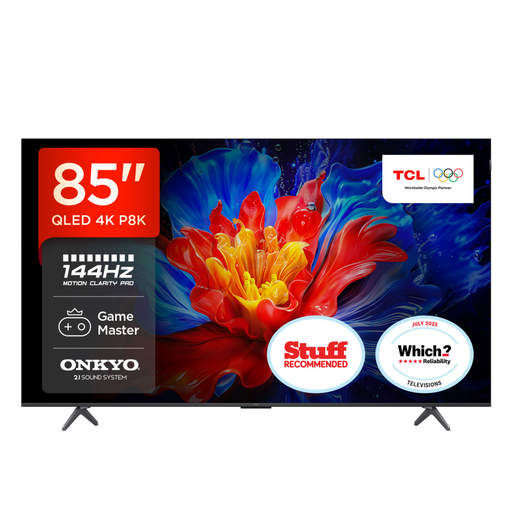 No image available
A large-screen route for shared gaming and viewing only where the room and seating distance suit an 85-inch display.
The listing states 4K, 120Hz, HDMI 2.1, VRR, ALLM, four HDMI 2.1 ports and an Onkyo 2.1 sound system. Its stated width is 1893 mm; confirm the exact console mode available on the intended HDMI input.
 No image available
A very large television for a dedicated viewing room with enough space for sofa-based gaming and shared use.
The listing states 4K, HDMI 2.1, VRR, ALLM, four HDMI 2.1 ports, Google TV and a 120Hz-to-144Hz gaming refresh range. Its stated width is 2180 mm and stand depth is 420 mm; check room fit and port-by-port console support.
 No image available
A desk-display option for close, single-player console use rather than a shared sofa-viewing setup.
The listing states a 31.5-inch OLED panel, 4K at 165Hz, two HDMI 2.1 ports and PS5 compatibility with 4K at 120Hz. Check VRR behaviour for your intended PS5 or Xbox mode, and confirm any external audio or streaming hardware you need.
No. It is needed when the console mode you want requires it. Xbox Support states that Series X 4K gaming at 120fps needs a Series X, an Ultra High Speed HDMI cable supporting HDMI 2.1 and a television supporting HDMI 2.1; Series S or a non-HDMI-2.1 TV can still enable 120Hz at a lower resolution.
Measure from the main seating position to the proposed screen position before choosing a size. Which? advises this because an undersized screen can make viewing difficult, while an oversized set can dominate the room and be uncomfortable to take in.
Yes, if it has a usable low-latency gaming setting and the household accepts its picture-mode trade-offs. Sony describes ALLM or Game Mode as reducing input lag for gaming and returning to a standard picture mode for films; check the exact settings available on the model you choose.
Treat it as waste electrical and electronic equipment rather than ordinary household waste. GOV.UK states that the Waste Electrical and Electronic Equipment Regulations 2013, as amended, encourage recovery, reuse and recycling; check your local authority or retailer for current collection arrangements.