Who is this for?

Families with widely spaced seats

If some viewers sit well to the side of the screen, check how clearly they can see faces and details from those positions. LG UK describes wide viewing angles for its OLED TVs, while Samsung UK specifies a wide-viewing-angle feature on its 50-inch QN90D; neither statement establishes how every TV will look from your seats.

People sharing videos in a bright room

Windows and lamps can make reflections an important part of the choice. Look for an anti-reflection feature documented for the exact model and screen size, rather than assuming it applies across a product range.

Households with stored video files

If family videos are kept on a USB drive or home network, establish their file formats and intended playback route before choosing a TV. Sony UK advises checking the model Help Guide because supported formats can change with updates.

What matters when choosing?

OLED TV

Consider when: People regularly watch from substantially off-centre seats; LG UK attributes wide OLED viewing angles to self-lighting pixels.

Keep in mind: Panel type does not establish the chosen TV's size, connections or compatibility with your videos.

Mini LED or LCD with specified viewing features

Consider when: The room is bright and the exact model and size document both wide-viewing-angle and anti-reflection features. Samsung UK specifies these features for its 50-inch QN90D.

Keep in mind: A feature stated for one model or size cannot be assumed for another Mini LED or LCD TV.

ConcernWhat to checkWho this matters to
Picture from side seats Check viewing-angle information for the exact model and size; in a bright room, check its anti-reflection specification too. If relatives sit along the sides of the room, I want faces and details to remain clear without moving everyone in front of the screen. Around 42% of consumers would put off-centre picture consistency first.
Access to stored videos Match your video formats and resolution to the TV's documented USB, network or device-sharing route. When our clips are stored on a drive or home network, I need a dependable way to show them without preparing a different copy each time. For around 33% of consumers, playback compatibility would be the primary concern.
Screen size and room fit Measure seating distances, TV width and stand footprint, or check the proposed wall position. With viewers both near and far from the screen, I need a size everyone can see that still fits the furniture and room. Room fit would come first for around 25% of consumers.

Buying pitfalls

  • Assuming a bigger TV solves side-seat viewing

    Screen size alone does not establish how the picture appears off-centre, and a feature advertised for one size may not apply to another.

    Check the exact model's viewing-angle information and, where reflections matter, its size-specific anti-reflection specification.

  • Assuming a USB port will play every family video

    Playback can depend on the file's codec, container and resolution, the drive format and whether the video comes through USB or a home network.

    Identify a few representative files from your collection and compare them with the current manual for the exact TV. Sony UK's cited home-network guidance does not support 4K video through that route.

  • Choosing the diagonal without measuring the space

    A screen may suit the viewing distance but not fit the furniture or proposed wall position. People at the sides also need to be considered.

    Measure the TV location and the usual seats, then check the selected model's overall width, stand footprint and mounting requirements.

  • Passing on an old smart TV while still signed in

    Apps and account information may remain on a TV after it is unplugged.

    Before donating, selling or recycling it, log out of apps and follow the manufacturer's instructions for a factory reset.

Brands to consider for specific features

LG

LG UK presents OLED as a route for households concerned about viewing from the sides.

  • LG attributes its OLED viewing-angle claim to pixels that emit their own light.
  • That brand claim does not establish the connections, video-file support or room fit of an individual LG model.

Samsung

Samsung UK documents wide-viewing-angle and anti-reflection features for its 50-inch QN90D, a useful example of what to look for in a bright room.

  • The cited model information identifies both features alongside Mini LED backlighting.
  • The claim is specific to the cited model and size; check other Samsung TVs individually.

Sony

Sony UK's support guidance illustrates why stored-video playback needs an exact-model check.

  • Its support material directs owners to model guidance for file compatibility and distinguishes USB from home-network playback.
  • Features shown in specifications for the older X95J must not be assumed for another Sony model.

TVs to consider on Joybuy

These choices include OLED TVs in several screen sizes and a Direct LED TV. Compare their stated sizes with your room, then check the exact model's side-seat viewing and your intended way of sharing videos before choosing.
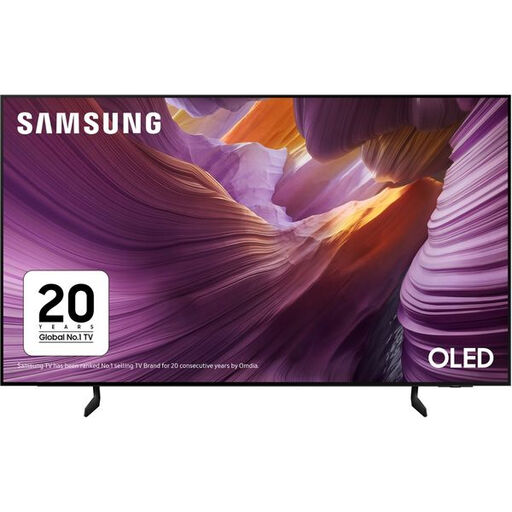
Samsung QE65S85FAE 65-inch 4K TV

Samsung QE65S85FAE 65-inch 4K Smart TV

Consider this OLED-route model if you are assessing a 65-inch screen for a wide seating arrangement.

Check the TV's dimensions against your furniture and confirm that its playback or sharing options work with your family videos.

View on Joybuy

Samsung S85F QE83S85FAE 83-inch 4K TV

Samsung S85F QE83S85FAE 83-inch 4K Smart TV

This OLED-route model is worth assessing if the farthest seats call for a larger screen and the room can accommodate it.

Check the TV and stand dimensions, viewing distance and compatibility with the way your videos are stored or shared.

View on Joybuy

Sony BRAVIA 8 K65XR80BP 65-inch OLED TV

Sony BRAVIA 8 K65XR80BP 65-inch OLED 4K Google TV

Consider the 65-inch OLED screen for a group seated across the room; Google Cast is named in the product title for sharing from a compatible device.

Check room fit and the exact model's requirements if you plan to play files directly rather than cast them.

View on Joybuy

Sony BRAVIA A90 XR48A90K 48-inch OLED TV

Sony BRAVIA A90 XR48A90K 48-inch OLED 4K Google TV

The 48-inch OLED screen is an option to assess where seating is closer together; check whether it is large enough for the farthest viewers.

Google Cast is named in the product title. Confirm compatibility with your sharing device, and check separate file-playback requirements if needed.

View on Joybuy

TCL 65V6C 65-inch Direct LED 4K TV

TCL 65V6C 65-inch Direct LED 4K Google TV

If you are considering a 65-inch LCD-based alternative, assess this model's picture from your off-centre seats rather than relying on screen size alone.

Check its dimensions and confirm the video-input or file-playback route you intend to use.

View on Joybuy

Frequently asked questions

How large should a TV be for a family viewing together?

Choose a size using the actual seating distances and available space, not the number of viewers alone. Sony UK's 4K viewing guidance gives starting distances of about 1.2 m for 65 inches, 1.4 m for 75 inches and 1.6 m for 85 inches; also check the TV width, stand footprint and side-seat positions.

Will a TV play videos from my USB drive or home network?

It will depend on the exact TV, files and playback route. Check supported codecs, containers, file systems and resolution in the model's current guidance. Sony UK notes that supported formats can change with updates and that 4K video is not supported through home-network playback in its cited guidance.

What energy information should I check for a TV?

Check the energy label for the television you intend to buy rather than assuming that two sizes or models use energy in the same way. GOV.UK's energy-information guidance says labels for products within scope must be displayed at the point of sale, including on websites.

Do I need a TV Licence just to watch family videos?

No TV Licence is needed solely to watch videos or DVDs, according to GOV.UK. Whether one is needed for other viewing depends on what you watch or record, so check the current GOV.UK guidance if you also use live TV services or BBC iPlayer.

What should I do before passing on an old smart TV?

Log out of its apps and follow the manufacturer's factory-reset instructions before selling, donating or recycling it. Recycle Your Electricals advises signing out before unplugging a TV; ask your retailer about its take-back or collection arrangements if you are replacing the set.