For local football games on a PS5 or Xbox Series X, start with a 4K TV whose intended HDMI input supports 120 Hz, variable refresh rate (VRR) and Auto Low Latency Mode (ALLM), then check that the console, game and connection can use those features. Choose screen size around the seats your group will actually use, and check the audio connection before putting an AV receiver between the console and TV. A refresh rate above 120 Hz is chiefly worth considering if a compatible gaming PC will also be connected.
Who this setup suits
Competitive local-match players
If quick passes and changes of direction matter most, check the TV’s gaming input modes and look for independent input-lag measurements for the exact model. A high refresh-rate label alone does not tell you how responsive a connected console will feel.
Home-cinema football groups
When several people need to follow the pitch, choose a screen size for both the main seat and seats to the side. Room lighting, picture contrast and the way a soundbar or receiver connects also matter when the TV serves films after the match.
Mixed console-and-PC households
If a gaming PC may join the setup later, distinguish its possible higher-refresh modes from the 120 Hz output described in PlayStation and Xbox console guidance. Check which modes work at 4K on the input you plan to use.
What to check when choosing
For local football games, check the console connection first, then measure for shared viewing and plan where each HDMI device will connect.
| Concern |
What to check |
Who this matters to |
| Responsive play and smooth motion |
Check 4K/120, VRR and ALLM on the exact HDMI input. Confirm the console and game support the mode you want to use. |
When a late input could spoil a quick pass, I want responsive controls more than an impressive refresh-rate label; around 40% of consumers would put responsive play first. |
| Shared home-cinema view |
Measure the main and side seating positions before choosing screen size. Check the stand or mounting requirements and the audio connection. |
With friends following the same match, I need everyone to see the pitch comfortably, while the screen still works for films; roughly 40% of consumers would make shared viewing their main concern. |
| Connection and future use |
Check the cable and any receiver’s stated 4K/120 pass-through. If a PC is planned, check which higher-refresh modes its connection can use. |
If I use a receiver now and might add a PC later, I want the connection to work without choosing a feature solely for its headline number; about 20% of consumers would prioritise compatibility and future use. |
Buying pitfalls
-
Assuming a 120 Hz or 144 Hz label guarantees 4K/120 gameplay
The game, console, cable, selected TV input and any receiver all affect the available output. Xbox Support specifies a compatible Xbox Series X, Ultra High Speed HDMI cable and HDMI 2.1 TV for its 4K/120 setup.
Check the exact input’s supported modes before buying, then inspect the console’s video-output status after connection.
-
Routing the console through an unchecked AV receiver
A receiver that cannot pass through the intended video mode can limit the connection even when the console and TV support it.
Consult the receiver manual for 4K/120 pass-through on the ports you intend to use. If that route is uncertain, connect the console directly to the TV and plan the audio connection separately.
A direct-to-TV route may require changing your cabling or how the sound system connects.
-
Leaving old-TV collection until delivery day
GOV.UK says retailers may charge to cover transport when collecting old electrical equipment from a customer’s home; in-store take-back and home collection are not the same service.
Check the retailer’s recycling and collection terms before arranging delivery, particularly if the old TV must also be taken down from a wall.
Brands to consider for gaming and home cinema
Samsung
Samsung’s OLED range includes S90F models and the S95H line for buyers considering gaming alongside cinema viewing.
- Samsung’s UK materials describe gaming-oriented motion features on S90F models and gaming features on the S95H.
- Check the exact size, HDMI ports and available modes. The S90F’s advertised 144 Hz capability is not, by itself, a reason to expect console output above 120 Hz.
LG
LG’s OLED evo C-series is a home-cinema option for buyers who also need console-gaming features.
- LG UK highlights refresh rate, input lag, VRR and 4K picture quality as gaming considerations in its TV guidance.
- Check the selected model and size for its supported inputs and modes; brand picture claims do not replace model-specific specifications or independent latency measurements.
Sony
Sony’s BRAVIA range is relevant to PlayStation-focused setups that also serve as a home cinema.
- Sony UK documents 4K/120, VRR and ALLM as gaming features on compatible BRAVIA models.
- Confirm which functions the exact TV and HDMI ports support; the BRAVIA name alone does not establish compatibility.
Joybuy TVs for this setup
These TCL 4K TVs cover different screen sizes for shared viewing. Compare each size with your seating and installation space, then confirm the intended console input’s gaming modes before choosing.
 No image available
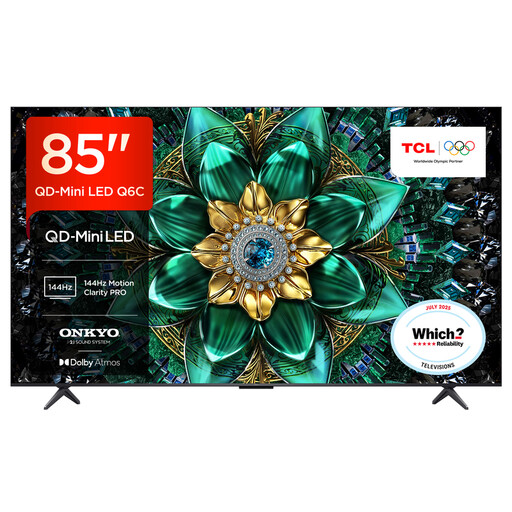
TCL 85Q6C-UK 85-inch QD-Mini LED 4K TV
Consider this 85-inch model if the screen and seating layout suit a large shared-viewing room.
Its title specifies a 144 Hz native refresh rate and an ONKYO 2.1 sound system. Confirm 4K/120 and VRR support on the HDMI input you will use with your console.
View on Joybuy
 No image available
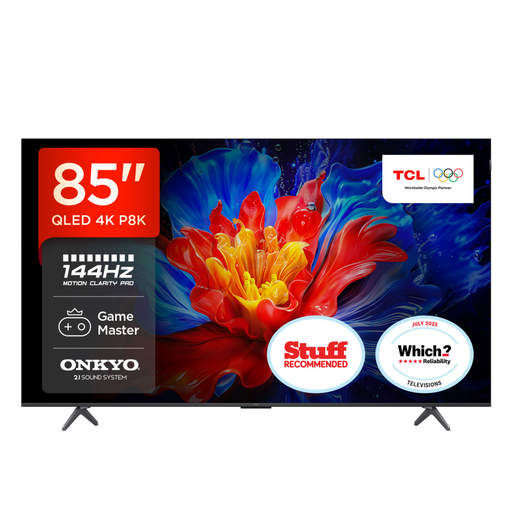
TCL 85P8K-UK 85-inch QLED 4K TV
This 85-inch option is worth assessing where several players will share a large screen.
The title specifies a 144 Hz native refresh rate and an ONKYO 2.1 sound system. Check the exact 4K/120 input mode and which gaming modes apply to your source.
View on Joybuy
 No image available
TCL 98Q6C-UK 98-inch QD-Mini LED 4K TV
Consider the 98-inch screen only after checking the seats, installation position and route into the room.
Its title specifies a 144 Hz native refresh rate and an ONKYO 2.1 sound system. Confirm the console’s 4K/120 input mode and the conditions for any additional advertised gaming modes.
View on Joybuy
 No image available
TCL 50Q6C-UK 50-inch QD-Mini LED 4K TV
The 50-inch size is an option when your seating arrangement calls for a smaller screen than the large-format models above.
Its title specifies a 144 Hz native refresh rate and an ONKYO 2.1 sound system. Check the intended HDMI input’s 4K/120 and VRR modes against your console.
View on Joybuy
 No image available
TCL 55P8K-UK 55-inch QLED 4K TV
Consider the 55-inch size if it fits both the main player’s seat and the other viewing positions.
The title lists an ONKYO 2.1 sound system and a 288 Hz Game Accelerator mode. Check that mode’s applicable resolution and source conditions separately from the 4K/120 mode you need for a compatible console.
View on Joybuy
Frequently asked questions
Do PS5 or Xbox football games need a 144 Hz TV?
No: 144 Hz is not a general console requirement. PlayStation describes 120 Hz output for compatible TVs and games, while Xbox Support describes a compatible 4K/120 setup for Xbox Series X. A higher refresh mode may be relevant if you also plan to connect a PC that can use it.
Can I connect the console through an AV receiver at 4K/120?
Yes, if the receiver and the ports in use support the required pass-through mode. Check its manual before routing the console through it; otherwise, connect the console directly to the TV and arrange audio through a compatible TV-to-sound-system connection.
Do I need to replace the console’s HDMI cable?
Not necessarily: use the supplied Ultra High Speed HDMI cable if it reaches and suits your setup. For a longer replacement intended for 4K/120, check for Ultra High Speed HDMI certification; HDMI Licensing Administrator describes that cable category for configurations up to 48 Gbps.
What should I arrange for the old TV?
Check the retailer’s electrical take-back and collection arrangements before delivery. GOV.UK distinguishes free in-store take-back from home collection, for which retailers may charge to cover transport.


