Daytime race viewers
If daylight or kitchen lights reach the screen, you need to consider reflections and picture visibility before deciding how large a TV to buy.


For daytime cycling coverage, start with the TV’s stated reflection handling and its position relative to windows and lights. If people will watch from different seats, check viewing angles too: a Mini LED model with a specified anti-reflection screen is one option for a bright position, while OLED is worth considering when side-seat viewing matters and direct reflections can be controlled. Check the exact TV’s dimensions, stand or mounting requirements and live-viewing source before choosing.
If daylight or kitchen lights reach the screen, you need to consider reflections and picture visibility before deciding how large a TV to buy.
When viewers sit to the side rather than directly in front of the TV, check how well the exact model accommodates those viewing positions.
If the TV must fit a particular cabinet or wall position, its overall dimensions, stand footprint or mounting specification matter alongside its screen size.
Consider it when: Daytime reflections are the main concern and the exact model specifies reflection handling; Samsung states that its QN90D has an anti-reflection screen.
Check carefully: Reflection treatment, viewing angles and motion specifications vary by model; the Mini LED name alone settles none of them.
Consider it when: Several people watch from side seats and you can position the screen away from strong direct reflections. LG describes wide viewing angles and high contrast as OLED characteristics.
Check carefully: Those characteristics do not establish how a particular TV will handle reflections from your windows or lights.
| Concern | What to check | Who this matters to |
|---|---|---|
| Daylight reflections | Look for reflection-handling information for the exact model, then consider its position relative to windows and lights. | If I watch races during the day, reflections could obscure riders and on-screen graphics. Around 33% of consumers would put daylight visibility first. |
| Side-seat viewing | Check the model’s viewing-angle information and sightlines from the dining seats. | When family or friends watch from around the table, I want the picture to remain usable away from the centre seat. Around 27% of consumers would prioritise side-seat viewing. |
| Safe physical fit | Compare the available space with the TV’s dimensions, stand footprint and weight; check mounting specifications if using a wall bracket. | If space is tight, I need a stable position away from cooking heat and moisture. Around 27% of consumers would make practical fit their primary concern. |
| Motion and live viewing | Check the native panel refresh rate and whether your intended live-TV service, app or set-top box can be used with the TV. | During fast camera pans, I want to follow the race through the viewing source I actually use. Around 13% of consumers would put motion and live-viewing readiness first. |
A TV can have a suitable screen size but a stand that is too wide for the intended surface. Sony publishes separate dimensions, stand and mounting measurements for its BRAVIA 7.
Measure the available position and compare it with the exact model’s dimensions, stand width, weight and VESA mounting details.
Samsung specifies that the QN90D’s 4K 144Hz mode applies to PC-connected content. That figure does not describe what a cycling broadcast or streaming app will deliver.
Check the native panel rate, any conditions attached to a motion claim and the source you will use to watch the race.
Cooking and washing areas can expose a TV to heat or moisture. Electrical Safety First advises using a flat, stable surface away from both.
Choose the position before buying and follow the manufacturer’s installation and ventilation instructions.
Energy Saving Trust explains that TV energy labels show consumption per 1,000 hours separately for standard dynamic range (SDR) and high dynamic range (HDR).
Compare both figures for the models and screen sizes you are considering.
Its QN90D is a reference point when comparing specified reflection handling with viewing angles for a bright kitchen diner.
Its OLED range is relevant when several people will watch from off-centre seats.
The BRAVIA 7 provides model-level specifications to compare when planning a Mini LED installation.
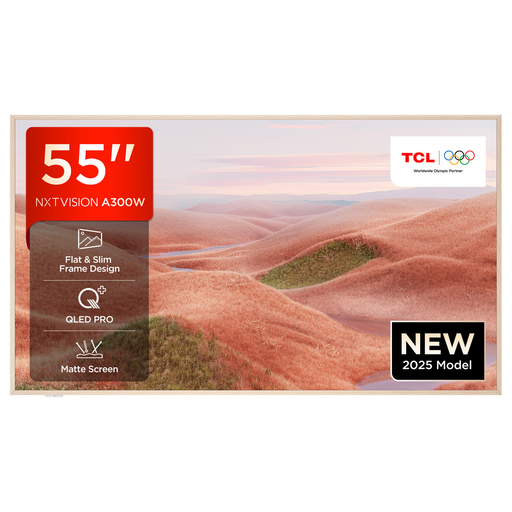
This TV lists a matte anti-glare screen, which is relevant if reflections are part of your kitchen-diner decision. Check its physical fit and the viewing positions around your table separately.
 No image available
For a kitchen diner where reflections are a concern, this model lists a matte anti-glare screen. Check the view from your planned seats as well as the screen position.
The product title specifies a 55-inch screen, QLED, 4K HDR and Google TV. Compare the exact stand dimensions and any mounting requirements with your available space before buying.
Yes, if the chosen position suits the TV and its installation instructions. Electrical Safety First advises placing a TV on a flat, stable surface away from moisture and heat; also check the exact model’s dimensions, stand or mounting requirements.
Not necessarily: a headline refresh-rate mode may apply only to particular inputs. Samsung limits the QN90D’s stated 4K 144Hz mode to PC-connected content, so check the native panel specification and the broadcast, app or set-top box you intend to use.
Yes, if you watch or record live TV on any channel or service. GOV.UK also states that using BBC iPlayer requires a TV Licence.
Compare their energy-label consumption figures at similar screen sizes. Energy Saving Trust says TV labels give separate kWh-per-1,000-hours figures for SDR and HDR viewing.