What matters when choosing?
Measure the room and map out the side seats before comparing picture features. For LCD TVs, panel type can affect the balance between off-centre viewing and contrast: RTINGS describes IPS as generally favouring wider angles and VA as generally favouring higher contrast.
| Concern |
What to check |
Who this matters to |
| Side-seat picture |
Look for viewing-angle results for the exact model. For an LCD TV, check its panel type where confirmed. |
If our group spreads across the sofa, I want people at the ends to see a convincing picture too; around 31% of consumers put off-centre consistency first. |
| Screen size |
Measure the main viewing distance and the available furniture or wall width. |
When fine wildlife detail is difficult to see from our seats, a room-fitting screen becomes the priority; roughly 25% of consumers put screen size first. |
| Dark scenes and HDR |
Check the model’s HDR formats and whether the intended programme, service and app support a compatible format. |
I care most about dark footage and subtle detail, but need the documentary source to work with the TV; around 25% of consumers prioritise picture detail and HDR compatibility. |
| Daytime viewing and energy use |
Assess reflections under your usual viewing conditions and compare energy labels for shortlisted TVs. |
Our viewing often happens in a bright room, and I want to consider electricity use alongside the picture; about 19% of consumers put those practical checks first. |
Brands to consider
These ranges provide starting points for comparing display types and features; check specifications for the particular model and size you intend to buy.
LG
LG’s UK range includes OLED and LCD-based options for comparing different screen approaches.
- LG describes its OLED screens as using individually controlled pixels and its QNED evo AI range as Mini LED.
- Those range descriptions do not establish the viewing angle, HDR support, brightness or stand fit of a particular model.
Sony
Sony offers OLED models for buyers considering a large-screen Google TV.
- Sony lists Dolby Vision and Google TV for its BRAVIA 8A line, with 55-inch, 65-inch and 77-inch sizes listed for that line.
- Check the selected model and size rather than applying BRAVIA 8A specifications to another Sony TV.
Panasonic
Panasonic’s Z80 OLED line is relevant when several HDR formats are on the shortlist.
- Panasonic lists Dolby Vision, HLG, HDR10 and HDR10+ for its cited 65-inch Z80 model.
- Confirm format support and availability for the exact size and model; the Z80 specification does not apply to every Panasonic TV.
Joybuy TV choices
These OLED and Mini LED TVs offer several screen sizes to consider for group documentary viewing. Compare each size with your seating distance, and check side-seat performance for the exact model.
 No image available
Samsung S85F QE83S85FAE 83-inch OLED TV
Consider this large OLED screen if the main seats are far enough away and the room can accommodate it. The listed size is 83 inches, with 4K Ultra HD resolution; check viewing-angle results and placement dimensions for this model.
View on Joybuy
 No image available
Hisense U7Q Pro 55U7QTUK Pro 55-inch Mini LED TV
Consider this 55-inch option where the seating distance suits a smaller screen. Its name specifies 4K HDR and VIDAA; check independent side-seat results, the intended apps and the applicable energy information before choosing it for the group.
View on Joybuy
 No image available
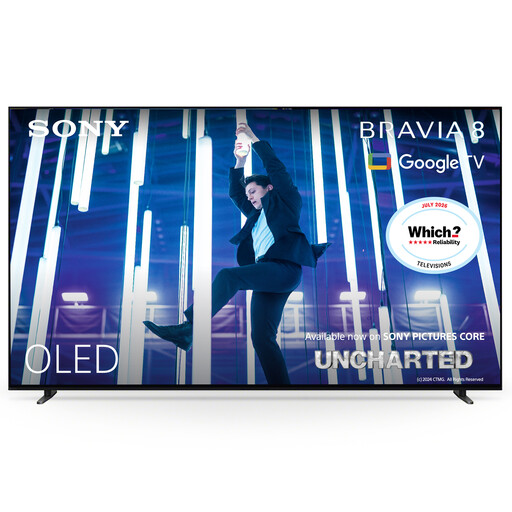
Sony BRAVIA 8 K65XR80BP 65-inch OLED TV
This OLED size may suit a group whose seating distance calls for a 65-inch screen. The product name specifies 4K HDR, Google TV and Dolby Vision; confirm the intended service’s formats and this model’s side-seat performance.
View on Joybuy
 No image available
Sony BRAVIA 8 K55XR80BP 55-inch OLED TV
Choose between this 55-inch variant and larger screens using the actual seating distance, not the group size alone. Its product name specifies 4K HDR, Google TV and Dolby Vision; check the required apps and viewing-angle results for this model.
View on Joybuy
 No image available
TCL Q6C 75Q6C 75-inch QD-Mini LED TV
Consider this larger LCD-based screen if a 75-inch diagonal fits the seating distance and placement. Its product name specifies 4K HDR and Google TV; check side-seat picture results and the exact variant’s stand dimensions.
View on Joybuy
Common questions
How do I choose a TV size for a large group?
Start with the main viewing distance, not the number of people. Which? advises measuring from sofa to TV; also check the available wall or furniture width and whether people at the sides have a workable view.
Is OLED always the right choice for group viewing?
No: OLED is worth considering for wide seating and dark-scene contrast, but an LCD or Mini LED model may also suit the room and preferred size. RTINGS notes that IPS and VA LCD panels make different viewing-angle and contrast trade-offs, so check results for the exact TV.
What should I check before placing or mounting the TV?
Measure the available space and check the exact model’s stand footprint or mounting requirements. If wall mounting, use the model’s stated weight and mounting specification when selecting a suitable mount; screen diagonal alone does not establish fit.
Should I compare energy labels for UK televisions?
Yes. GOV.UK guidance covers energy information for in-scope electronic displays, including televisions. Compare the labels and product information for the particular models you are considering, rather than using energy class as a picture-quality measure.
Do I need a TV Licence for nature documentaries on BBC iPlayer?
Yes. TV Licensing states that you must be covered by a TV Licence to watch or download BBC iPlayer on any device. Live TV on other channels or streaming services has separate licence requirements; watching on-demand programmes on other services does not, by itself, require one.


