Choose a 4K TV for shared viewing by assessing picture quality and everyday controls alongside the console features your household will use, rather than judging by size alone. If compatible PS5 or Xbox Series X games at 4K/120Hz matter, check the exact model, HDMI input and cable; if dialogue is a priority, assess the TV’s sound before deciding whether to add a soundbar. Which? assesses picture, sound, ease of use, accessibility and gaming as distinct parts of a TV decision.
Who is this TV for?
Households sharing a screen with a console
If one TV serves both films and PS5 or Xbox Series gaming, assess its everyday picture and controls as well as the gaming modes your console and games can use. PlayStation and Xbox both make compatibility with the connected display part of their gaming guidance.
Viewers who put dialogue first
If speech is hard to follow or built-in sound feels too limited for films, assess the shortlisted TV’s sound before choosing a TV-only setup or adding a soundbar. Which? treats sound as a separate part of its TV assessments.
Households needing accessible controls
If someone needs spoken menus, larger text or higher-contrast controls to use the TV independently, check those functions on the exact model. For subtitles and audio description, also check the programmes and services the household watches; Ofcom identifies these as programme access services.
What should you check?
Start with the screen’s main job as a shared TV, then check the console connection, sound and accessibility requirements that could change the setup. A soundbar and accessible controls can be considered alongside gaming features; they are not competing TV categories.
| Concern |
What to check |
Who this matters to |
| Shared-viewing picture |
Compare independent picture and motion assessments for the exact TV and screen size, alongside how easily everyone can use its menus. A 4K label alone does not describe those qualities. |
If films and programmes are on most evenings, I want a picture everyone can enjoy, not just a screen with gaming labels; around 29% of consumers put shared-viewing picture quality first. |
| Console connection |
Match the actual console and games to the TV’s supported resolution, refresh rate, VRR and ALLM. Check which HDMI input accepts the intended signal and what cable is required. |
When I play compatible high-frame-rate games, I need the console to use the TV mode I am buying it for; roughly 29% of consumers make console compatibility their primary concern. |
| Dialogue and sound |
Read independent sound assessments for the shortlisted TV. If considering a soundbar, confirm compatible ARC/eARC connections on both devices and the intended HDMI port. |
If dialogue gets lost during programmes, I would assess speech clarity before adding another device; about 21% of consumers chiefly prioritise sound and dialogue. |
| Accessible operation |
Try the exact model’s voice guidance, magnification, contrast and shortcuts where possible. Check the watched services for subtitles or audio description. |
If I need spoken feedback or more legible menus to operate the TV independently, those controls come before extra gaming modes; around 21% of consumers place accessible use first. |
Buying pitfalls
-
Assuming every 120Hz label means 4K/120Hz from every port
A TV’s refresh-rate description does not, by itself, confirm the signal a particular HDMI input accepts. Xbox’s 4K/120Hz guidance requires compatible console, TV and cable hardware; Samsung UK identifies 4K 120Hz Game Mode only for selected TVs.
Check the exact model’s input specifications and connect the console to the specified port. Once connected, inspect the console’s detected display modes.
-
Choosing a soundbar before checking the TV connection
ARC or eARC support depends on the ports and devices being connected. Sony UK notes that not every HDMI port necessarily supports eARC.
Check both manuals, match the labelled ARC/eARC connections and leave a suitable input available for the console.
The connection may also call for a suitable HDMI cable and space for another powered device.
-
Expecting a TV menu to make every programme accessible
On-screen aids can help someone operate the TV, but subtitles and audio description also depend on the programme or service. Samsung UK notes that its audio-description control works where the broadcast supports it.
Try the model’s menu aids, then check the channels and on-demand services the household uses for the required access service.
-
Assuming app-based viewing never needs a TV Licence
TV Licensing says the requirement applies to watching live TV on a TV service or streaming service and to using BBC iPlayer; an aerial is not the deciding factor.
Check what the household intends to watch, rather than deciding from the type of screen or app alone.
Brands to consider
Brand guidance can help narrow the questions to ask, but gaming ports, sound connections and accessible controls still need checking on the exact TV.
LG
LG UK discusses VRR, ALLM and refresh rate in its gaming-TV guidance, making those useful specifications to check when considering an LG model for console play.
- The gaming guidance identifies features relevant to responsive play.
- Do not assume the same refresh rate or HDMI features apply across LG ranges and sizes.
Samsung
Samsung UK documents TV controls including Voice Guide, magnification and high-contrast menus, which may matter where independent operation is a priority.
- Its accessibility guidance provides specific controls to look for on a shortlisted model.
- Audio description depends on broadcast support, while Samsung UK lists 4K 120Hz Game Mode for selected TVs rather than the whole range.
Sony
Sony UK provides guidance on checking VRR support and connecting a BRAVIA TV to a soundbar through ARC or eARC.
- Model specifications and labelled connections give buyers concrete checks for a console-and-soundbar setup.
- The Sony name alone does not establish VRR support or mean every HDMI port supports eARC.
Panasonic
Panasonic UK describes selected OLED and LED TV series with gaming functions alongside film viewing.
- Its series information identifies 120Hz or 144Hz and HDMI-related gaming features to investigate.
- Those specifications apply to named series; confirm the precise model, size and port configuration before planning 4K/120Hz console use.
Joybuy TVs for shared viewing
These are 4K TVs to consider when films and programmes share a screen with console play. Compare their stated formats and sizes with your room and viewing needs, then check the exact HDMI gaming modes, sound and accessible controls that matter to your household.
 No image available
TCL 55P8K-UK 55-inch QLED 4K HDR PRO TV
Consider this 55-inch model if a shared 4K screen and console connection are both priorities.
The title names an ONKYO 2.1 sound system. Its “288Hz Game Accelerator” wording does not establish a 4K/120Hz console mode: check the supported resolution, refresh rate and HDMI input for your console.
View on Joybuy
 No image available
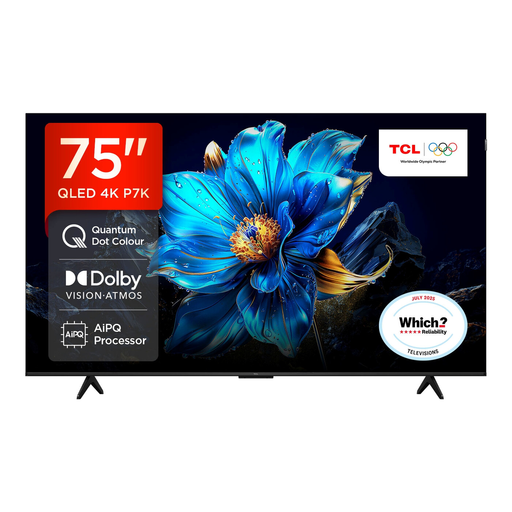
TCL 75P7K 75-inch QLED Direct LED 4K TV
Consider the 75-inch format if it suits the shared viewing space and seating arrangement.
The title names Google TV, Dolby Vision and Dolby Atmos. Before choosing it for high-refresh console play, confirm the resolution and refresh rate supported by the intended HDMI input; the listed Game Accelerator description does not establish 4K/120Hz.
View on Joybuy
 No image available
TCL 65Q7C 65-inch QD-Mini LED 4K TV
Consider this 65-inch TV if its format fits the shared viewing space and you also want to assess its console options.
The title states a 144Hz native refresh rate, up to 2048 local dimming zones and audio by Bang & Olufsen. Native refresh rate alone does not confirm 4K/120Hz input, VRR or ALLM, so check the precise HDMI specifications.
View on Joybuy
 No image available
TCL 55V6C 55-inch Direct LED 4K HDR TV
Consider this 55-inch Google TV for a shared screen where console play is one of several uses.
Its title specifies a 120Hz Game Accelerator for FHD, not 4K/120Hz. Check the exact HDMI modes before choosing it for a higher-resolution, high-refresh console setup.
View on Joybuy
 No image available
Haier H43K85GUF 43-inch 4K LED TV with Freely and Fire TV
Consider the 43-inch format where that screen size suits the shared room and high-refresh gaming is not the main requirement.
The title also names HDR10 and Dolby Audio. If console play is important, check the supported input modes rather than assuming that its 4K description includes 4K/120Hz.
View on Joybuy
Common questions
Which TV features matter for PS5 or Xbox Series X gaming?
Check 4K/120Hz input, VRR and ALLM on the exact TV if your console and games can use them. PlayStation says VRR needs a compatible TV and supported game or output; Xbox says Series X gaming at 4K/120Hz requires compatible HDMI 2.1 TV and cable hardware. Check the specified HDMI port rather than relying on a general gaming label.
Does a shared living-room TV need a soundbar?
Not automatically: assess the shortlisted TV’s sound against the household’s need for clear dialogue and film audio first. If a soundbar would address a shortfall, check compatible ARC/eARC ports on both devices; Sony UK notes that eARC is not necessarily available on every HDMI port.
Will accessibility settings provide subtitles or audio description on every programme?
No. TV controls can help someone find and use access settings, but the programme or service must provide the required track. Ofcom identifies subtitles, signing and audio description as access services, while Samsung UK says its audio-description option depends on broadcast support.
Does watching through a smart TV app require a TV Licence?
TV Licensing says a licence is required for watching live TV on a TV or streaming service and for using BBC iPlayer. Check the household’s intended viewing rather than assuming that an app-based connection changes the requirement.
What should we check after connecting the console and soundbar?
Check the console’s detected resolution and refresh rate against the TV’s specified HDMI input, then confirm any VRR mode you intend to use. For a soundbar, use the labelled ARC/eARC connections and consult both manuals for port and cable requirements; Sony UK’s connection guidance notes that these details vary by setup.


