What to check before choosing
For one main TV shared between films, streaming and games, establish physical fit first, then compare the picture, connections and everyday controls that matter most to your household.
| Concern |
What to check |
Who this matters to |
| Room fit and screen size |
Measure the usual eye-to-screen distance and available space; check the exact TV's outer dimensions and stand width. |
If the TV must fit a particular unit or wall space, diagonal size is only a starting point. About 29% of consumers put room fit and comfortable viewing size first. |
| Film and streaming picture |
Compare the exact model's display type and reflection handling in light similar to your room; consider off-centre seats. |
For films watched in a dim room or streaming during daylight, the picture needs to work under the household's usual lighting. Film and streaming picture is the main concern for about 29% of consumers. |
| Console compatibility |
Check the intended HDMI input for the required 4K/120, VRR and ALLM modes, including any soundbar or receiver in the connection path. |
When console games are a regular part of shared TV use, the required mode must work on the connection actually used. Roughly 24% of consumers make console compatibility their primary need. |
| Dialogue and everyday use |
Assess speech settings and the remote; confirm required apps on the exact model and eARC support if adding a soundbar. |
If following speech or finding a programme takes effort, sound controls and a manageable interface matter more than another picture feature. About 18% of consumers put dialogue and ease of use first. |
Joybuy TVs for these viewing needs
These TVs include QD-Mini LED and Mini LED options at several sizes, plus a 42-inch OLED option. Compare each set's physical fit and confirm the gaming modes, apps and sound controls you need on the exact model.
 No image available
Hisense 55U7QTUK Pro 55-inch Mini LED TV
Consider this 55-inch screen if it fits the shared viewing space and you want to assess a Mini LED option for films and games. The product name specifies 4K HDR, VIDAA OS and a built-in subwoofer; confirm the console mode, required streaming apps and speech settings for your setup.
View on Joybuy
 No image available
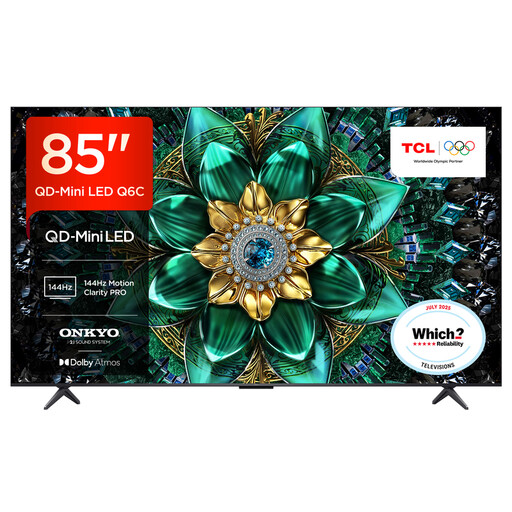
TCL 85Q6C-UK 85-inch QD-Mini LED TV
This 85-inch 4K HDR Google TV is a large-screen option where the room and installation space allow it. Check its dimensions and stand or mounting requirements; confirm the intended console input and refresh mode rather than relying on the refresh-rate wording in the product name.
View on Joybuy
 No image available
TCL 50Q6C-UK 50-inch QD-Mini LED TV
Consider this 50-inch 4K HDR Google TV when a smaller screen better suits the viewing space. Check the exact dimensions and required apps, and verify the console resolution and refresh mode on the HDMI input you plan to use.
View on Joybuy
 No image available
TCL 98Q6C-UK 98-inch QD-Mini LED TV
This 98-inch 4K HDR Google TV calls for a careful check of seating distance, access and installation space. Before choosing it for console use, confirm the required mode on the intended input; the product's refresh-rate descriptions should not be taken as confirmation of every source and setting.
View on Joybuy
 No image available
Sony XR42A90K 42-inch BRAVIA A90 OLED TV
This 42-inch 4K HDR OLED Google TV is an option if OLED appeals but the room calls for a smaller screen. Check the set's outer dimensions and confirm which HDMI input supports the console features you intend to use; also check required apps and dialogue controls.
View on Joybuy
Questions about choosing a TV
How do I choose TV size for a shared living room?
Measure from the usual seated eye position to the planned screen location, then check the TV's full dimensions and stand width. Samsung UK suggests a 4K viewing-distance starting range of roughly one to 2.5 times the screen size, while Sony UK gives minimum-distance guidance based on screen height; use the room layout and your viewing comfort to assess the size.
Do I need HDMI 2.1 for my console?
Check the functions you actually want rather than relying on the HDMI version label alone. For compatible equipment, verify 4K/120, VRR and ALLM on the exact TV model and input; HDMI describes VRR and ALLM as gaming features, but their implementation depends on the connected devices.
Will eARC make dialogue clearer?
No, eARC alone does not establish dialogue clarity. HDMI describes it as an audio connection capable of carrying supported formats to compatible equipment; assess speech settings and listening needs before deciding whether to add a soundbar.
Should an online TV listing show an energy label?
Yes, for products within the relevant UK energy-labelling rules. GOV.UK says the energy label must be displayed at the point of sale, including on a website; use the label to compare the applicable product information, not as a measure of picture quality or gaming capability.


