Start with the barrier that affects viewing: check the TV and streaming service settings for subtitles, audio description and menu access before adding equipment. If speech is difficult to distinguish, consider dialogue controls; for private listening, check the TV’s headphone connection and whether its speakers can stay on for someone else. Features vary by model, app and programme, so confirm the setup you intend to use.
Who needs which access features?
Viewers who use subtitles or SDH captions
Check whether the apps and programmes you watch offer the captions you need, including sound-context information in subtitles for deaf and hard-of-hearing viewers (SDH). Also check how easily you can select them during playback and adjust their appearance where the service allows it.
Viewers who want clearer dialogue
Check dialogue and loud-sound controls on the playback device before adding a soundbar or headphones. If you add audio equipment, confirm that its connection and controls work with the TV and sources you use.
Viewers who need easier navigation
Look for spoken menu guidance, readable interface settings and an accessibility shortcut on the exact TV or streaming device. A voice guide helps with device menus; it is not the same as a programme’s audio-description track.
What should you check before choosing?
Start with the service and programme, then check the device controls and audio connections needed in your viewing room.
| Priority | What to check | Your needs |
|---|
| Access tracks |
Check the intended service and titles for subtitles, SDH and audio description. Find out whether the tracks can be selected during playback. |
I need to find programmes with the right access track and switch it on without struggling through menus. Netflix says SDH availability can differ between seasons or episodes. |
| Caption readability |
Check caption size, contrast and background controls in the app and device you will use. Test them from your usual viewing position. |
Captions need to be readable on my screen, not merely available as an on/off setting. The Netflix Help Center describes appearance controls, but their availability should be checked on the intended UK account and device. |
| Speech clarity |
Check for dialogue adjustment or reduced dynamic range on the playback device. If considering a soundbar, confirm its TV connection and which sources can use the setting. |
I want speech to stand out from music and effects without complicating the controls. Apple Support notes that its stronger Enhance Dialogue setting may alter the original audio mix. |
| Private listening |
Check the exact TV’s headphone pairing or audio output, plus its settings for simultaneous speaker output. Verify the proposed connection method. |
One person needs headphones while someone else still hears the TV speakers. Sony UK says simultaneous output depends on the TV model and connection method. |
| Menu control |
Check spoken guidance, text-display options and the remote’s accessibility shortcut on the exact model. Try the intended streaming apps as well as the TV menu. |
Finding a programme and changing its settings should be manageable without relying on a difficult menu path. Samsung UK documents a Voice Guide and a Smart Remote accessibility shortcut, subject to the selected model’s features. |
Where can a setup go wrong?
-
Assuming a TV feature works in every app
A device may provide access controls while a particular programme lacks the track you need. Netflix notes that SDH is not available for every season or episode.
Check the apps and programme types you watch most often, including how to find and select their subtitles or audio-description tracks.
-
Assuming Bluetooth headphones leave the TV speakers on
Pairing headphones does not establish that another viewer can listen through the speakers. Sony UK says simultaneous output depends on the model and connection method.
Use the exact TV manual to check Bluetooth audio support, output routing and the planned headphone or transmitter connection.
If the planned connection cannot provide both outputs, a compatible transmitter or a different connection method may be needed.
-
Using dialogue adjustment in place of access tracks
Dialogue controls change the sound mix; they do not add written sound context or narration of visual action. Apple Support notes that stronger dialogue enhancement may alter the original mix.
Choose captions or SDH for the required text and sound information, audio description for narrated visual action, and dialogue controls when the issue is following speech.
-
Overlooking a mains-powered accessory’s UK setup
A transmitter or audio accessory needs power information and a connection suitable for the intended installation. GOV.UK sets out product-safety requirements for electrical equipment placed on the Great Britain market.
Before ordering, confirm the supplied plug, rated input, instructions and applicable UK-market product information with the seller.
Which brands document relevant features?
Apple
Apple TV 4K is a streaming-device reference for viewers comparing menu access, captions and playback audio controls.
- Apple Support documents VoiceOver, Zoom, caption and SDH preferences, audio balance and mono audio for Apple TV 4K.
- Check the hardware, connected audio equipment and intended content before relying on a particular playback feature; availability can vary.
Samsung
Samsung UK documents TV voice guidance and a remote shortcut that may be relevant when menu navigation is the main barrier.
- Samsung UK describes Voice Guide for spoken information about on-screen items and an Accessibility Shortcut opened by holding mute on a Smart Remote.
- Confirm the controls on the selected TV, remote and connected apps rather than assuming the same menu experience across models.
Sony
Sony UK’s model-specific guidance is useful when headphone pairing or listening through two outputs affects the choice.
- Sony UK explains that simultaneous TV-speaker and audio-device output can be possible, depending on the model and connection method.
- For its Android or Google TV models, Sony says Bluetooth audio pairing requires A2DP support; check the exact TV manual.
LG
LG UK documents Audio Guidance for spoken TV menus and device status.
- LG UK identifies Audio Guidance as a menu-narration feature. Specifications for the older 55NANO866NA and 55UM7400PLB also list simultaneous audio output and Clear Voice III.
- Those older model listings do not establish the features of a different or current LG TV; check its own specifications.
Joybuy soundbar options for dialogue
These soundbars are options to consider when following speech is the main issue. They do not replace subtitles or audio description; check the intended TV connection and programme sources before choosing either one.
 No image available
Bose Smart Ultra Soundbar, Arctic White
For a setup focused on following dialogue, check how its dialogue control works with the programmes you watch and whether your TV has the connection you plan to use. Confirm the supplied plug and UK-market product information with the seller.
View on Joybuy
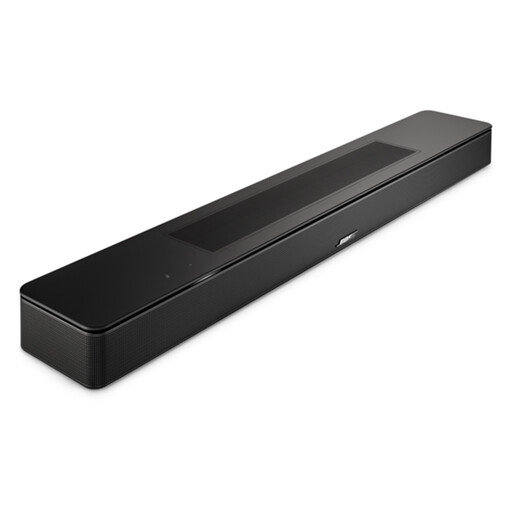 No image available
Bose Smart Compact Soundbar
If space around the TV affects your choice, check this model’s dimensions alongside its dialogue controls and the connection available on your TV. Confirm the supplied plug and UK-market product information with the seller.
View on Joybuy
Common questions
Will a new TV provide subtitles or audio description for every programme?
No. A TV or streaming device can help you select an available track, but the service and title determine whether it is offered. The Netflix Help Center says SDH may be unavailable for some seasons or episodes, so check the programmes you intend to watch.
What should I check before buying TV headphones or a transmitter?
Check the exact TV’s audio outputs, headphone pairing support and whether its speakers can remain active. Sony UK says simultaneous output depends on model and connection method; its Android or Google TV models also need A2DP support to pair with Bluetooth audio devices.
Is a voice guide the same as audio description?
No. A voice guide speaks information about device menus and controls, while audio description is a programme track narrating relevant visual action when the title offers it. Check both functions separately if you need both navigation help and programme narration.
What should I confirm for a mains-powered TV audio accessory?
Confirm the supplied plug, rated input, instructions and applicable UK-market product information with the seller. GOV.UK sets out safety requirements for electrical equipment placed on the Great Britain market; a suitable TV connection does not by itself establish that the power setup is suitable.


