Check your TV’s audio outputs and Bluetooth-audio support before choosing headphones for private evening viewing. Direct Bluetooth suits a TV that supports the required headset and listening arrangement; a compatible wired connection, dedicated RF system or Bluetooth transmitter offers another route. Two-listener and TV-speaker-plus-headphone playback depend on the exact equipment, while some optical systems require PCM/stereo output.
Who needs which setup?
Viewers checking TV compatibility
If you want private sound but do not know which audio connections your TV offers, identify its exact model and check its audio menu before choosing headphones. Sony’s guidance makes clear that Bluetooth accessories and Bluetooth audio support are not necessarily the same thing.
People sharing the screen
If two people want headphones, or one person needs headphones while another uses the TV speakers, check that the TV or transmitter explicitly supports that arrangement. Samsung and Sony describe options and limits that vary by model and connection.
Viewers who prefer a charging base
A dedicated TV-headphone system may suit regular evening use if you want one place to store and charge the headset. Check that its transmitter accepts an output your TV can provide; Sennheiser’s RS 175-U, for example, has optical and analogue connection options.
What should you check before buying?
Start with a connection your TV can provide, then establish who needs to hear the programme. Once that arrangement is clear, weigh picture-to-sound timing and the practicalities of wearing and charging the headphones.
Direct Bluetooth
Choose it when: Your TV explicitly supports Bluetooth audio and the number of listeners you need.
Bear in mind: Sony identifies A2DP as necessary for Bluetooth audio on its applicable TVs; pairing and simultaneous speaker output are not guaranteed by a Bluetooth version number.
Dedicated RF system
Choose it when: You want a transmitter and headset designed to work together, often with a fixed charging location.
Bear in mind: The base still needs a compatible TV output. Sony says an additional RF headset must be designed to receive the same signal.
Bluetooth transmitter
Choose it when: Your TV lacks suitable Bluetooth audio but has an output a transmitter can use, and you want to use compatible Bluetooth headphones.
Bear in mind: The transmitter adds a connection and settings to check; its input, headphone compatibility and support for a second listener are product-specific.
Wired headphones
Choose it when: Your TV or connected source has a usable headphone output and the cable can reach your seat safely.
Bear in mind: A cable can snag or obstruct a walkway, and connecting headphones can change speaker output on some TVs.
| Concern |
What to check |
Who this matters to |
| TV connection |
Check the exact TV model for Bluetooth audio or a usable optical or analogue output. Match any transmitter input and required audio format to that output. |
If I cannot connect the headphones to my TV, none of their other features will help me watch privately. Around 33% of consumers put connection certainty first. |
| Shared listening |
Confirm the precise two-headphone or speaker-plus-headphone arrangement with the TV or transmitter maker; check second-headset compatibility. |
When someone else is watching, I need to know whether we can both hear the programme in the way we prefer. Roughly 27% of consumers make that shared-listening arrangement their primary concern. |
| Lip-sync |
Check any claimed low-latency mode across the whole wireless connection and compare dialogue with lip movements after setup. |
I want the freedom of wireless headphones without dialogue noticeably trailing the picture. For around 20% of consumers, lip-sync is the first consideration. |
| Everyday use |
Consider the charging routine, controls while worn, fit and the maker’s stated range under its specified conditions. |
For regular evening viewing, I want headphones I can comfortably use and have ready for the next programme. Around 20% of consumers prioritise that day-to-day ease. |
Mistakes to avoid
-
Assuming any Bluetooth TV can pair with headphones
A TV may use Bluetooth for accessories without supporting Bluetooth audio. Sony identifies A2DP as the relevant audio profile on its applicable TVs.
Check the exact TV model’s audio features before buying headphones for direct pairing. If it lacks suitable Bluetooth audio, check whether an available TV output can feed a transmitter instead.
That alternative may require a separate transmitter or adaptor.
-
Assuming an optical cable is enough
A connected optical transmitter can remain silent if the TV sends an audio format it cannot accept. Sennheiser specifies PCM for the RS 175’s digital input, and Avantree advises PCM for applicable transmitter setups.
Check the transmitter’s accepted formats and whether your TV can supply one of them. Select PCM/stereo when required, then test the programme source you normally use.
-
Assuming a second listener will just work
Two Bluetooth headsets, two RF headsets and headphones alongside TV speakers are different arrangements. Samsung’s Dual Audio applies to specified Smart TVs, while Sony says RF expansion requires a headset designed for the same signal.
Decide which arrangement you need and confirm it for the exact TV, connection and second headset before buying.
A compatible additional headset or a different transmitter base may be needed.
-
Turning up the volume to make dialogue clearer
Private listening does not remove the risks of prolonged loud sound. RNID recommends regular listening breaks and using a volume limiter where one is available.
Begin at a moderate volume, use dialogue settings if your equipment offers them, and take breaks rather than continually raising the level.
Brands relevant to this choice
Sennheiser
Its RS 175-U is a dedicated wireless TV-headphone system with a transmitter and charging base.
- Sennheiser lists optical and analogue connection options for the RS 175-U.
- Its RS 175 manual specifies PCM for digital audio input. Check your TV’s output format and confirm any extra headset is compatible with the exact system.
Avantree
Its TV-audio guidance covers transmitter connections and the sound settings they may require.
- Avantree provides setup guidance for applicable optical and HDMI-ARC transmitter connections.
- Its PCM guidance and any speaker-bypass arrangement depend on the particular transmitter and TV; PCM alone does not ensure the TV speakers remain active.
Sony
Sony’s TV support and RF-headphone guidance help distinguish direct pairing from a separate transmitter route.
- Sony identifies an optical-connected transmitter as an option where a TV lacks the A2DP profile needed for Bluetooth audio pairing.
- Simultaneous speaker output varies by TV and connection; additional RF headphones must receive the same signal as the transmitter.
Samsung
Relevant when a household already has a Samsung Smart TV and wants to check its built-in listening options.
- Samsung documents Multi-output Audio on supported TVs and Dual Audio for two Bluetooth devices on Samsung Smart TVs manufactured from 2022.
- Check the exact TV model and compatible devices; these functions are not universal Bluetooth features.
LG
Relevant to LG TV owners checking whether direct Bluetooth-device pairing is available.
- LG’s UK support describes pairing through the TV’s Sound Out and Bluetooth Device settings.
- Use the exact TV manual to check any requirement for two headsets or continued TV-speaker playback.
Joybuy products for this setup
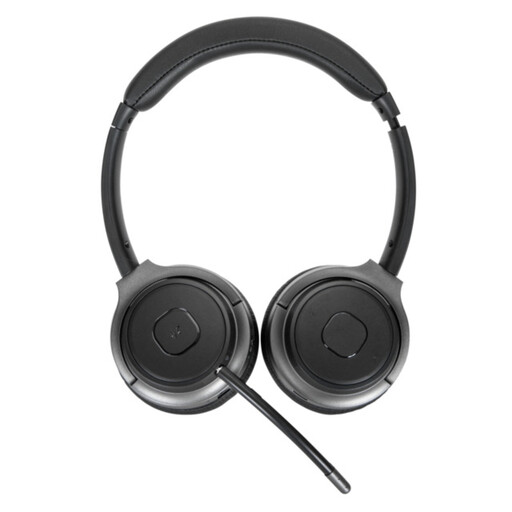
This headset is a possible choice for a wired private-listening setup. Check your TV’s audio output and speaker behaviour before choosing that route.
 No image available
Targus Wireless Stereo Headset
For private TV listening, consider its wired Aux route if your television has a usable 3.5 mm audio output. Check whether connecting headphones changes the TV-speaker output. Do not rely on wireless TV pairing without confirming compatibility with your exact TV.
View on Joybuy
Common questions
Does a newer Bluetooth version mean headphones will work with my TV?
No: check whether the exact TV supports Bluetooth audio and whether the headphones meet its pairing requirements. Sony identifies A2DP as necessary for Bluetooth audio pairing on its applicable TVs; a Bluetooth version number alone also cannot establish picture-to-sound timing.
Why is there no sound from an optical headphone transmitter?
Check that the TV is sending sound through its digital output and that its selected format is accepted by the transmitter. Sennheiser specifies PCM for the RS 175’s digital input, while Avantree advises PCM for applicable transmitter setups; change the TV setting when the equipment requires it.
Can someone use headphones while another person hears the TV speakers?
Yes, if the exact TV and connection support simultaneous output. Samsung documents Multi-output Audio on supported TVs, whereas Sony warns that some models or connection methods cannot keep both outputs active. Confirm the arrangement in your TV’s manual before choosing headphones or a transmitter.
Can two people listen through wireless headphones at once?
Yes, where the TV or transmitter explicitly supports two compatible listening devices. Samsung documents Dual Audio on its Smart TVs manufactured from 2022; Sony says an additional RF headset must be designed to receive the same signal. Check the precise TV or base-station model rather than assuming any two headsets will pair.


