What to check before buying
Decide whether the lesson must remain audible to everyone in the room before choosing where its sound and your microphone will come from.
| Concern |
What to check |
Who this matters to |
| Shared conversation without echo |
For a speakerphone, check for stated acoustic echo cancellation and full-duplex audio, then plan a position near the people speaking. |
When several of us watch together, we need to hear the lesson and ask questions without the room audio returning through the microphone. About 36% of consumers put shared, room-audible conversation first. |
| Private listening and speaking |
Check whether the computer can use the headset’s Bluetooth connection or USB receiver, and whether it can select the headset microphone. |
If I join alone, I can listen through a headset rather than leave the TV speakers on. Private listening is the primary need for about 29% of consumers. |
| Voice pickup with TV speakers on |
Check where a USB or wireless clip-on microphone will sit, how it connects, and whether the setup works at the intended TV volume. |
I want to keep hearing the lesson through the TV but need my questions picked up from my seat. About 21% of consumers place a close, separate microphone first. |
| Video and voice in one device |
Check webcam compatibility and microphone permissions; test a recording from the usual chair position. |
When I also need a camera, one webcam microphone is convenient if I sit close enough to it. Adding video alongside basic voice capture comes first for about 14% of consumers. |
Joybuy products for personal audio and video
These headsets, earbuds and webcam are options for individual listening or close-seated video participation. If everyone needs to hear and speak in the room, use the speakerphone checks above when choosing that type of setup.
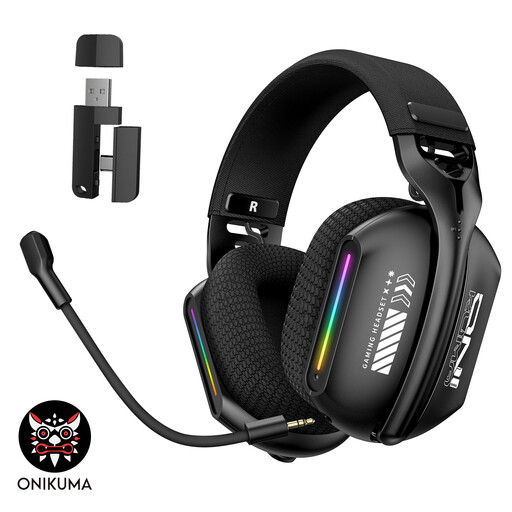 Image unavailable
ONIKUMA GT808 triple-mode wireless headset
Consider this over-ear headset when one person can hear the lesson through headphones instead of the TV speakers. Its title identifies a microphone and a 2.4 GHz wireless mode; check which connection method your computer can use and select the headset microphone in the meeting app. It is not a shared-room speakerphone.
View on Joybuy
 Image unavailable
EMEET all-in-one 4K webcam with four-mic array
This USB webcam combines a camera, four-microphone array and dual speakers for someone who also needs video. Check the computer connection and test its microphone from your normal seat with the intended audio output and volume; the product information here does not establish acoustic echo cancellation for TV-speaker use.
View on Joybuy
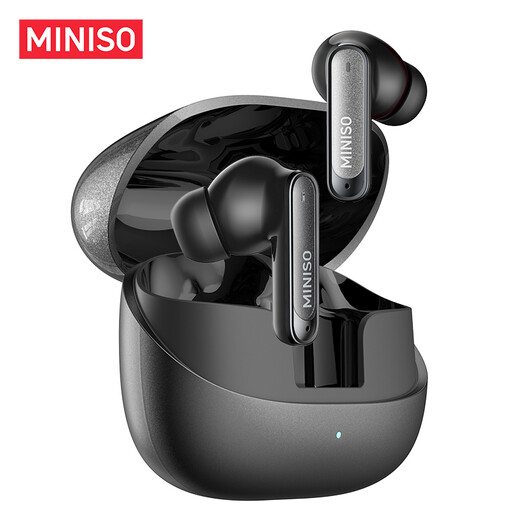 Image unavailable
MINISO MS106 Bluetooth earbuds with microphone
These earbuds offer personal listening and a built-in microphone for a solo participant, rather than sound for everyone watching the TV. The title specifies Bluetooth 6.0; check compatibility with the host computer and test that the meeting app uses the earbud microphone.
View on Joybuy
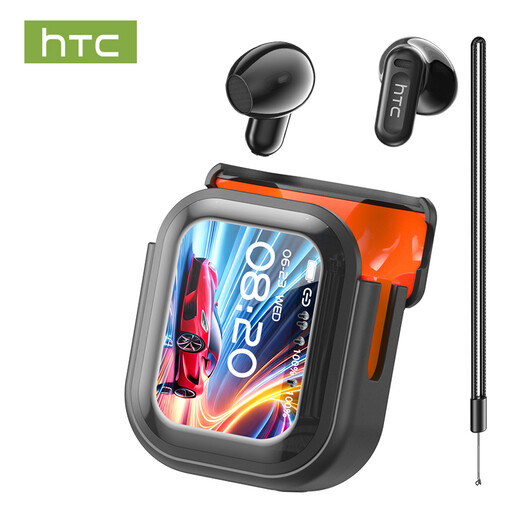 Image unavailable
HTC NE20 Bluetooth earbuds with LED display
These earbuds are another personal-audio option for one participant and have a built-in microphone. Confirm the exact variant’s Bluetooth and battery specifications before choosing it, then check computer pairing and test the selected meeting microphone. They do not provide room-audible lesson sound for other viewers.
View on Joybuy
Questions about TV-based lessons
How can I hear the lesson in the room and still ask questions?
A USB speakerphone with stated acoustic echo cancellation and full-duplex audio is a route to consider when people share a seating area; place it near them and use it for room playback. If you instead keep the TV speakers and add a separate microphone, test for echo at the intended volume. Zoom also advises checking for nearby devices with duplicate active meeting audio.
What should I check on the computer connected to the TV?
Check its available USB connections or Bluetooth capability against the device you plan to use. Select the intended microphone as the input, confirm the meeting app can access it and make a test recording; Zoom also provides a speaker-and-microphone test before a call.
Will a Bluetooth headset keep stereo sound while its microphone is active?
Do not assume it will on every computer and headset. Microsoft Support says stereo playback while using a microphone through Bluetooth LE Audio requires Windows 11 version 24H2 or later and factory-integrated Bluetooth LE support, so check the computer and audio device together.
Can I use any wireless clip-on microphone without a licence?
Check the actual operating band rather than assuming the answer from the product type. Ofcom says the 2400–2483.5 MHz range can be used without a licence subject to applicable requirements; confirm the rules for the exact model and its intended use. Check the relevant market documentation for equipment supplied in Great Britain, or the applicable requirements if buying for Northern Ireland.
Is a webcam microphone enough for a lesson watched on a TV?
It may suit one person who also needs a camera and sits close to the webcam, provided a microphone test is clear from their normal seat. A webcam microphone is not automatically suited to someone across the room, particularly with TV speakers playing nearby.


