Start with the distance from your sofa and the TV’s actual dimensions: a 42–48-inch 4K model is worth considering where space is tight, while a 55-inch set needs more room. OLED’s individually controlled pixels make it relevant if dark-stage contrast is your priority, but check the particular model in your room; if you plan to add a soundbar or AV receiver, confirm that both devices support HDMI eARC.
Who is this for?
Dark-stage picture viewers
If theatre backgrounds, spotlights and costume colours matter most to you, OLED is a display technology to examine. Sony and Samsung describe its pixels as individually controlled, allowing dark and bright parts of an image to be controlled separately; the result on screen still depends on the model.
Small-room subtitle viewers
If you need to follow translated subtitles and performers without crowding the room, judge size from your seating position and available space. Samsung UK’s TV-sizing guidance also recommends checking a set’s physical dimensions rather than relying on its diagonal measurement alone.
Voice-and-orchestra listeners
If you may add a soundbar or AV receiver, plan the audio connection alongside the TV. HDMI Licensing Administrator explains that eARC can send TV audio to a compatible audio device through one HDMI cable; the speakers and connections on the exact models still matter.
What matters when choosing?
Measure the room and viewing position before settling on a screen size. Then weigh dark-scene picture priorities against audio plans and the light that falls on the screen where you normally watch.
| Concern |
What to check |
Who this matters to |
| Dark-stage picture detail |
Compare the exact TV’s dark scenes and reflections with familiar footage if possible; do not assume that every OLED model looks alike. |
When I watch a dimly lit stage, I want performers and scenery to remain distinguishable against the background; roughly 31% of consumers put dark-scene picture detail first. |
| Screen size and fit |
Measure sofa distance, available width and the exact TV’s dimensions and stand depth. Samsung UK lists 1.7 m as its viewing-distance guidance for a 55-inch 4K TV, not a fixed rule. |
If subtitles are hard to follow from my sofa, a larger image matters, but the set must still fit the room; around 25% of consumers make screen size and physical fit their main concern. |
| Voices and external audio |
Assess the exact model’s sound options and confirm eARC on both devices if you intend to connect a compatible soundbar or AV receiver. |
I want to follow soloists clearly and have the option of adding audio equipment later; approximately 25% of consumers prioritise voices and an upgradeable audio setup. |
| Daytime reflections |
Check where windows and lamps reflect at your usual viewing time, and assess the exact screen in that lighting. |
When the room is bright, reflections can distract me from the performance; roughly 19% of consumers place daytime viewing conditions first. |
Buying pitfalls
-
Choosing by diagonal size alone
A 55-inch picture may make subtitles easier to see from farther back, yet the set could be too wide for a unit or alcove. A smaller set has the opposite trade-off for wide-stage scenes.
Measure your seating distance and space, then check the chosen TV’s width, height, stand depth and packaged dimensions before ordering.
-
Assuming every HDMI port provides eARC
An HDMI socket alone does not establish that the TV and an audio device can use eARC together. HDMI Licensing Administrator distinguishes eARC from ARC, so check the connection on both exact models.
Identify each device’s eARC-labelled port and check the cable requirements for the setup you intend to use.
An external audio device also needs a suitable position and a cable route in the room.
-
Applying an OLED range claim to every model
Panel technology does not tell you how a particular set handles reflections, processing or built-in sound. A manufacturer’s range description is not a specification for every size and generation.
Compare the exact model’s dimensions, ports and sound options, and assess its picture in lighting similar to your room where possible.
-
Assuming a recording never needs a TV Licence
In the UK, the service and viewing mode matter. TV Licensing says a licence is required for BBC iPlayer viewing and for watching or recording live TV, including live streams.
Check whether your plans include live performances or BBC iPlayer, rather than relying on whether a performance is described as a recording.
Brands to consider
LG
LG’s UK OLED evo C6 range includes a 42-inch model for buyers considering a compact OLED screen.
- The listed 42-inch size gives you a specific model to measure against a narrow TV space.
- LG’s picture descriptions are claims about the C6, not a guarantee of how every LG OLED will appear in your room. Check the chosen variant’s dimensions and connections.
Sony
Sony BRAVIA OLED models are relevant if you are comparing an OLED picture with model-specific sound options.
- Sony describes individually controlled OLED pixels and screen-aligned sound on compatible models with Acoustic Surface Audio+.
- Screen sizes and audio equipment vary across BRAVIA models; confirm the features on the exact set you are considering.
Samsung
Samsung offers UK buyers 42-inch OLED options and TV-sizing guidance for comparing a screen with their seating distance.
- Samsung describes independent OLED pixel adjustment as a way to control contrast within an image.
- Check the selected model’s stand dimensions, ports and reflection handling rather than treating a range description as its full specification.
Joybuy TV choices
These choices span compact 42–48-inch OLED TVs, a 43-inch LED TV and larger 55-inch TVs. For either size, check the precise footprint against your room; consider a 55-inch model only if your seating distance and available space make it workable.
 No image available
Sony BRAVIA XR42A90K 42-inch OLED 4K TV
Consider this 42-inch model where a compact screen is a priority for opera viewing.
The title identifies an OLED, 4K HDR Google TV with Dolby Vision and Dolby Atmos listed. Check its full dimensions against your furniture and confirm eARC on the exact set if you plan to add external audio.
View on Joybuy
 No image available
Sony BRAVIA XR48A90K 48-inch OLED 4K TV
Consider the 48-inch screen if you want more image area than a 42-inch model and have measured enough space for it.
The title lists HDR, Google TV, Google Cast, Dolby Vision and Dolby Atmos. Check the stand footprint, built-in speaker arrangement and eARC connection on the exact model before deciding how to handle sound.
View on Joybuy
 No image available
Samsung S90F 55-inch OLED 4K TV (2025)
This larger-screen option is worth considering only if the sofa position and furniture can accommodate a 55-inch TV.
The title identifies an OLED 4K smart TV. Measure the space for the exact set and assess reflections from your usual viewing position rather than assuming how it will look in a small room.
View on Joybuy
 No image available
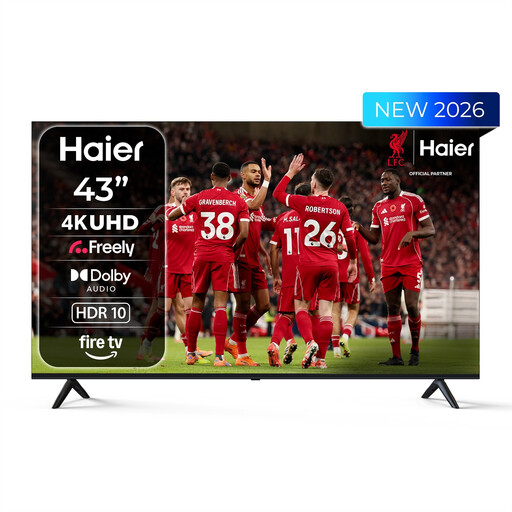
Haier H43K85GUF 43-inch 4K LED TV
This 43-inch LED model offers another compact-screen route if OLED is not a requirement for you.
The title lists Freely, Fire TV, HDR10 and Dolby Audio. Its LED designation should not be taken as an OLED specification; check the exact dimensions and audio connections for your planned setup.
View on Joybuy
 No image available
Hisense E8Q 55E8QTUK 55-inch Mini-LED 4K TV
Consider this 55-inch option only where a larger image fits both your viewing distance and the available space.
The title identifies a Mini-LED HDR TV with VIDAA OS and a built-in subwoofer. Check the complete dimensions and the exact audio connections before relying on it for an external sound system.
View on Joybuy
Common questions
Do I need a UK TV Licence for opera recordings on demand?
You do not need one solely for on-demand programmes on services other than BBC iPlayer, according to TV Licensing. A licence is required for BBC iPlayer, including its on-demand programmes, and for watching or recording live TV on a channel or streaming service.
Should I look for eARC if I might add a soundbar?
Yes, check for eARC if you expect to use a compatible soundbar or AV receiver. HDMI Licensing Administrator says it can carry TV audio over one HDMI cable and supports high-bitrate formats; confirm eARC on both exact devices rather than assuming an ARC-labelled connection is equivalent.
What can I do with an old TV when replacing it?
You can take an old TV to a household waste recycling centre rather than putting it in household rubbish. GOV.UK also states that a retailer selling you a new electrical product must accept an old like-for-like product free of charge; check the retailer’s arrangements for handing it over.


