What matters when choosing?
Start with the services the household uses, then choose a screen for the usual seating position and assess whether the TV’s own sound meets everyone’s needs. A separate streaming device or soundbar adds equipment and connections, so decide what problem each addition would solve.
| Concern |
What to check |
Who this matters to |
| Streaming and catch-up access |
Check each required app and the live-TV or catch-up route on the exact UK model. Confirm which services need an internet connection. |
If we regularly switch between live TV and streaming, everyone needs to find their programmes without changing setups. Around 33% of consumers would make service access their primary concern. |
| Shared screen experience |
Measure the usual sofa-to-screen distance, then compare screen size and independent picture assessments of the exact models. |
From our usual seats, the whole group needs a picture that is comfortable to watch. Roughly 27% of consumers would put the shared screen experience first. |
| Dialogue clarity |
Look for dialogue settings and check independent audio assessments; if adding a soundbar, confirm the connection on both devices. |
When voices are hard to follow, we do not want to keep adjusting the volume between scenes. Around 20% of consumers would prioritise dialogue clarity. |
| Room fit and setup |
Confirm the TV and stand dimensions, planned mounting arrangement, connection locations and viewing position. |
In a room with limited space, the screen and its connections need to fit where we actually watch. Approximately 20% of consumers would treat room fit and setup as their main concern. |
Brands to consider
A brand’s platform can help narrow the search, but check services and features against the exact TV model rather than assuming they apply across its range.
Samsung
Consider applicable Tizen-based models if a stated operating-system upgrade policy matters to the household.
- Samsung says qualifying One UI Tizen TVs can receive Tizen OS upgrades for up to seven years.
- Check whether the chosen model qualifies and carries each required app; the upgrade policy does not guarantee third-party app availability throughout that period.
LG
Consider webOS models when looking for a TV interface that offers access to a range of UK viewing apps.
- LG lists an app store and features services including Freeview Play and major subscription apps in its UK webOS information.
- LG says content availability varies by region. Confirm the services on the exact model under consideration.
Sony
Consider relevant BRAVIA Android TV or Google TV models if their specific app and support arrangements suit the household.
- Sony’s UK support information covers catch-up services and model-specific ways to install or manage apps.
- Catch-up features rely on online services, and the ability to install new apps depends on the model.
Joybuy smart TVs for shared viewing
These smart TVs offer different screen sizes and built-in viewing platforms for a shared-room setup. Choose among them by checking the services everyone needs and measuring the viewing position; a separate streaming device or soundbar remains a decision about your particular setup.
 No image available
LG 43QNED80A6A 43-inch QNED 4K TV
Consider this webOS TV if a 43-inch screen fits the shared seating position and the household’s required services are available on this model.
The product name specifies 4K UHD, an α7 AI Processor, AI Magic Remote and eARC. Check a proposed soundbar’s connection before pairing it with the TV.
View on Joybuy
 No image available
Haier H50S80GUF 50-inch 4K QLED TV
Consider the 50-inch size if it suits the distance from the main seats and there is enough space for the TV and stand.
The product name lists Fire TV, Freely and Dolby Audio. Confirm current access to the household’s channels and apps on this exact model, along with its overall dimensions.
View on Joybuy
 No image available
LG 32LQ63006LA 32-inch smart TV
A 32-inch screen may be worth considering where the viewing position and available furniture space call for a smaller TV; measure before deciding whether it works for the group.
The product name lists webOS, Freeview HD and AI Sound. Check the exact model’s required apps and confirm its display resolution before purchase, as the available product information gives conflicting HD Ready and Full HD descriptions.
View on Joybuy
 No image available
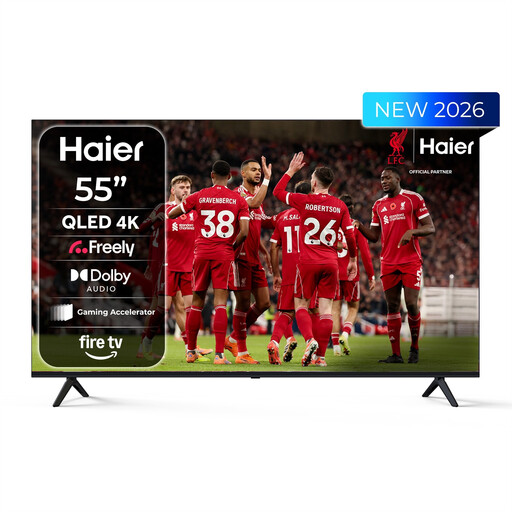
Haier H55S80GUF 55-inch 4K QLED TV
Consider the 55-inch screen if the measured viewing distance and planned installation position suit a larger TV.
The product name lists Fire TV, Freely and Dolby Audio. Confirm the exact services the household uses and check the TV and stand dimensions before choosing this size.
View on Joybuy
 No image available
Coocaa 40CTQH38ZUK 40-inch Full HD QLED TV
Consider this 40-inch model if its screen and base fit the intended space and seating distance.
The product name lists TiVo, Freely, HDR10 and Dolby Audio. Check that the exact model currently carries the channels and apps the household wants.
View on Joybuy
Frequently asked questions
Can a smart-TV platform guarantee all our apps?
No. Check the current app list for the exact UK model and each service the household uses. LG notes that availability can vary by region, and Sony says app installation options depend on the model.
Should we add a soundbar for clearer speech?
Try the TV’s dialogue setting first; consider a soundbar if speech remains difficult to follow. Check the exact TV and soundbar connections before buying, because HDMI Licensing Administrator says eARC is not defined as backwards-compatible with ARC.
Does Freeview Play need internet for catch-up programmes?
Yes, its catch-up and on-demand services need an internet connection. Freeview describes these services alongside live television in the Freeview Play guide; check the connection and the exact services available on your chosen device.
Do we need a TV Licence if we mainly stream?
It depends on what the household watches, not on whether it owns a smart TV. TV Licensing says a licence is needed to watch live TV on a service or use BBC iPlayer; watching only other services’ on-demand programmes does not by itself trigger that requirement.
How does TV licensing work in a shared home?
Check the tenancy arrangement as well as the household’s viewing activity. TV Licensing’s student guidance says a jointly rented property needs one licence for the address, while separately contracted rooms or self-contained accommodation can require a different arrangement.


