What matters when choosing?
For a regular side seat, assess the picture from that angle before settling on a screen size. In a bright room, make reflections a separate check: a wide viewing angle does not remove a window or lamp reflected in the screen.
| Concern |
What to check |
Who this matters to |
| Side-seat picture |
View the exact TV from your usual angle, or consult a review that tests off-centre picture quality. |
When I sit well away from the centre, I want colours and contrast to stay convincing throughout the film. Around 33% of consumers put side-seat picture consistency first. |
| Dark-scene contrast |
Assess familiar dark scenes under your usual evening lighting; compare the exact models rather than relying on a display label alone. |
Night scenes matter more to me than daytime viewing, so I pay particular attention to black levels and detail in shadows. Dark-scene picture quality comes first for around 27% of consumers. |
| Reflections |
Note where windows and lamps sit, then check the exact model’s stated reflection treatment. |
I can see light reflected in the screen during films, even when viewing from the side. Around 20% of consumers make reflection control their primary concern. |
| Screen fit and energy information |
Check the screen against your seating layout and compare the exact models’ supplied energy information. |
I want a screen that fits my room and seating distance, with energy information I can compare before choosing. For around 20% of consumers, those practical considerations come first. |
OLED TVs for this viewing setup
These Joybuy choices follow the OLED route for film viewing from a side seat. Their screen sizes differ, so check each exact model from your intended position and under your usual lighting rather than treating the display type as a complete picture assessment.
 Image unavailable
Samsung S85F QE83S85FAE 83-inch 4K TV
Consider this size if an 83-inch screen fits your seating layout; check its picture from the side seat and in your usual room lighting.
The product name specifies an 83-inch 4K Ultra HD smart TV with Wi-Fi. Check the exact TV’s weight and bracket compatibility if you plan to mount it.
View on Joybuy
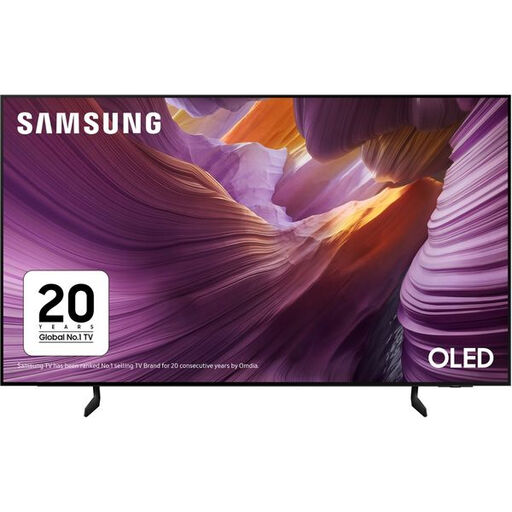 Image unavailable
Samsung QE65S85FAE 65-inch 4K TV
A 65-inch option to assess from your usual side seat, particularly if room reflections may affect film viewing.
The product name specifies a 65-inch 4K Ultra HD smart TV with Wi-Fi. Confirm that the TV and its specifications correspond to QE65S85FAE before choosing it, and check its exact reflection treatment rather than assuming it has Glare Free.
View on Joybuy
 Image unavailable
Sony BRAVIA A90 XR48A90K 48-inch OLED TV
Consider this 48-inch OLED if that screen size suits your room; assess the exact TV’s picture and reflections from the intended side seat.
The product name specifies 4K HDR, Google TV, Dolby Vision and Dolby Atmos. Check screen fit and the model’s mounting requirements for your setup.
View on Joybuy
 Image unavailable
Sony BRAVIA 8 K65XR80BP 65-inch OLED TV
This 65-inch OLED is another size to assess for side-seat films; compare its picture in your room’s usual lighting.
The product name specifies 4K HDR, Google TV, Dolby Vision and Dolby Atmos. Before wall mounting, confirm the exact model’s VESA pattern and weight against the bracket.
View on Joybuy
Frequently asked questions
Is OLED a good starting point for a regular side seat?
Yes, OLED or QD-OLED is a sensible starting point when the off-centre picture is the priority. LG UK describes OLED’s wide viewing angles, and product information considers both types suitable off-centre; assess the exact TV for reflections in your room as well.
When should I consider an LCD or Mini LED TV instead?
Consider one when the room is bright and the side seat is used only occasionally. Which? notes that LCD TVs are usually brighter than OLED TVs, but check the individual model’s viewing angle before deciding it works from your seat.
What energy information should I compare?
Compare the supplied energy label and product information for the exact TVs. GOV.UK describes an A-to-G electronic-display class; check the information applicable to your delivery location because labelling arrangements differ between Great Britain and Northern Ireland.
Will an angled wall mount help with a side-seat view?
An angled mount can aim the screen towards the seat, provided the exact TV, bracket and wall fixing are compatible. Check the TV’s VESA pattern and weight against the bracket rating before installation, and keep cables and plugs in good condition, as Electrical Safety First advises.
How should I judge whether a 55-inch or 65-inch screen fits?
Use viewing distance as a starting point, then assess the screen from your actual side seat. Which? gives roughly 3.4–3.7 metres for a 55-inch TV and around 4 metres for a 65-inch TV; your room layout and viewing angle still matter.


