For a large group watching silent films, choose screen size around the farthest regular seat, then weigh side-seat picture quality against the room’s lighting. OLED is worth considering for widely spread seating in a room you can dim; a large Mini LED or Neo QLED TV is worth comparing when daylight, lamps or screen size are the stronger constraints. Check those characteristics on the exact model rather than assuming its display technology settles the choice.
Who is this for?
Hosts with seats spread across the room
If guests use side chairs as well as the central sofa, picture consistency away from the middle matters. LG describes wide viewing angles as a feature of its OLED range, making individual OLED models worth examining for a room you can dim.
Hosts using a bright living room
If daylight or lamps remain on during a screening, compare brightness and reflection handling on the exact TV. TCL and Samsung position their QD-Mini LED and Neo QLED ranges for these conditions, but features differ between models.
Viewers working around a fixed layout
When the farthest seat, wall width or TV stand limits your options, measure before settling on a screen diagonal. Which? advises starting with the distance between the seating and the planned screen position.
What matters when choosing?
For a silent-film group, establish where everyone will sit and how much light reaches the screen before comparing display technologies. Read the audience figures below as shares of consumers whose primary concern is each factor, rather than as separate rates for everyone who cares about it.
OLED
Consider it when: Guests sit well off-centre and you can dim the room; LG describes wide viewing angles and self-lighting pixels across its OLED range.
Check carefully: Reflections and ambient light still depend on the chosen model and the room.
QD-Mini LED or Neo QLED
Consider it when: A large screen is feasible but daylight or lamps are difficult to control; TCL lists large QD-Mini LED sizes, while Samsung discusses selected Neo QLED features for bright rooms.
Check carefully: Neither the technology name nor range-wide guidance establishes side-seat or reflection performance for a particular model.
| Concern |
What to check |
Who this matters to |
| Picture from side seats |
Check the exact model’s viewing-angle claims against the planned seating positions; look at side-seat viewing where possible. |
When guests sit away from the centre, I want the picture to remain easy to follow without moving chairs. Around 29% of consumers put side-seat picture quality first. |
| Screen size and seating distance |
Measure the main and farthest seats, then check the TV’s width, stand footprint and delivery route. |
If people sit at the back, I need intertitles to be comfortable to read without choosing a screen that will not fit. For around 29% of consumers, size and room layout are the primary concern. |
| Light and reflections |
Identify window and lamp reflections; compare brightness and screen-treatment claims for the exact model. |
In a room I cannot reliably darken, reflections could interrupt low-contrast scenes. Roughly 24% of consumers prioritise viewing under those lighting conditions. |
| Film source and setup |
Confirm the required HDMI connections or USB playback formats, plus mounting and delivery arrangements. |
If my films come from a player, laptop or local files, I need the chosen TV and setup to accommodate that source. Connecting and installing the TV comes first for around 18% of consumers. |
Buying pitfalls
-
Choosing a diagonal without measuring the seats
A screen can fit the room yet leave distant guests struggling with intertitles, or prove too wide for the cabinet or delivery route.
Measure from the proposed screen position to the main and farthest regular seats. Check the selected TV’s width, depth with stand, mounting position and delivery access before ordering.
-
Treating a display technology as a viewing-angle guarantee
Side-seat picture quality and reflections depend on the model and room, not just whether the label says OLED, Mini LED or QLED.
Check model-specific viewing-angle and screen-treatment information, and view a comparable seating angle in person if possible.
-
Skipping the energy label
Screen diagonal alone does not tell you how to compare the energy information for two TVs.
For an in-scope UK electronic display, consult the exact model’s energy label and product information sheet. GOV.UK sets out requirements for those materials.
-
Assuming a silent film settles the TV Licence question
The relevant distinction is how you watch, not whether the film has dialogue or sound. TV Licensing says watching live TV or using BBC iPlayer requires a TV Licence.
Check your intended service and whether you will watch live or on demand; TV Licensing treats on-demand programmes on other services differently from live viewing.
Brands to consider for this viewing setup
LG
An OLED range to examine when side seats and black-and-white contrast are priorities.
- LG describes its OLED pixels as self-lighting and its OLED range as maintaining picture quality from wide viewing angles; its UK C6 range includes a 77-inch variant.
- Those are manufacturer statements, not a comparison of every TV. Assess reflections, room lighting and the specifications of the exact variant.
Samsung
A Neo QLED range to examine when the group watches in a bright or mixed-use room.
- Samsung discusses bright-room viewing and says selected Neo QLED models combine Ultra Viewing Angle with Anti Reflection.
- Those features are model-dependent; Samsung’s QN80H listing identifies Neo QLED technology but does not establish both features for every variant.
TCL
A large-screen QD-Mini LED range to examine where the room can accommodate a bigger display.
- TCL lists Q7C-UK sizes from 50 to 115 inches and publishes brightness and dimming specifications for named models.
- Specifications and viewing results should not be carried from one size or model to another; confirm the chosen variant and its room fit.
Sony
An OLED option for comparing published connection and playback specifications alongside picture features.
- Sony lists a QD-OLED display, X-Wide Angle, four HDMI inputs and USB playback support for the XR-65A95L.
- Those specifications belong to the XR-65A95L, not every Sony TV; check the model and availability you intend to buy.
Joybuy TVs to consider
These TCL choices cover larger QD-Mini LED screens and smaller Direct LED options for rooms with tighter space. Compare each diagonal with the farthest seat; these listings do not settle how the picture will look from every side seat or under your room’s lighting.
 No image available
TCL 75Q7C 75-inch QD-Mini LED 4K HDR TV
Consider this larger screen if the farthest regular seat and the available wall space make a 75-inch TV practical.
The product name identifies QD-Mini LED, 4K HDR and Google TV. Check picture consistency from side seats, reflections, physical dimensions and the exact model’s energy information.
View on Joybuy
 No image available
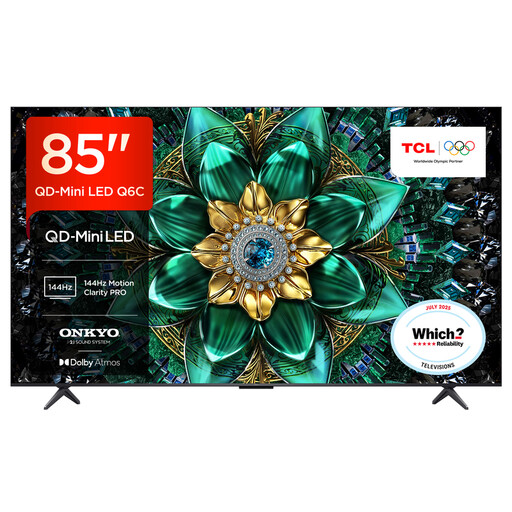
TCL 85Q6C-UK 85-inch QD-Mini LED 4K HDR TV
The 85-inch screen is worth considering if viewers sit far back and the room and delivery route can accommodate it.
The product name identifies QD-Mini LED, 4K HDR and Google TV. Confirm the exact dimensions and energy information, and assess reflections and viewing from side seats.
View on Joybuy
 No image available
TCL 65V6C 65-inch Direct LED 4K HDR TV
This is a smaller-screen option when a 75- or 85-inch TV will not suit the room; check whether intertitles remain comfortable to read from the back.
The product name identifies Direct LED, 4K HDR and Google TV. Assess side-seat viewing and room fit for the exact model.
View on Joybuy
 No image available
TCL 43V6C 43-inch Direct LED 4K HDR TV
Consider the 43-inch size only if the seating layout keeps the farthest viewers close enough to follow intertitles comfortably.
The product name identifies Direct LED, 4K HDR and Google TV. Check the screen’s placement and picture from the planned side seats.
View on Joybuy
 No image available
TCL 55V6C 55-inch Direct LED 4K HDR TV
The 55-inch size may fit a constrained layout, provided viewers at the back can still read the film’s intertitles.
The product name identifies Direct LED, 4K HDR and Google TV. Confirm room fit, reflections and side-seat picture quality for this model.
View on Joybuy
Frequently asked questions
Do I need a TV Licence to watch silent films?
Whether you need a TV Licence depends on how you watch, not whether the film has sound. TV Licensing says you need to be covered to watch live TV or use BBC iPlayer; it distinguishes those uses from on-demand viewing on other services. Check your intended source and viewing circumstances.
What energy information should I check for a new TV?
Check the exact model’s energy label and product information sheet. GOV.UK says in-scope electronic displays must be supplied with an accurate energy label and accompanied by a product information sheet; compare the information for the sizes and models you are considering.
How should I dispose of an old TV?
Use an appropriate electrical-equipment recycling route rather than ordinary household waste. UK government guidance covers waste electrical and electronic equipment; ask the retailer whether collection is available for your chosen item and address, and what the service includes.
What can I do if a new TV is faulty after delivery?
A faulty TV bought from a trader may qualify for a remedy under the UK Consumer Rights Act 2015. GOV.UK explains that a repair or replacement can be available when a fault is discovered more than 30 days after purchase or delivery. Keep the order and delivery records, describe the fault to the seller and distinguish a fault claim from a change-of-mind return.


