Dark-room split-screen racers
You play local multiplayer in a dim room and want to make out dark sections of the track while leaving enough screen area for each player.


For racing in a reliably dark room, compare OLED TVs for their pixel-level black control, but choose a screen size only after checking what each split-screen player can see from their usual seat. If you also want a large LCD screen or PC refresh modes above 120Hz, consider a suitable Mini LED model; whichever route you take, confirm the exact TV and HDMI input support the gaming modes your console or PC can use.
You play local multiplayer in a dim room and want to make out dark sections of the track while leaving enough screen area for each player.
You want to use 4K at 120Hz, variable refresh rate (VRR) or automatic low-latency mode (ALLM) where your console, game and TV support them. Xbox Support sets out the equipment needed for Xbox Series X 4K/120 play.
You share a TV between a console and gaming PC, so you need to check both the console’s 4K/120 path and any higher-refresh mode you intend to use from the PC.
Choose the display route around your room and devices, then check the seating plan and the exact signal modes before settling on a model.
Consider it when: dark-scene contrast is your priority; LG, Samsung and Panasonic describe OLED pixels that can be controlled individually.
Check before choosing: gaming ports and refresh modes still vary by model and size, so OLED alone does not establish console compatibility.
Consider it when: you want a large shared screen or a model with a PC-oriented mode above 120Hz, as offered in TCL’s Q9BK range.
Check before choosing: a brightness or refresh-rate claim does not establish how the exact TV handles dark scenes; compare its black handling if that will decide your purchase.
| Concern | What to check | Who this matters to |
|---|---|---|
| Dark-scene visibility | Compare black handling and shadow detail; check the exact TV’s HDR support separately from its panel type. | If tunnels and night tracks are hard to follow, I would put contrast ahead of extra refresh modes. Roughly 31% of consumers put dark-scene visibility first. |
| Shared-screen layout | Map each player’s seat and the TV’s dimensions before choosing a diagonal. | With several people watching different parts of one screen, I need each view and its race information to remain readable. Around 25% of consumers make the shared-screen layout their primary concern. |
| Console responsiveness | For compatible 4K/120 play, check the game, console, HDMI input and cable; verify VRR and ALLM support on the same setup. | When a racing game supports a higher frame rate, I want the TV connection to accept the mode I use. Approximately 31% of consumers prioritise console responsiveness. |
| PC refresh flexibility | Check the exact input, resolution and VRR mode for a PC refresh rate above 120Hz. | If I also connect a capable gaming PC, I may want access to its higher-refresh output rather than choosing solely around console modes. About 13% of consumers put PC refresh flexibility first. |
A 120Hz panel or HDMI 2.1 label does not, by itself, establish which input accepts your chosen 4K/120 and VRR signal.
Check the exact model’s input specifications and any AV receiver between the console and TV. Xbox Support also specifies an Ultra High Speed HDMI cable for Xbox Series X 4K/120 setup.
A PC-oriented refresh mode is a separate consideration from the 4K/120 setup Xbox Support describes for Xbox Series X.
Match the advertised mode to your actual console or PC, game and connection before treating a higher number as useful to you.
Split-screen gives each player only part of the display; a larger TV still has to fit the room and the usual viewing positions.
Mark out the intended TV position and check whether each player can read their section of the screen from their seat.
Citizens Advice distinguishes cooling-off rights for qualifying online purchases from in-store change-of-mind arrangements. A problem with faulty, damaged or misdescribed goods is a separate matter.
Before ordering a large TV, check the seller’s delivery and change-of-mind return arrangements, including how a collection would be organised.
LG’s UK OLED range is relevant if dark-room contrast is central to your choice.
Samsung’s UK OLED range offers another route to individually controlled pixels for dark-room viewing.
Sony BRAVIA is relevant if you want to examine TV features designed for compatible PS5 or PS5 Pro setups.
Panasonic’s UK OLED Z80 series illustrates an OLED route with stated gaming features.
TCL’s QD-Mini LED Q9BK is a reference point for a large-screen LCD route with PC-oriented gaming modes.
These TVs cover OLED and LCD options for dark-room split-screen racing, with different screen sizes to assess against your seating plan. Check gaming inputs and modes on the exact model before choosing.
 No image available
Consider its stated 98-inch screen for several local players if the TV position and seats allow for it.
Check which HDMI input and resolution support the refresh and VRR modes you plan to use.
 No image available
Consider this 65-inch Mini LED option if it suits your group’s seating layout.
The title names a 165Hz Game Mode Ultra; check the HDMI input and signal modes available to your console or PC, and compare dark-scene handling if contrast is decisive.
 No image available
Consider the 75-inch screen against the space available to each split-screen player.
The title states a 144Hz native refresh rate; check that the dimming features and gaming modes you need apply to this 75-inch variant and its chosen HDMI input.
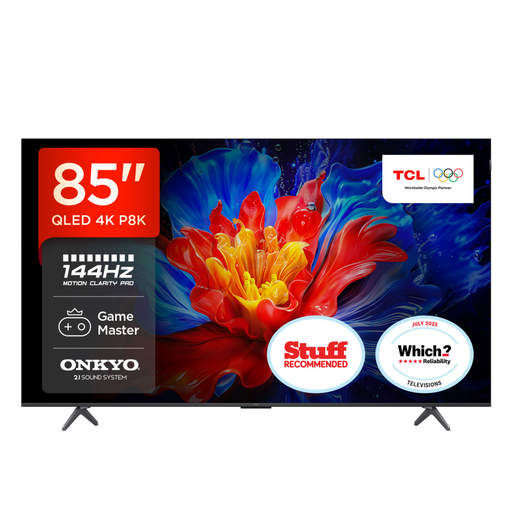 No image available
Assess this 85-inch shared-screen option against your room dimensions and player seats.
Its title and specification use different 120Hz and 144Hz wording; confirm the native rate, VRR mode and supported resolution for your connection. QLED does not, by itself, tell you how dark scenes will look.
 No image available
Consider this 65-inch OLED model if dark-room viewing is a priority and its size works for each player’s seat.
Before choosing it for a particular console or PC mode, confirm 120Hz, VRR, ALLM and the supported HDMI inputs for this exact model.
Start with dark-scene visibility and whether every player can read their part of the screen from their usual seat. OLED’s individually controlled pixels make it a relevant contrast-first route, as Samsung and Panasonic describe, but you should still check the exact TV’s gaming modes if you use a compatible console or PC.
Xbox Support specifies an Xbox Series X, an Ultra High Speed HDMI cable and an HDMI 2.1 TV for 4K gaming at 120Hz. Set the console to 4K UHD and 120Hz, and check that the chosen TV input and any AV receiver in the connection can pass the signal.
Not for the Xbox Series X 4K/120 setup described by Xbox Support. A mode above 120Hz is worth checking if you also have a gaming PC, game and connection that can use it; confirm the mode on the exact TV rather than relying on a headline refresh rate.
For a qualifying UK online purchase from a business, Citizens Advice describes a 14-day change-of-mind cooling-off period; remedies for faulty, damaged or misdescribed goods are separate. Check the seller’s arrangements for returning a large TV, and ask about old-electrical take-back arrangements; GOV.UK sets out retailer responsibilities for electrical waste.