Who is this setup for?

Households keeping an existing TV

If the screen still suits the room but its built-in apps do not meet the household’s needs, an HDMI-connected player offers a way to change the streaming platform without changing the display. Check the TV’s input and the player’s exact app support first.

Viewers who use broadcaster apps

When BBC iPlayer, ITVX or Channel 4 matters alongside subscription services, check each service on the precise TV or player model. ITV distinguishes ITVX app support from its live-TV feature, so an app listing alone may not answer a live-viewing question.

Households with an unreliable TV-room connection

If playback works elsewhere but struggles at a main or secondary TV, the connection in that room deserves attention before the screen is replaced. Ofcom identifies the wireless link within a home as a possible bottleneck.

What should you check first?

Add a streaming player

Choose it when: The existing TV has a working HDMI input and a satisfactory picture, but its app platform does not meet your needs.

Bear in mind: A player does not improve the TV’s screen or sound; its exact generation must support your required apps and viewing features.

Replace the smart TV

Choose it when: The display itself needs replacing, there is no usable HDMI input, or you want the screen and apps in one device.

Bear in mind: A newer TV is not a guarantee of every app or live-TV feature. ITV’s ITVX support conditions vary by platform and model year.

Improve the connection

Choose it when: The apps run but playback buffers or loses quality at the TV’s location.

Bear in mind: Ethernet needs a workable cable path, while changes to in-home Wi-Fi will not resolve a problem with the broadband service itself.

Concern What to check Who this matters to
Essential apps Check each provider’s support for the exact TV or player model. If you watch ITVX live, check that feature separately from on-demand access. I need the household’s broadcaster and streaming apps on the shared screen, including live viewing where relevant. About 32% of consumers put exact app and feature compatibility first.
Screen or add-on Check the existing TV’s HDMI input, picture and sound. For 4K or HDR, confirm that the TV and connection support the intended format. If the screen itself no longer suits our room, adding apps will not solve that problem. Improving the display is the primary need for about 25% of consumers.
Playback reliability Test playback at the TV’s location and compare a wired connection where practical. When programmes buffer in the viewing room, I want a dependable connection before changing a TV that otherwise works. About 25% of consumers prioritise connection reliability.
Secondary-room setup Check HDMI clearance, power, the room’s network connection and the apps needed on that screen. For an additional TV, I want a straightforward setup without replacing a satisfactory display. A compact secondary-room arrangement comes first for about 18% of consumers.

Common setup mistakes

  • Choosing by the “smart TV” label or brand alone

    Broadcaster support can vary by model and feature. ITV lists ITVX support for Samsung smart TVs from 2017 onwards, while its 2016 models are limited to on-demand viewing.

    Check each essential app against the exact device and confirm live-TV support separately if your household uses it.

  • Replacing the TV before checking the connection

    A new screen may encounter the same interruptions if the in-home wireless link is the cause. Ofcom identifies Wi-Fi as a possible bottleneck and says a wired connection is usually faster and more reliable.

    Test playback in the TV room, then compare Ethernet where practical before deciding that the display or player needs changing.

  • Expecting an HDMI cable or switch to add apps

    HDMI accessories connect or manage devices; they do not supply a streaming platform or an internet connection.

    If the missing feature is an app, check a compatible player or smart TV. If the app works but playback is unstable, investigate the network instead.

  • Assuming app-based viewing never needs a TV Licence

    TV Licensing states that watching live TV on a channel or streaming service, or using BBC iPlayer, requires TV Licence coverage on any device.

    Check how the household will watch, rather than treating the absence of an aerial as the deciding factor.

Brands and platforms to consider

Samsung

A smart-TV route when replacing the screen and choosing an integrated app platform.

  • Samsung UK provides BBC iPlayer setup guidance for its TVs.
  • ITV lists ITVX support for Samsung smart TVs from 2017 onwards, with 2016 models limited to on-demand viewing. Check the exact model and required features.

Amazon Fire TV

An add-on streaming route for a TV with a usable HDMI input.

  • ITV lists Amazon Fire TV among platforms supporting ITVX live TV.
  • If you want a wired connection, check compatibility with the particular Fire TV device and Ethernet adapter before buying.

Roku

An HDMI-connected player route for an existing or secondary TV.

  • Roku identifies its Streaming Stick 4K model 3820 as a player that connects directly to a TV and supports HD, Full HD, 4K and HDR formats.
  • Confirm required apps on the specific player and test Wi-Fi where the TV will be used; support information for model 3820 should not be assumed to cover every Roku variant.

Google

A streaming-box route for households considering a wired connection at the TV.

  • Google specifies Ethernet for Google TV Streamer (4K), and Channel 4 confirms its app is available on that device.
  • Google specifies a certified HDMI 2.1 cable sold separately for this model. Check every other essential app individually.

Apple

An Apple TV 4K box may suit a household considering Apple services or its wired-network configuration.

  • Apple specifies Gigabit Ethernet for the Apple TV 4K Wi-Fi + Ethernet version.
  • The Wi-Fi version does not have that Ethernet connection. Check the selected configuration, TV format and required apps.

Joybuy products for add-on streaming and connectivity

These products address two ways to keep an existing TV: add a streaming stick to a suitable HDMI-equipped display, or consider a network accessory when the connection in the viewing room needs attention. A network accessory does not add TV apps.

Roku Streaming Stick 4K with Dolby Vision

Roku Streaming Stick 4K with Dolby Vision

Consider this add-on route if the existing TV’s picture is satisfactory and it has a usable HDMI input. The product information describes direct HDMI connection and lists 4K Ultra HD, Dolby Vision and HDR10+; the intended format still depends on a compatible TV and HDMI path.

Check current support for every essential app and live-TV feature on this exact stick before choosing it for the shared screen.

View on Joybuy

Roku Streaming Stick 4KPlus

Roku Streaming Stick 4KPlus

This is another add-on option for a TV with a usable HDMI input. Its product information describes a compact stick and a Voice Remote Pro for playback, TV power and volume controls.

Confirm the required broadcaster apps and live features on this variant, as well as TV compatibility and the accessories needed for your setup.

View on Joybuy
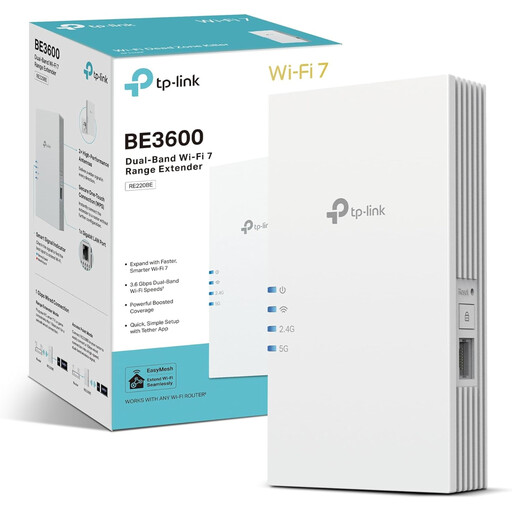
TP-Link RE220BE BE3600 Wi-Fi 7 Range Extender

TP-Link RE220BE BE3600 Wi-Fi 7 Range Extender

Consider this network accessory when the TV has the apps you need but playback is unreliable in its room. Its product information describes range-extender and access-point modes and an Ethernet connection for a smart TV; it does not add streaming apps.

Check compatibility with your home network and whether it can be positioned within range of the existing router. The effect on playback will depend on conditions at the TV’s location.

View on Joybuy

Frequently asked questions

Do I need a TV Licence for a streaming-only TV in the UK?

TV Licensing states that you need TV Licence coverage to watch live TV on any channel or streaming service, or to use BBC iPlayer, regardless of the device. Decide based on what the household watches, not on whether the television has an aerial.

How can I check whether a TV or player has our broadcaster apps?

Check each essential service against the exact TV model or player generation before buying. ITV publishes separate ITVX platform conditions and live-TV availability; Channel 4 confirms its app on Google TV Streamer devices, but that does not establish support for other apps or every Google TV device.

When should I work on the connection instead of replacing the TV?

Investigate the connection first when the required apps run but playback buffers or loses quality in the TV room. Test at that location and compare Ethernet where feasible: Ofcom identifies in-home Wi-Fi as a possible bottleneck and says wired connections are usually faster and more reliable.

Will a 4K streaming player make any TV show 4K?

No. The TV and HDMI connection must support the intended format, and the service and connection must be suitable for it too. Apple specifies a compatible 4K and HDR TV for Apple TV 4K’s 4K and HDR output; Netflix notes that slow or unstable connections can lower streaming quality.