Who is this setup for?
The useful upgrade depends on what your existing TV can already do and what makes viewing difficult at home.
Households with an older or limited smart TV
If a required app is absent or the built-in interface is difficult to use, an HDMI streaming device offers another platform without replacing a working TV. Which? notes that buying a smart TV does not guarantee access to every app; check the exact TV and proposed device against each service’s current support list.
Households wanting remote-led streaming
A stick or set-top box provides a TV-facing interface rather than relying on a phone for everyday navigation. Check the remote and setup process for the exact model, including the internet connection and platform account it requires.
Homes with unreliable Wi-Fi near the TV
If the connection is the main difficulty, check network coverage before replacing a working streaming device. A model with Ethernet, or one that supports a compatible Ethernet adaptor, gives you a wired option; availability differs by device.
What should you check first?
Start with the services you watch, then check whether the existing TV or a separate device can connect, run those apps and work reliably in your room.
| Priority | What to check | Your needs |
|---|
| Required apps |
Check each provider’s supported devices and the exact TV or streamer model. Confirm any operating-system or firmware minimum; ITV lists platform-specific ITVX support. |
I need the catch-up, live-TV and subscription apps my household actually uses. If they already work on the TV, another device may not solve a problem. |
| Connection and setup |
Confirm an available HDMI input, the device’s power arrangement, internet access and its account requirements. Amazon lists HDMI, internet and an Amazon account for Fire TV Stick setup; Apple lists HDMI, an HDMI cable and internet for Apple TV setup. |
I want a setup we can connect and activate without relying on equipment or an account we cannot use. |
| Controls |
Compare the exact model’s remote and interface with the TV’s existing controls. Check whether setup calls for a phone or another device. |
A straightforward TV remote matters more to us than controlling viewing from a phone. |
| Network and picture |
Check Wi-Fi where the TV sits and whether the chosen model offers Ethernet. For 4K on Google streaming devices, Google specifies a compatible 4K display and HDCP 2.2 support. |
If the connection is unstable, I would address that before changing a functioning app platform. I would only rely on 4K output after checking the whole setup. |
| Existing TV services |
Check whether your TV already supports the Freeview Play, Freely or other services you use. Keep service accounts and TV Licence requirements separate from the device choice. |
Adding an internet TV interface should not be mistaken for changing our subscriptions or the way we watch live TV. |
Platforms and brands to consider
These are different ways to use an existing TV, not interchangeable promises of app support; confirm the model and services you need.
Amazon Fire TV
A Fire TV Stick adds an Amazon streaming interface to a TV with an available HDMI port.
- Amazon’s setup guidance specifies an internet connection and Amazon account; ITV lists Amazon Fire as an ITVX platform.
- Check the exact Fire TV model and each required app rather than assuming identical support across devices.
Roku
Roku players and sticks offer a separate HDMI-connected platform for an existing television.
- Roku provides HDMI setup guidance and says its streaming players are designed to receive software updates.
- ITV specifies a minimum firmware version for continued ITVX support on Roku devices; confirm the exact player’s current compatibility.
Google TV / Chromecast
Google’s streaming-device range provides another platform for a compatible display, with connections varying by model.
- Google specifies HDCP requirements for its streaming devices, including HDCP 2.2 for 4K content.
- Check the exact device’s setup and network connections; an Ethernet option on one model does not establish one on every model.
Apple TV
An HDMI-connected set-top-box route for households considering a separate Apple TV interface.
- Apple’s setup guidance identifies the HDMI cable, display and internet connection needed to connect Apple TV.
- ITV lists ITVX support for Apple TV from tvOS 18; check the intended model’s software and any required apps.
Everyone TV: Freeview Play, Freesat and Freely
UK TV-service routes worth checking on the existing television before adding another streaming interface.
- Ofcom’s Everyone TV report describes Freeview Play as a broadcast and on-demand service and Freely as live and on-demand TV delivered through compatible smart TVs without an aerial or dish.
- Availability depends on the TV and service; do not assume a particular existing TV or separate streamer supports Freely.
Streaming sticks on Joybuy
These Roku sticks represent the HDMI streaming-stick route for adding a separate platform to an existing TV. Check the exact model’s app support and firmware requirements alongside your TV’s connections; the wider decision also includes keeping built-in apps, using an existing connected device or considering a set-top box.
 No image available
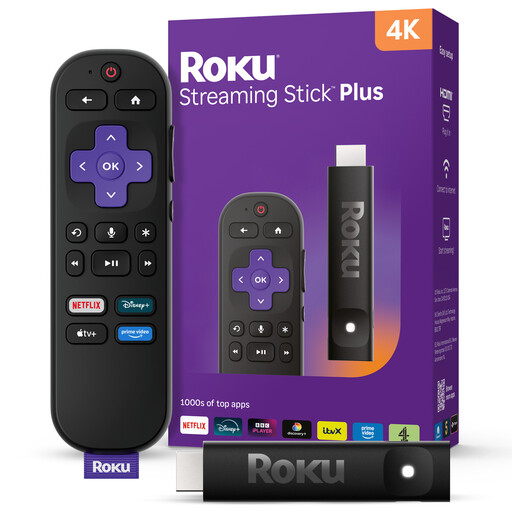
Roku Streaming Stick 4KPlus
A Roku stick is an option for adding a separate streaming interface to an existing TV. Roku’s player setup uses HDMI; check that your TV has an available input and confirm that your required apps support this exact model and its firmware.
View on Joybuy
 No image available
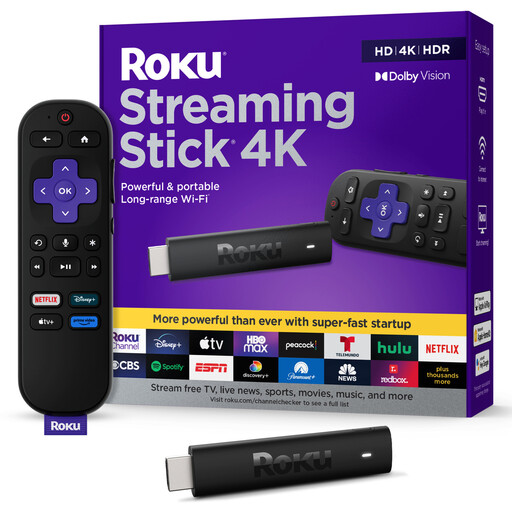
Roku Streaming Stick 4K Doly Vision
This Roku stick is another route to a separate interface on an HDMI-equipped TV. Check the exact model’s app and firmware support before choosing it; if you intend to watch in 4K, also confirm that your TV and connection equipment meet the relevant requirements.
View on Joybuy
Frequently asked questions
Will a streaming stick work with an older TV?
It can work if the TV has a functioning HDMI input and you can meet the stick’s power and internet requirements; the TV does not have to be smart. Roku and Amazon both specify an available HDMI connection in their player or Fire TV Stick setup guidance. Check the particular TV input and device requirements before buying.
How can I check whether ITVX will work?
Check ITV’s current supported-device guidance against the exact platform and software version, then check the device maker’s information for your model. ITV lists several connected-TV routes for ITVX but specifies minimum versions for some, so a platform name alone is not enough.
Do I need a 4K TV for a 4K streaming device?
You need a compatible 4K display to watch in 4K, even if the streaming device carries a 4K model name. Google also specifies HDCP 2.2 for 4K content on its streaming devices. Check the TV and connection requirements before relying on the higher resolution.
What if Wi-Fi is weak near the television?
Check the connection first rather than assuming a different streaming platform will fix it. If you want a wired connection, confirm that the exact device has an Ethernet port or supports a compatible adaptor; this varies between streaming models.
Does adding a streaming device change UK TV Licence requirements?
No. TV Licensing says a licence is needed to watch live TV on any channel or streaming service, and to use BBC iPlayer, regardless of the device. On-demand viewing on other services does not by itself require a TV Licence.


