Households missing a catch-up app
If you want to keep your TV, check whether its exact model or connected player supports the broadcaster and subscription apps you use. ITVX and Netflix provide device-specific compatibility guidance.


Keep your current TV if its supported apps, controls and connection meet your household’s needs; an HDMI-connected streamer can add app access without replacing a screen that still suits you. Choose a stick or box by checking the services and features you use, the remote and sign-in arrangements, and whether Wi-Fi or a wired connection works at the TV. Replace the TV when you also want a different screen, and confirm app support for the exact model before buying.
If you want to keep your TV, check whether its exact model or connected player supports the broadcaster and subscription apps you use. ITVX and Netflix provide device-specific compatibility guidance.
If several people use the same screen, consider how easily everyone can navigate, sign in and access the profiles or accessibility features they need. ITVX and Channel 4 describe features that vary by service and device.
If playback is unreliable, check the connection at the TV before choosing hardware. A box with Ethernet may be worth considering where a cable can reach and Wi-Fi is the weak link.
When it suits you: Check an existing HDMI-connected player first if the screen still works for your household.
Trade-off: App support, software and features still depend on that player and the service.
When it suits you: Consider a separate player when you want to keep a suitable TV but need supported apps or a different interface.
Trade-off: Check HDMI access, power, remote controls and the exact app features; a stick that relies on Wi-Fi will not fix an unreliable connection.
When it suits you: Choose this route when you also want a different or replacement screen.
Trade-off: App availability can vary by model and region; LG advises checking the specific TV, and ITVX lists model-specific support.
When it suits you: Consider a box with Ethernet if a cable can reach the TV and Wi-Fi is the problem you have identified.
Trade-off: Google lists Ethernet on its TV Streamer (4K) and says its required certified HDMI cable is sold separately.
For consumers choosing how to watch catch-up and subscription services at home, the checks below relate to different primary needs.
| Concern | What to check when buying | Who this matters to |
|---|---|---|
| App and feature support | Check the exact device, model and software for the apps and features you use, including plan or accessibility requirements. | If a particular catch-up app or plan feature is essential, I want to know it works on this exact TV or player; about 29% of consumers put app and feature support first. |
| Keeping the existing screen | Check its apps and HDMI input, then see whether a compatible player would meet your needs before replacing the TV. | If my screen still suits the household, I want to add the missing app without replacing it; about 24% of consumers prioritise keeping a suitable TV. |
| Remote and accessibility | Check the remote and navigation, and confirm any essential accessibility feature on the specific service and device. | If people sharing the TV need straightforward controls or a particular access feature, I want to check those details before choosing; about 18% of consumers prioritise controls and accessibility. |
| Connection at the TV | Check playback or connection quality where the TV sits; consider Ethernet only if a cable can reach and Wi-Fi is the weak link. | If playback struggles in the TV room, I want to identify whether Wi-Fi or the broadband connection is the issue; about 17% of consumers put connection reliability first. |
| Accounts and profiles | Check profile support on the service and how each viewer can sign in on the chosen device. | If we share the screen, I want each viewer’s sign-in and profile arrangements to work on the service we use; about 12% of consumers prioritise shared accounts. |
App availability does not guarantee that every plan or access feature works on every device. Netflix provides a compatibility check for its ad-supported experience, while Channel 4 lists device differences for audio description.
Check the feature you use—not just the app name—on the exact platform before buying.
A compatible HDMI-connected player may provide the app on your existing screen, so an app issue does not by itself mean the TV needs replacing.
Check the TV’s other apps and HDMI input, then compare an additional player with the reasons you might replace the screen.
Playback depends on the connection, and 4K viewing also depends on a compatible display and content.
Check the connection at the TV and confirm the display, service plan and content requirements before choosing hardware.
Channel 4 says registration is free and warns that some QR-reader apps can direct viewers to unaffiliated pages that ask for payment details.
Follow the broadcaster’s on-screen pairing instructions and use its own site for sign-in.
A streaming stick is one way to add a player to a TV you want to keep; Roku also supplies TVs powered by its platform.
A streaming stick is a connected-player option for a TV the household wants to retain.
Google TV Streamer (4K) is a box option for households considering a separate interface and wired networking.
A Samsung smart TV is an integrated-screen route when the household is also considering replacing its display.
An LG webOS TV is another integrated-TV route when replacing the screen is part of the decision.
These Joybuy options are smart TVs for households considering a screen replacement alongside streaming apps.
 Image unavailable
For households replacing a screen and considering a smart-TV interface.
Listed features: Direct LED, 4K HDR, Dolby Atmos, AiPQ Processor and 120Hz Game Accelerator (FHD).
 Image unavailable
For households replacing a screen and considering a smart-TV interface.
Listed features: Direct LED, 4K HDR, Dolby Atmos, AiPQ Processor and 120Hz Game Accelerator (FHD).
 Image unavailable
For households replacing a screen and considering a smart-TV interface.
Listed features: Direct LED, 4K HDR, Dolby Atmos, AiPQ Processor and 120Hz Game Accelerator (FHD).
 Image unavailable
For households considering a smart TV with Freely and a TiVo interface.
Listed features: 40-inch Direct-LED, Full HD, HDR10, Dolby Audio and QLED.
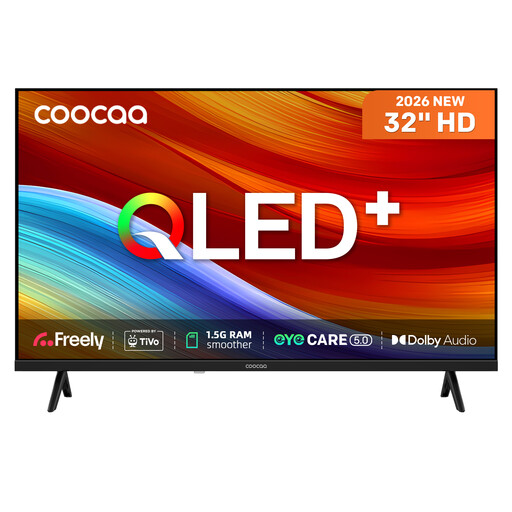 Image unavailable
For households considering a smaller smart TV with Freely and a TiVo interface.
Listed features: 32-inch Direct-LED, HD, HDR10, Dolby Audio and QLED.
No; the label alone does not establish compatibility. ITVX lists TV-model exceptions and says Roku and NOW sticks or boxes need firmware v15.1 or later following its app update, so check the exact model and installed firmware.
For ITVX, you can use its documented QR-code or numeric-code sign-in process, or sign in using the remote. Channel 4 also documents code-based TV sign-in; follow the services’ own pairing instructions rather than a third-party QR-reader payment page.
Check the device’s connection and software before treating the hardware as faulty. Netflix explains that an unstable connection can affect playback, and ITVX recommends checking network and device settings.
No. TV Licensing says viewers in the UK must be covered to watch live TV on any device or use BBC iPlayer. It says a licence is not needed solely for on-demand programmes on other services such as ITVX or Netflix if you do not watch live TV.
Check the box contents and the services you plan to use. Google says the certified HDMI cable required for its TV Streamer (4K) is sold separately; access to some app content can also require a subscription or other payment.