What matters when choosing
Start with the picture from your side seat, then weigh dark-scene contrast against reflections in your room. Panel labels alone cannot settle that choice: RTINGS distinguishes the wider viewing angles of IPS LCD from VA LCD, while Samsung describes wide-angle and anti-reflection features on specific models rather than on every LCD TV.
OLED
Consider when: The side seat is used regularly and dark stages are central to what you watch; LG describes its self-lit OLED pixels as providing wide viewing angles and deep blacks.
Bear in mind: Prolonged static images can pose an image-retention risk, so follow the chosen model’s screen-care guidance.
IPS LCD
Consider when: Several seats need a usable off-centre picture and OLED is not the route you want.
Bear in mind: IPS LCD generally gives up contrast compared with VA LCD, a relevant compromise for dark stage scenes.
Wide-angle LCD with anti-reflection treatment
Consider when: Reflections are a major issue and the exact model has the wide-angle and screen treatment you need.
Bear in mind: Mini LED or QLED in a product name does not establish how that model looks from your seat.
| Concern | What to check | Who this matters to |
|---|
| Off-centre picture |
View the exact TV from your seat or consult independent horizontal viewing-angle measurements. |
If I sit to one side, I want faces and costume colours to remain convincing without moving to the middle. Around 29% of consumers put off-centre picture fidelity first. |
| Dark-stage detail |
Compare dark footage with spotlights and subtitles from the intended viewing position. |
When a recording uses a black stage, I want to follow the performers without the background looking washed out. Dark-scene contrast comes first for around 23% of consumers. |
| Reflections |
Check window and lamp positions; assess the exact screen’s anti-reflection treatment in similar lighting. |
Daylight or a lamp falls across my screen, so I need to see the action before fine differences in black level matter. Roughly 18% of consumers make glare control their primary concern. |
| Recording and subtitles |
Confirm the intended app, disc or media-file playback and the accessibility options on the particular recording. |
I rely on a particular recording source or subtitle track, and a good picture is little use if I cannot play it as needed. Playback and accessibility come first for around 18% of consumers. |
| Size and installation |
Measure the viewing distance, full TV and stand dimensions, and intended mounting space. |
My cabinet or wall position limits what will fit, while subtitles still need to be comfortable to read from my seat. For roughly 12% of consumers, room fit is the primary need. |
OLED TVs for side-seat viewing
These Joybuy choices are OLED TVs in several screen sizes, for consumers considering the wide-angle, dark-scene route. Compare each size with your seating distance and installation space, and check the intended recording source separately.
 No image available
Samsung 55-inch S90F OLED 4K Vision AI Smart TV
Consider this OLED model if you regularly watch from the side and want to compare dark stage scenes on a 55-inch screen.
The title specifies 4K resolution. Check the intended recording app or device and measure the viewing distance and stand space before ordering.
View on Joybuy
 No image available
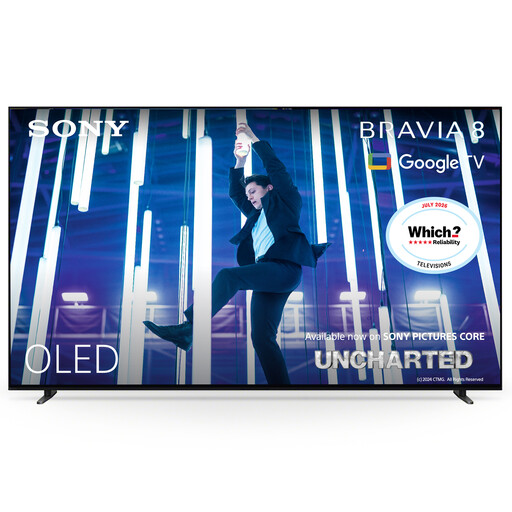
Sony 65-inch BRAVIA 8 K65XR80BP OLED 4K HDR Google TV
This OLED option is worth assessing if a 65-inch screen suits the distance from your side seat.
The title names Google TV and Dolby Vision/Atmos. Confirm the apps and recordings you use, and measure the full space required for the TV and stand.
View on Joybuy
 No image available
Sony 55-inch BRAVIA 8 K55XR80BP OLED 4K HDR Google TV
Consider this OLED variant if a 55-inch screen is the more suitable fit for your seating distance and available space.
The title names Google TV and Dolby Vision/Atmos. Check your particular recording service and subtitle options rather than relying on the smart-TV label.
View on Joybuy
 No image available
Samsung S85F QE83S85FAE 83-inch 4K Ultra HD Smart TV
If you are considering a particularly large screen for the side-seat setup, establish whether this 83-inch model suits both the viewing distance and the installation space.
The title identifies 4K Ultra HD and smart-TV capability. Check the exact model’s viewing-angle behaviour and full dimensions before deciding.
View on Joybuy
 No image available
Sony 48-inch BRAVIA A90 XR48A90K OLED 4K HDR Google TV
This OLED model gives you a 48-inch size to assess if the available furniture or wall space is limited.
The title names Google TV and Dolby Vision/Atmos. Check that subtitles remain comfortable to read at your actual distance and that your recording source works with the chosen playback setup.
View on Joybuy
Frequently asked questions
OLED or LCD: which should I consider for a side seat?
Start with OLED if you regularly watch from the side and dark theatre scenes matter to you. For LCD, RTINGS describes IPS as having wider viewing angles than VA, while IPS generally has a contrast trade-off; in a bright room, assess an exact LCD model’s wide-angle behaviour and reflections rather than choosing by its panel label alone.
Will a new smart TV provide subtitles or audio description for my recordings?
A smart TV cannot guarantee those options for a particular theatre recording. Subtitles and audio description depend on the title and provider, so confirm the service, app or playback device you will use and check the options on the recordings themselves.
Do I need a UK TV Licence to watch theatre recordings?
It depends on how you watch them: TV Licensing says you need to be covered by a TV Licence to watch or record live TV on any channel or streaming service, or to use BBC iPlayer. Check your particular viewing method against TV Licensing’s guidance rather than deciding from the fact that the programme is a theatre recording.
What should I check before installing or replacing a TV?
Measure the full TV and stand footprint, viewing distance and intended mounting position before ordering. Electrical Safety First advises placing a TV on a flat, stable surface away from heat and moisture; if you are replacing an old set, check an appropriate electrical-equipment recycling or retailer take-back route.


