
24/7 Customer Support

Free returns

Same-day & Next-day Delivery

Quality Guaranteed

Unlock Your Welcome Offers: FREE Delivery | Up to 80% OFF | Free 30-day JoyPlus trial
Download the APP
A TV wall mount bracket can free up floor space, improve viewing angles and give a room a cleaner appearance. However, choosing one by screen size alone can lead to costly mistakes. The right mount must match your television, wall structure and intended viewing position.
Marketing descriptions can also make similar-looking products seem interchangeable. Before buying, check the practical details below to avoid an unsuitable bracket, difficult installation or restricted access to your cables.
A television’s diagonal measurement does not confirm that a mount will fit. Two 55-inch TVs may use different mounting-hole layouts and have different weights.
Always check:
A product described as a universal TV mount is only universal within its listed VESA and weight limits.
An ultra-slim design can place the screen close to the wall, but limited space behind the TV may make HDMI connections, power cables and streaming devices harder to reach. This matters in bedrooms and living rooms where equipment may need occasional adjustment.
A fixed TV wall mount is suitable when the screen can remain in one position. For easier access or changing viewing positions, a tilting or full-motion design may be more practical.
A bracket can be suitable for the television but unsuitable for the wall. Plasterboard alone may not support the combined weight of the TV and mount. Most products in this category require fixing into wooden studs or solid masonry, such as brick or concrete.
Before installation, identify the wall construction and the location of studs or suitable masonry fixing points. If cables are hidden inside a wall, take care not to drill into electrical wiring or pipework. For uncertain installations, consider using a qualified installer.
The VESA pattern is the horizontal and vertical distance between the mounting holes on the back of the TV, measured in millimetres. Common patterns include 75 × 75mm, 200 × 200mm and 400 × 400mm.
For example, a VESA 400x400 TV bracket should accommodate TVs with mounting holes no wider or taller than 400mm, provided all other limits are met. Check the TV manual or measure the hole spacing before ordering.
The bracket’s maximum load should exceed the television’s actual weight. Do not rely on the screen-size range as a substitute for the weight rating. Allow for the mount itself and avoid adding accessories that place extra strain on the arms.
The products below list capacities ranging from 35kg to 100kg. These figures are product specifications, not a replacement for checking whether the wall and fixings can carry the combined load.
Your room layout should determine the bracket style:
Also check whether the bracket supports both flat and curved screens. Compatibility depends on the mounting pattern and supplied hardware rather than the screen shape alone.
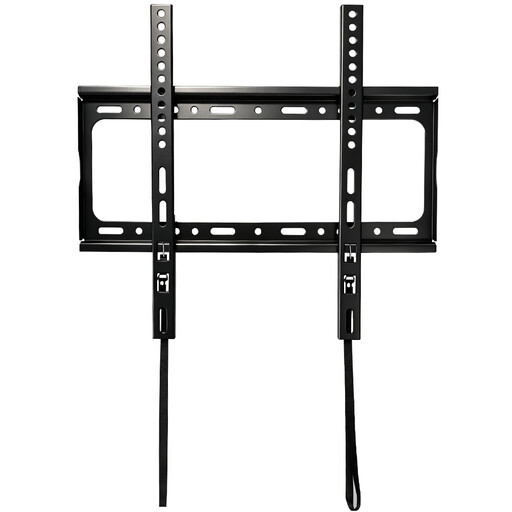
Why This Fits Their Persona: A straightforward option for a standard living-room setup where the screen will face the main sofa and frequent repositioning is not required.
Its compatibility information states support for 26–75-inch TVs and VESA patterns up to 400 × 400mm, helping buyers check more than screen size alone.
Fixed 2.5cm wall distance, cold-rolled steel construction and a listed maximum load of 100kg.
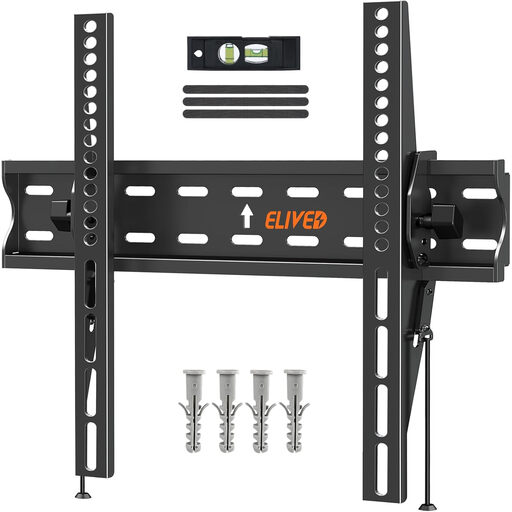
Why This Fits Their Persona: Suitable for homeowners creating a neat, minimalist media wall in a living room, bedroom or home office.
The product specifies both VESA compatibility and a 45kg load limit, while its quick-lock system and included spacers address installation and fitting details.
38mm wall profile, 0° to -8° tool-free tilt and compatibility with listed flat or curved screens.
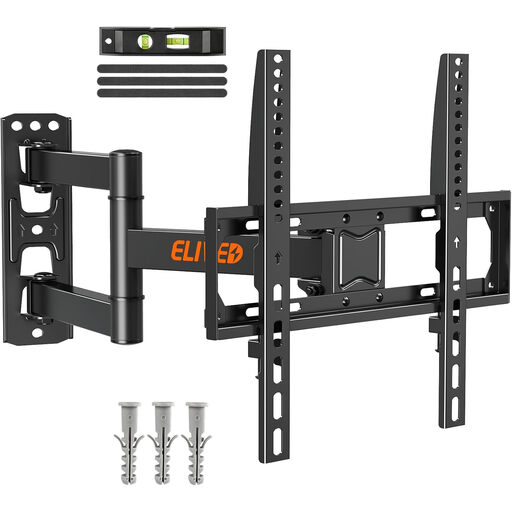
Why This Fits Their Persona: A practical choice for corner rooms, open-plan layouts or households where viewers need to adjust the screen towards different seating positions.
Its articulated design provides substantial movement, while the stated 35kg capacity and 75 × 75mm to 400 × 400mm VESA range give clear selection limits.
±90° swivel, +5°/-13° tilt, extension up to 488mm and ±3° post-installation levelling adjustment.
Before fixing any TV wall mount bracket, work through these checks:
Renters should obtain permission before drilling. Avoid mounting directly to plasterboard unless the installation system specifically supports it and the wall structure has been assessed.
We have compiled a complete, real-time list of products that fully satisfy these strict selection criteria and UK safety regulations.
Not usually when fixed to plasterboard alone. The bracket should be secured to suitable structural support, such as timber studs or masonry, using fixings designed for that wall type. Check the product instructions and seek installation advice if the wall construction is unclear.
It depends on the room. A fixed TV wall mount works well when everyone watches from directly in front. A full-motion TV bracket may be more suitable for corner rooms, open-plan spaces or screens viewed from several angles, but it requires more wall clearance and careful installation.