Motion-first football viewers
If camera pans, player runs or the moving ball are hard for you to follow, compare the exact models’ motion specifications and independent motion tests. A refresh-rate label alone cannot tell you how a match will look.


Start with a screen size that fits your seating distance, then assess motion handling and confirm how you will receive the final. OLED may appeal if contrast is a priority, while a Mini LED/LCD model offers another route to consider; neither display type guarantees clearer football action, so check the exact model and your intended live-TV service.
If camera pans, player runs or the moving ball are hard for you to follow, compare the exact models’ motion specifications and independent motion tests. A refresh-rate label alone cannot tell you how a match will look.
If several people will watch together, measure the sofa-to-screen distance and available space before settling on a diagonal size. Which? advises considering viewing distance rather than choosing size in isolation.
If you plan to watch through ITVX or another connected-TV service, confirm that your device supports the service and that the particular event is available. ITV Help warns that some live events are not available on every device.
Consider it when: contrast is a priority for viewing in controlled light; LG UK describes pixel-level black levels and contrast for its 55-inch C5 OLED.
Bear in mind: an OLED panel does not establish how another model handles football motion or whether it supports your live service.
Consider it when: you want an LCD-based option and can compare model-specific dimming and motion features; Sony UK lists local dimming and a 120Hz panel for its BRAVIA 5 K-55XR5.
Bear in mind: the Mini LED label alone does not establish reflection handling, viewing angles or motion quality across models.
| Concern | What to check when buying | Who this matters to |
|---|---|---|
| Fast-action clarity | Check the exact model’s panel refresh specification, then look for independent tests of motion during sport. | If the ball and players become distracting to follow during camera pans, motion clarity takes priority; around 36% of consumers put this need first. |
| Screen size and room fit | Measure viewing distance and the space for the TV, including its stand or wall position. | When hosting a group, I need everyone to follow the match without a screen that overwhelms the room. Around 29% of consumers prioritise that fit. |
| Live-service access | Confirm the broadcaster, supported device and account access for the particular final; test live playback beforehand. | If I rely on an app rather than a broadcast receiver, access to the actual event matters more than an app icon on the TV; roughly 21% of consumers make this their primary concern. |
| Energy and viewing obligations | Compare the exact models’ energy labels and check TV Licence coverage for your planned live viewing. | For regular use, I want to understand energy information and what I need in place to watch live TV. This is the main concern for around 14% of consumers. |
For UK live viewing, TV Licensing says coverage is required when watching or recording live TV through a TV or streaming service. Check that separately from the television’s features.
Samsung’s stated 144Hz motion feature for the 65-inch S90F and Sony’s stated 120Hz panel for the BRAVIA 5 K-55XR5 describe different model-specific features. Neither number alone establishes how clear a match will look.
Use the specifications to narrow your options, then consult an independent motion review of the exact model.
ITV Help says some live events may not be available on all devices, even where ITVX itself is supported.
Identify the final’s broadcaster and check the intended device, account and live-event access before match day. Keep a compatible alternative viewing method in mind if needed.
A diagonal measurement does not show how the TV will fit your seating distance, furniture or wall space.
Measure the room, then confirm the dimensions and stand footprint of the exact screen size you intend to buy.
TV Licensing says watching or recording live TV requires TV Licence coverage whether you use a broadcast service or a streaming service.
Check your household’s coverage for the planned viewing. Compare energy labels separately when assessing the TVs themselves.
A reference point if you are comparing OLED models with stated motion features and Tizen smart-TV options.
A reference point for buyers considering OLED, webOS and contrast alongside the practical demands of watching sport.
A reference point for a Google TV-based Mini LED/LCD option with model-specific specifications.
These TVs offer different screen sizes and stated display or connected-TV features relevant to watching a football final. Match each one to your room and viewing service, and use exact-model testing to assess motion rather than treating a specification as the result.
 No image available
Consider this 55-inch option if that screen size fits your seating distance. Its product name identifies QLED, 4K HDR PRO and Google Cast; check the exact model’s motion tests and your intended live-service access.
 No image available
Consider the 75-inch screen only if it suits your seating distance and available space. The product name states up to 2048 local-dimming zones and a 144Hz native refresh rate; neither figure substitutes for an exact-model motion review or confirms access to the final.
 No image available
This is another 75-inch option to assess against your room measurements. The product name states up to 512 dimming zones and a 144Hz native refresh rate; check independent motion testing and the service carrying your final.
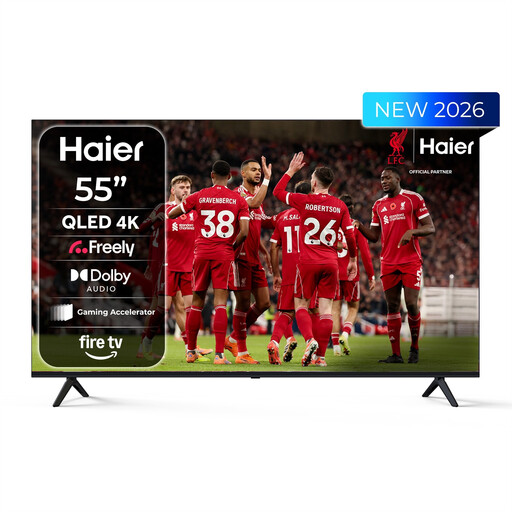 No image available
Consider this 55-inch model if Freely or Fire TV is relevant to your viewing plans. Its product name also states HDR10+, Dolby Audio and energy rating E; confirm the particular event and device access before relying on either TV platform.
 No image available
Consider this 65-inch option if its size fits your room. The product name states up to 2048 local-dimming zones and a 144Hz native refresh rate; assess motion through exact-model testing and confirm access to your live service.
No: 120Hz is not a requirement for receiving a football broadcast. It is a panel specification worth considering if motion matters to you, but compare independent tests of the exact TV rather than assuming its refresh rate predicts how the match will look.
No: app support does not guarantee access to a particular live event. ITV Help says certain live events may not be available on all devices, so check the final’s broadcaster, your TV platform and account access before match day.
Yes, if you watch or record live TV through a streaming service, TV Licensing says you need to be covered by a TV Licence. Its guidance also requires coverage for BBC iPlayer, including catch-up and on-demand BBC programmes.
Check the access options for the specific broadcast or stream as well as how easily you can use the TV’s controls. Ofcom identifies subtitles, signing and audio description as access services; their availability for the final needs to be checked with the service carrying it.