Sofa-first console players
If you play in a lounge or shared room, start with viewing position and screen fit, then check that the TV and its intended HDMI input support the console modes you want.


Choose a TV if you mainly play from a sofa and want a larger screen for a shared room; consider a monitor if you play close to the screen at a desk. Whichever you choose, check the exact HDMI input and the resolution, refresh rate, HDR and variable refresh rate (VRR) modes supported by both the display and your console, as well as the games you intend to play.
If you play in a lounge or shared room, start with viewing position and screen fit, then check that the TV and its intended HDMI input support the console modes you want.
If you sit close to the screen, assess desk space and the monitor’s documented HDMI modes. A high refresh rate advertised for PC use does not, by itself, establish the mode available to your console.
If you use a PS5, Xbox Series X|S or Nintendo Switch 2, match the display to your console and games rather than buying on a 4K, 120 Hz or VRR label alone.
Decide where you will sit before comparing video modes: a sofa setup and a desk setup place different demands on screen size and positioning. Then check the complete console-to-display connection, including any audio equipment between them.
Choose it when: You want a larger screen for a lounge or shared room.
Keep in mind: According to Samsung UK and Xbox Support, supported gaming modes can depend on the TV model and the HDMI input used.
Choose it when: You play close to the screen and need a display that fits your desk.
Keep in mind: Check the monitor’s console modes over HDMI; ASUS ROG documents different PS5 and Xbox modes even for its XG43UQ.
| Concern | What to check | Who this matters to |
|---|---|---|
| Room fit and shared use | Measure the available space and decide whether the screen needs to serve other people in the room. | If I play from the sofa and share the screen, I need it to suit the room before I compare gaming features. Around 31% of consumers put room fit and shared use first. |
| Console video modes | Match your console and games to the display’s resolution, refresh rate, HDR and VRR modes on the intended HDMI input. | I do not want to choose a display feature my console or games cannot use. Console-mode compatibility comes first for around 31% of consumers. |
| Desk play and responsiveness | Check desk depth and the monitor’s console-specific HDMI refresh and VRR modes, not just its headline refresh rate. | When I play fast games at a desk, close viewing and a suitable console mode matter more to me than a shared-room screen. Around 23% of consumers prioritise desk play and responsiveness. |
| Audio and connections | Decide whether display speakers suffice; if adding audio equipment, check its HDMI pass-through for the video modes you want. | I want straightforward sound without losing a video mode through an extra device. Audio and connection simplicity are the primary concern for around 15% of consumers. |
A TV’s advertised gaming mode may require a particular input. Xbox Support notes that some TV inputs support lower resolutions, while Sony UK advises enabling Enhanced Format on the HDMI port used by the console for supported 4K/120 setups.
Check the exact TV model’s input guidance before buying, then use the specified port and settings.
A PC refresh-rate specification does not establish the monitor’s PS5 or Xbox mode over HDMI. Console modes can differ even on the same monitor.
Look for manufacturer documentation covering your console, intended resolution, refresh rate and VRR mode.
The available combination depends on the console, game, display and connection. Nintendo UK specifies Switch 2 TV output up to 4K at 60 fps, with 120 fps supported at 1080p or 1440p; software support also varies.
List the modes you want for your console and intended games, then check those combinations against the display documentation.
Xbox Support warns that a soundbar, AV receiver or other device between the console and display can affect video features and quality.
Check the intermediate device’s documented HDMI pass-through. If a mode does not appear, test a direct console-to-display connection.
Keeping the intended video mode may require a different connection arrangement or compatible audio equipment.
A TV brand to consider for a sofa setup when gaming modes are part of the decision.
A TV brand to consider if you are checking a particular model’s console Game Mode.
A TV line to examine for a living-room console setup, particularly when checking PS5-related settings.
A monitor line to examine when documented console modes are important to a desk setup.
These TVs relate to the sofa and shared-room side of the decision. Compare their screen sizes with your space, and confirm your console’s intended video modes on the exact model and HDMI input before choosing.
 No image available
Consider this 65-inch TV for sofa viewing where you also want a built-in subwoofer. Its name specifies 4K HDR and a 165 Hz Game Mode Ultra feature; check the exact console mode and required HDMI input rather than treating that figure as console output.
 No image available
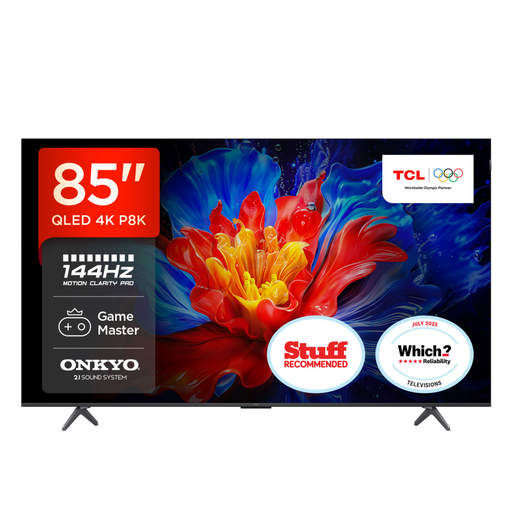
Consider the 85-inch screen for a sofa setup only after checking that it fits the intended space. The product name specifies a 144 Hz native refresh rate and an ONKYO 2.1 sound system; confirm the console modes available through its HDMI inputs.
 No image available
The 55-inch screen is worth considering when an 85-inch TV would not suit the room. Its product name specifies ONKYO 2.1 audio and a 288 Hz Game Accelerator feature; do not interpret the latter as a console output mode. Check the modes supported by the exact TV and HDMI input.
 No image available
Consider this 75-inch TV for a larger sofa-viewing space, checking the dimensions and stand arrangement before deciding where it will go. Its product name specifies a 144 Hz native refresh rate; confirm the resolution and refresh combinations available to your console through HDMI.
 No image available
The 43-inch size makes this a TV option to assess for a more compact setup; check its physical dimensions against your space. Its named 120 Hz Game Accelerator mode is specified for FHD, so do not assume 4K at 120 Hz.
For the 4K-at-120 Hz setup described by Xbox Support, you need an Xbox Series X, an Ultra High Speed HDMI cable and a TV supporting HDMI 2.1. Xbox Support says 120 Hz may still be possible at a lower resolution if the display does not support HDMI 2.1.
Yes, if the monitor supports the relevant PS5 output mode. PlayStation provides a 1440p output test covering 60 Hz and 120 Hz, SDR and HDR, and VRR where supported; check the result in the PS5 video-output settings after connecting the display.
No. Nintendo UK specifies TV output up to 3840 × 2160 at 60 fps; 120 fps is supported at 1920 × 1080 or 2560 × 1440. Frame-rate, HDR and VRR support also depend on the software.
It can, provided its HDMI pass-through supports the video mode you want. Xbox Support warns that an intermediate soundbar or AV receiver can affect video features and quality, so check the device’s documentation and test a direct console-to-TV connection if a mode is unavailable.